
If you just installed OpenClaw and opened openclaw.json for the first time, it can look intimidating. The good news: you rarely need to touch most of it. Once you understand a handful of core sections and the safe way to change them, OpenClaw configuration stops being scary and becomes a five-minute job. This guide walks through the basics: where the config lives, the four sections that matter, and the exact commands that keep you from breaking your install.
Where OpenClaw keeps its configuration
Everything lives in a single JSON file. The default location is ~/.openclaw/openclaw.json, but don’t assume: ask OpenClaw where its active file actually is.
openclaw config fileThat prints the resolved path, whether it came from the default location or the OPENCLAW_CONFIG_PATH environment variable. One file describes your agents, the models they use, the channels they talk on, and how the gateway runs. Because it is plain JSON, you can read it directly, but you should almost never hand-edit it. OpenClaw ships CLI commands that edit it safely, validate the result, and refuse to write a broken file.
Before you change anything, look at what you already have:
openclaw config getThat prints your live configuration with secrets redacted, so it is safe to run any time. Want a single value instead of the whole thing? Pass a path:
openclaw config get agents.defaults.model --jsonThe sections you actually care about
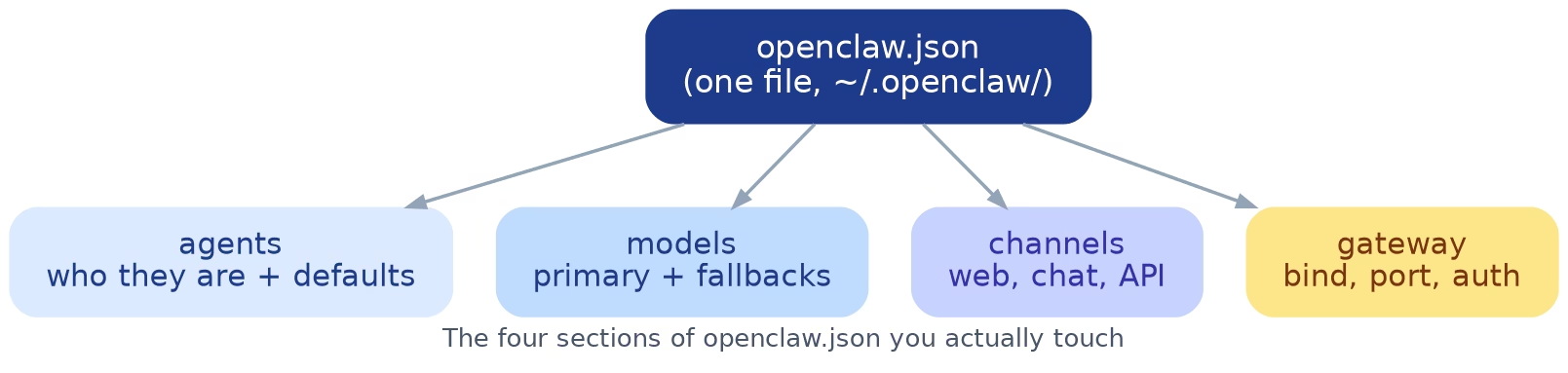
Most OpenClaw configuration falls into four buckets. Learn these and the rest of the file makes sense.
Agents
An agent is one assistant with its own personality, workspace, and model. The agents block defines each one, plus a shared defaults section they all inherit. If you want every agent to use the same model or the same backend, set it once in agents.defaults instead of repeating yourself. Individual agents live under agents.list, so a real path looks like agents.list[0].id.
Models
This is where you pick which language model powers your agents and in what order to fall back if one is unavailable. A typical setup names a primary model and a couple of fallbacks, so a single provider outage doesn’t take your assistant offline.
Channels
Channels are how you reach your agents: a web dashboard, a chat app like Discord or Telegram, an API. Each channel has its own settings, and you enable only the ones you use. Tokens for these usually point at a secret reference rather than sitting in the file as plain text.
Gateway
The gateway is the always-on process that ties it all together. Its config controls the network bind, the port, and authentication. If you run OpenClaw on a server, this is the section that decides who can reach it, so treat it with respect.
How to change configuration safely
Here is the habit that separates a smooth setup from a weekend of recovery: never overwrite the whole file. Make small, targeted changes and let OpenClaw merge them in.
Back up first
One line saves you a lot of grief:
cp "$(openclaw config file)" "$(openclaw config file).bak.$(date +%F-%H%M)"Now you have a timestamped snapshot to restore if anything goes sideways.
Set one value at a time
For a single key, config set is the simplest safe edit. It uses dot or bracket paths:
openclaw config set agents.defaults.heartbeat.every "2h"
openclaw config set browser.executablePath "/usr/bin/google-chrome"
Quote bracket paths so your shell doesn’t try to glob-expand them:
openclaw config set 'agents.list[0].tools.exec.node' "node-id-or-name"Patch several keys, don’t replace the file
For a handful of related changes, use a merge-style patch so you touch only the keys you mean to and leave everything else alone:
openclaw config patch --stdin <<'JSON'
{
  "agents": {
    "defaults": {
      "model": { "primary": "your-model-here" }
    }
  }
}
JSON
This edits one nested value and preserves the rest of your file. That’s far safer than pasting a whole config and hoping you didn’t drop a bracket. Not sure what a change will do? Add --dry-run and OpenClaw shows you the result without writing it.
Validate before you restart
Always confirm the file is still valid before you make it live:
openclaw config validateIf validation passes, apply the change with a restart:
openclaw gateway restartA restart does not lose anything persistent, but it does interrupt any in-flight conversations, so pick a quiet moment.
A quick command reference
These are the config commands worth memorizing. Every one of them is read-only except set, patch, and the restart.
openclaw config file— print the active config file path.openclaw config get [path]— read the redacted config, or one value.openclaw config set <path> <value>— change a single key.openclaw config patch --stdin— merge in several keys at once.openclaw config schema— print the JSON schema, handy for editor autocompletion.openclaw config validate— check the file is well-formed before restarting.
Prefer a menu to memorizing paths? Run openclaw config with no subcommand (or openclaw configure) to open the guided wizard, which walks you through sections like model, gateway, and channels.
Checking that everything is healthy
After a change, a few read-only commands tell you whether things are working:
openclaw doctorflags common problems and suggests fixes.openclaw statusshows the gateway, agents, and channels at a glance.openclaw models statusconfirms your models are reachable and authenticated.
Run these any time something feels off. They change nothing, so there’s no risk in checking.
One gotcha: immutable Nix installs
If you installed OpenClaw through Nix and see OPENCLAW_NIX_MODE=1, the rules change. OpenClaw treats openclaw.json as immutable, so the read-only commands (config get, config file, config schema, config validate) still work, but every config writer refuses. On those installs you edit the Nix source instead, under programs.openclaw.config or instances.<name>.config. If config set mysteriously won’t write, check this before you go hunting for permissions bugs.
A simple rule to configure by
When in doubt, follow the same loop every time: read the current value, back up the file, change the one thing you want, validate, restart, then verify with doctor and status. It sounds like a lot written out, but it takes a couple of minutes and it is almost impossible to break your install this way.
Frequently asked questions
Where is my OpenClaw configuration file?
Run openclaw config file. It prints the resolved path, which is ~/.openclaw/openclaw.json by default or whatever OPENCLAW_CONFIG_PATH points at.
Can I edit openclaw.json by hand?
You can, but you shouldn’t as a habit. Hand edits skip validation and it is easy to introduce a JSON syntax error. Use openclaw config set or config patch so the tool checks your work.
Will a restart delete my sessions or data?
No. A gateway restart keeps everything persistent; it only interrupts conversations that are actively running at that moment.
What if I break the config anyway?
Restore the backup you made and restart. This is exactly why the backup step comes first. Recovery is a single copy command away.
Wrapping up
OpenClaw configuration comes down to one file, four sections, and a safe change routine. Read before you write, change one thing at a time, validate before you restart, and back up every time. Master that loop and you can tune agents, models, and channels with confidence. Ready to go deeper? Run openclaw config file, open the guided wizard with openclaw configure, and make one small change to your models section today.