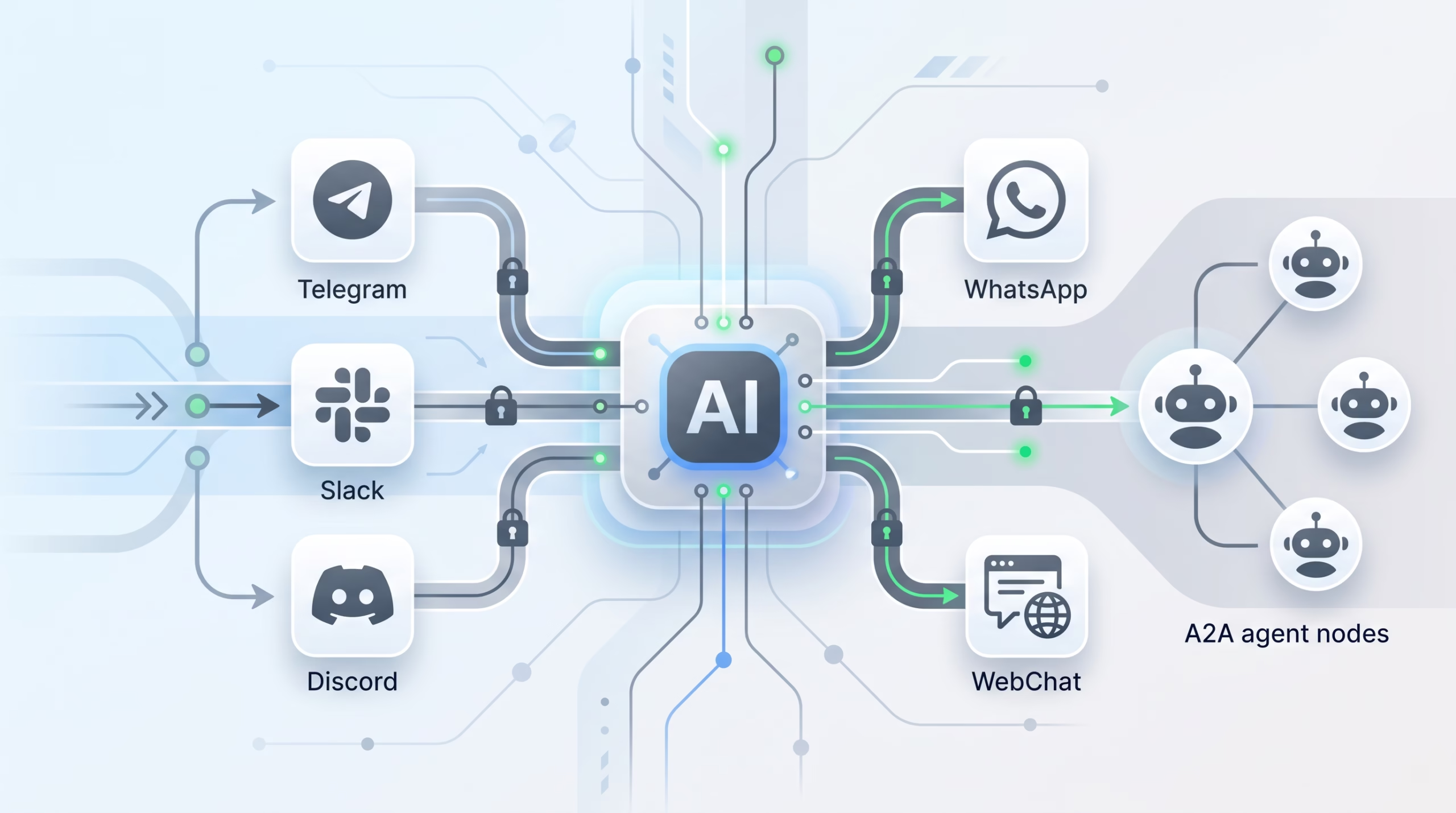

OpenClaw channels are the part of a self-hosted AI agent setup that most people notice first. Telegram, WhatsApp, Slack, Discord, iMessage, Signal, SMS, WebChat, A2A: these are the places where the agent shows up. But the channel is more than a chat connector. It decides how inbound messages enter the Gateway, which agent receives them, where replies go, how group rooms are gated, and which session gets the conversation history.
That is the useful way to think about OpenClaw channels. They are not a decorative menu of integrations. They are the transport boundary between humans, rooms, external agents, and the Gateway.
If you get the channel layer right, your agent feels reachable without being loose. If you get it wrong, the bot may look connected while replies land in the wrong place, groups stay silent, unknown senders slip through, or a public room inherits more context than it should.
What OpenClaw channels actually do
A channel connects a communication surface to the OpenClaw Gateway. The docs put it plainly: OpenClaw can talk to you on chat apps you already use, and each channel connects through the Gateway. Text works everywhere. Media, reactions, voice, threading, read history, and group metadata depend on the platform.
That platform difference matters. A Slack channel can expose channel IDs, thread context, and app scopes. Telegram groups have BotFather privacy mode and negative group IDs. WhatsApp uses QR pairing and keeps more state on disk. Discord has guilds, roles, channel maps, message content intent, and optional bot-authored message handling. The OpenClaw channel model hides some of that variation, but it does not erase it.
At runtime, a channel does four jobs:
- Ingress: it receives messages, normalizes sender and room facts, and hands admitted events to the Gateway.
- Routing: it gives the Gateway enough channel, account, peer, thread, team, or guild facts to pick the right agent.
- Session scoping: it decides which conversation bucket stores context for that direct message, group, room, or thread.
- Delivery: it sends the visible reply back through the source channel or through an explicit message-tool call.
The visible chat app is only the surface. The serious operator work sits underneath: identity, routing, session shape, access policy, and delivery checks.
Start with Telegram unless you have a stronger reason
The OpenClaw docs recommend Telegram as the first channel. That is not because Telegram is always the best long-term surface. It is because it is easy to prove the channel path works: create a bot token, add the channel, and check status. No plugin install is required for the bundled Telegram path, and the setup is less stateful than WhatsApp QR pairing.
openclaw channels add --channel telegram --token <bot-token>
openclaw channels status --probe
That small first win matters. When you are installing a self-hosted agent, you want one known-good chat path before you bring in heavier surfaces. Telegram is a good smoke test for Gateway reachability, channel config reload, pairing or allowlist behavior, message delivery, and your first command owner flow.
Pick a different first channel when the operating context demands it. If your team lives in Slack, start there. If your support workflow is Discord, use Discord. If the agent must talk to another agent, A2A or Reef may be the real first channel. Just avoid testing every channel at once. One clean channel teaches you more than five half-working ones.
The supported channel map
The channel catalog is broad. The overview page lists bundled, official, included-core, and external options. Bundled or core paths include Telegram, A2A, Reef, and WebChat. Official plugin channels include Discord, Slack, Signal, WhatsApp, iMessage, SMS, Matrix, Mattermost, Microsoft Teams, Google Chat, LINE, Nostr, Twitch, Zalo, and others. External plugins cover additional surfaces such as WeChat, WeCom, and Yuanbao.
That sounds like a lot, because it is. Do not choose by count. Choose by job.
- Personal operator access: Telegram, Signal, iMessage, WhatsApp, or WebChat are natural fits.
- Team rooms: Slack, Discord, Matrix, Mattermost, Google Chat, Microsoft Teams, and Telegram groups fit better.
- Phone-number workflows: SMS or WhatsApp may be closer to the user.
- Agent-to-agent traffic: A2A connects external agents through the A2A 1.0 JSON-RPC protocol; Reef handles guarded encrypted messaging between OpenClaw agents owned by different people.
- Local control and debugging: WebChat gives you an internal Gateway WebSocket surface rather than another public chat network.
The right question is not “Which channels does OpenClaw support?” The better question is “Which channel has the identity, delivery, and room controls that match this agent’s risk?”
Routing is deterministic, not model-chosen
OpenClaw replies go back to the channel where a message came from. The model does not pick the channel. That is a healthy boundary. A model can write useful text, but it should not decide whether a response goes to Slack, Telegram, WhatsApp, or a different user.
The Gateway routes inbound messages using configuration and source facts. The documented order starts with exact peer bindings, then parent peer matches, wildcard peer matches, Discord guild and role matches, Discord guild matches, Slack team matches, account matches, channel matches, and finally a fallback owner when the setup allows one. In multi-agent installs, this is what keeps a support agent, writing agent, personal assistant, and on-call agent from all competing for the same inbound message.
Outbound target prefixes add another layer. A target like telegram:123 can hint at the provider only when the selected channel is unresolved. If the caller already selected WhatsApp, a Telegram-prefixed target is rejected rather than magically crossing channels. That is exactly what you want from an operator system: explicit routing beats clever guessing.
When channel routing feels mysterious, inspect bindings and source facts before blaming the model. The model is downstream of the route.
Session scope is where channel design gets real
Channels do not only decide where a message arrives. They also decide which session stores the conversation.
By default, direct messages collapse into the agent’s main session. That means a DM from Telegram and a DM from another channel can share the same main conversation for that agent. For a personal assistant, this is often what you want. You can message it from whichever surface is nearby and keep one running context.
Groups and rooms are different. Under the default group scope, group chats and channels use their own per-channel session keys. A Telegram group, a Slack channel, and a Discord thread do not automatically merge into the agent’s main session. Telegram forum topics and Slack or Discord threads get their own thread-shaped keys too.
This is not trivia. It is one of the main safety knobs in OpenClaw. A trusted DM can stay close to main. A public group can be isolated, sandboxed, or routed to a different agent. A high-signal team room can opt into main only when everyone understands the tradeoff.
The warning is simple: do not merge noisy or public rooms into main just to make context “easier.” Context is authority-adjacent. Once a room shares the main session, it can shape the same long-running conversation the operator uses elsewhere.
Groups need separate rules
Group behavior has its own controls because groups are not big DMs. More people can speak, platform history may be injected as context, replies can be noisy, and one wrong setting can turn an assistant into an unwanted room participant.
The default posture is restrained. Group access is restricted, group senders are blocked until allowed, and replies normally require a mention unless you disable mention gating for a specific room. Accepted group requests post final reply text automatically by default.
Three controls matter most:
- Group policy: whether groups are disabled, open, or allowlisted.
- Sender authorization: who can trigger the agent inside the group.
- Mention gating: whether the bot responds only when mentioned or treats unmentioned room chatter as eligible input.
There is a clean mental model in the docs: DM access is controlled by direct allowlists, group access is controlled by group policy plus group allowlists, and reply triggering is controlled by mention gating or activation rules.
That split is worth keeping. An operator may be allowed to DM the bot but not trigger it in a public room. A room may be allowed for context, but only certain users should be able to start tool-using work from it. A channel may support history, but you may still choose to filter supplemental context to allowlisted senders.
Access control belongs in the channel layer
Do not push access control into prompts. Use channel policy.
OpenClaw gives you several channel-side controls. DM pairing lets unknown senders request access with a short code. Their message is not processed until approval. Pairing codes are 8 characters, expire after 1 hour, and pending requests are capped per channel account. That is a much better first-contact path than letting any stranger’s message become model input.
Static allowlists are still useful when you know the sender IDs. Access groups help when the same trusted set should work across several channels. Define a named group once under accessGroups, then reference it from channel allowlists with accessGroup:<name>. The important detail: an access group grants nothing by itself. It only matters when an allowlist field uses it.
For Discord, there is also a dynamic access group that can admit DM senders based on whether they can view a specific guild channel. That is useful when a Discord channel is already the source of truth for a team, but it fails closed when the bot cannot resolve membership or lacks access.
The pattern is the same across the channel layer: use stable platform IDs, keep allowlists narrow, reuse access groups where they reduce drift, and run openclaw doctor after config changes.
Ambient rooms are for quiet context, not automatic chatter
Ambient room events are one of the more interesting channel features because they change the shape of a group room. Supported rooms can feed unmentioned chatter to the agent as quiet context. The room stays silent unless the agent explicitly sends with the message tool.
That is useful for always-on rooms: a project channel, on-call room, or team chat where the agent should observe enough to be helpful without replying to every stray sentence.
There are two catches operators should remember. First, mention gating must be off for the room. If requireMention: true, unmentioned messages are dropped before they can become room events. Second, the agent needs the message tool. Room events use strict visible delivery; final assistant text stays private unless the agent calls the tool.
Supported room-event channels include Discord guild channels, Slack channels and private channels, Slack multi-person DMs, and Telegram groups or supergroups. Other channels keep their existing group behavior unless their page says otherwise.
Used well, ambient rooms are a quiet assistant pattern. Used carelessly, they become confusing: token usage appears, the agent “thinks,” but nobody sees a reply because visible delivery is tool-only. That is not a bug. It is the contract.
Bot loop protection keeps agent rooms sane
Some channels can admit bot-authored messages. That is useful for rooms with several bots or agent systems, but it can also create reply loops. OpenClaw’s shared bot loop protection watches rapid exchanges between two bot identities and suppresses the pair during a cooldown when they exceed the configured budget.
The built-in defaults are active where supported: 20 events per 60-second sliding window, then 60 seconds of cooldown. Discord, Feishu, Google Chat, Matrix, and Slack have documented support paths because they expose enough bot identity facts to track the pair.
This guard does not affect human-authored messages, single-bot deployments, normal self-message filtering, or bot conversations that stay under the budget. It is there for the bad night: two bots replying to each other so fast that the room becomes unusable.
Keep it enabled unless you have a specific, tested reason to allow bot-to-bot conversations without suppression.
How to add and verify a channel
The CLI surface is practical. Use openclaw channels add to configure accounts, openclaw channels list to inspect inventory, and openclaw channels status --probe for live checks. The docs call out that channels status keeps configured channels visible even when a plugin fails to load, which is exactly what you want during repair.
openclaw channels list --all
openclaw channels add --channel telegram --token <bot-token>
openclaw channels status --probe
openclaw channels capabilities --channel telegram
openclaw channels logs --channel all
When behavior is wrong but the channel looks connected, start with the troubleshooting ladder:
openclaw status
openclaw gateway status
openclaw logs --follow
openclaw doctor
openclaw channels status --probe
A healthy baseline shows a running runtime, a good connectivity probe, a capability level, and channel probes that report connected transport plus a working or audited account where the channel supports it.
Then debug by layer. If DMs are silent, check pairing or allowlists. If groups are silent, check group policy, room allowlists, mention gating, and sender authorization. If an ambient room shows token usage but no visible reply, check whether visible delivery requires message(action=send). If an update broke a channel, run openclaw doctor --fix and restart the Gateway before chasing platform settings.
How to choose the first channel for your setup
Use the simplest channel that proves the specific path you care about.
- For a personal operator assistant: start with Telegram or Signal, then add your preferred daily channel once access and owner commands are right.
- For a team assistant: start with Slack or Discord in one allowlisted test room, with mention gating on. Add ambient behavior only after ordinary mentions work.
- For a mobile-first setup: WhatsApp can be the right surface, but budget time for QR login, state storage, and relink troubleshooting.
- For agent-to-agent work: use A2A when an external A2A-compliant agent needs to discover OpenClaw and send authenticated JSON-RPC tasks.
- For public or semi-public rooms: keep group sessions isolated, use allowlists, consider sandboxing non-main sessions, and avoid main-session scope unless the room is truly trusted.
The best first channel is not the fanciest one. It is the one where you can answer five questions clearly: Who can message it? Which agent receives it? Which session stores it? How does a visible reply get delivered? How will I know it failed?
Common mistakes to avoid
The first mistake is treating “connected” as “safe.” A channel can connect while its DM policy is too broad, group allowlists are wrong, or session scope is merging context you meant to isolate.
The second mistake is letting display names become your identity layer. Prefer stable user IDs, channel IDs, guild IDs, team IDs, phone numbers, or platform-native identifiers. Names change. IDs hurt less later.
The third mistake is turning off mention gating before the room has a clear operating rule. Mention-gated bots are easier for a team to understand. Always-on rooms are powerful, but they need room-level intent, the message tool, and a model that reliably uses tool-only visible delivery.
The fourth mistake is debugging from stored sessions. The CLI docs warn that sessions are not a socket-health signal. A channel can be connected with no recent session row, or a stored session can exist while the provider transport is broken. Use channel status, probes, logs, and doctor for channel health.
FAQ
Which OpenClaw channel should I connect first?
Start with Telegram unless your team context points somewhere else. It is the fastest path to a working bot-token setup and gives you a clean channel smoke test.
Can multiple channels run at the same time?
Yes. OpenClaw can run multiple configured channels and route each chat according to channel, account, peer, team, guild, room, or binding rules.
Does the model decide where replies go?
No. Replies route back through the channel where the message came from, or through explicit configured targets. The Gateway owns routing; the model does not choose a different app on its own.
Are direct messages and group chats scoped the same way?
No. Direct messages use the agent main session by default. Groups and rooms usually get per-channel session keys unless you change group scope or bindings.
What is the safest way to let unknown users DM the bot?
Use DM pairing where the channel supports it. Unknown senders get a code, and their message is not processed until you approve the request.
Why does my ambient room use tokens but not post a reply?
Ambient room events are quiet by design. For visible output, the agent must call message(action=send), and the active tool policy must expose the message tool.
Bottom line
OpenClaw channels are the operating boundary between your agent and the outside world. The channel choice affects more than convenience. It shapes routing, access, session memory, group behavior, delivery, and troubleshooting.
Start with one low-risk channel. Verify the full path from inbound message to routed agent to visible reply. Lock down pairing, allowlists, and group rules. Then add richer rooms and agent-to-agent paths once the basic contract is clear.
That is slower than connecting every app on day one. It is also how you avoid building a self-hosted assistant that is reachable everywhere and understandable nowhere.
Suggested internal links: OpenClaw Channel Routing, OpenClaw Telegram Channel, OpenClaw Gateway Security.
Suggested external sources: https://docs.openclaw.ai/channels, https://docs.openclaw.ai/channels/channel-routing, https://docs.openclaw.ai/channels/groups
Image alt text: OpenClaw Gateway routing messages between Telegram, Slack, Discord, WhatsApp, WebChat, and A2A agent channels with access checks and session scopes.