
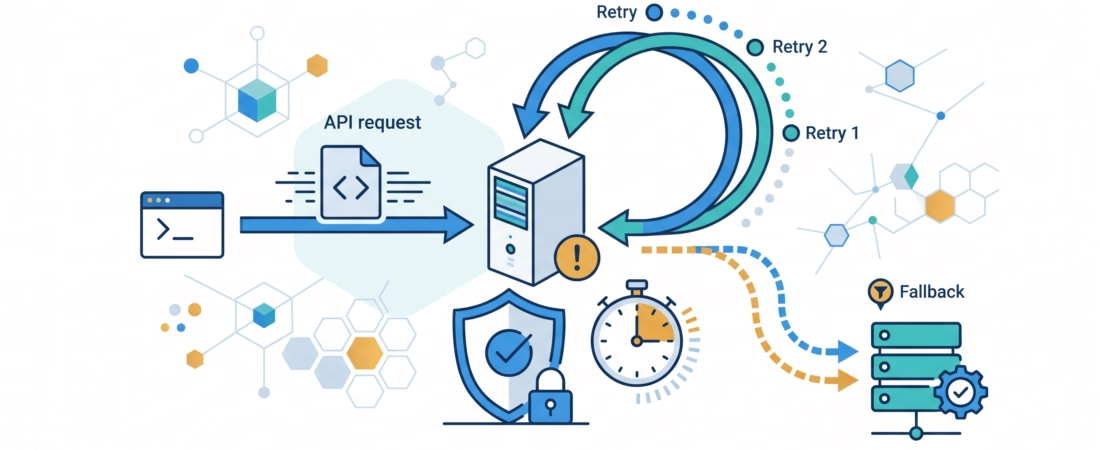
Your first LLM app works perfectly on your laptop. Then you show it to five people at once, or leave it running overnight, and it breaks. Good LLM API error handling is what separates a demo from something people can actually rely on. The model call is usually the least reliable part of your whole application, and it fails in ways you can predict and plan for.
This guide teaches you those failure types one at a time, then shows you what to do about each. No framework magic. Just the handful of ideas that make an app survive real traffic: knowing what to retry, backing off politely, setting timeouts, and having a plan for when a provider is simply down.
If you have been following this series, you have already made API calls, streamed responses, and built multi-step workflows. This is the module that makes all of that trustworthy.
Why LLM calls fail more than you expect
A normal function call in your code either runs or throws an obvious error. An LLM API call is different. It travels across the internet to someone else’s servers, which are shared by thousands of other developers, and which run models under heavy, uneven load.
So a call can fail because you did something wrong, because the provider is busy, because the network hiccuped, or because the model returned something your code didn’t expect. Beginners usually handle none of this, or they overcorrect and retry everything in a tight loop. Both are mistakes. The first gives you an app that crashes on the first bad minute. The second actually makes things worse, and I’ll show you why.
The failure types you must recognize
You can’t handle a failure you can’t name. Here are the ones you will meet, roughly grouped:
- Authentication errors — a bad or missing API key. This will never fix itself.
- Invalid requests — a malformed body, an unsupported parameter, or a prompt that exceeds the model’s context limit. Also your fault, also won’t fix itself on retry.
- Rate limits — you sent too many requests or tokens too fast. This is temporary.
- Server errors — the provider’s side failed (a 500, or an “overloaded” response). Temporary.
- Network failures and timeouts — the connection dropped or took too long. Usually temporary.
- Malformed model output — the call succeeded, but the text or JSON isn’t what your code needs. A different problem, covered in the structured-outputs module, but worth remembering here.
Notice the pattern already forming. Some of these are your problem and some are theirs. That distinction decides everything you do next.
Retry it or fail fast? The 4xx vs 5xx rule
Here is the single most useful habit in this whole topic: retry transient failures, fail fast on your own mistakes.
HTTP status codes give you a strong hint. Codes in the 400s (4xx) usually mean the request was wrong: a 401 is bad auth, a 400 is an invalid request. Retrying those just repeats the same mistake. Codes in the 500s (5xx) mean the server failed, which is often temporary and worth retrying.
The important exception is 429, a 4xx code that means “too many requests.” Despite being a 4xx, it is worth retrying, because it’s temporary. But read it carefully, because not every 429 is the same. OpenAI’s rate-limit documentation explains that a 429 can mean you hit a per-minute request or token limit. Anthropic’s error reference goes further and splits the cases: a 529 overloaded_error means Anthropic itself is temporarily overloaded (retry it), while a 429 rate_limit_error means your organization hit a limit (slow down and ramp up gradually). And a 429 that comes from a spending cap won’t clear no matter how many times you retry. You have to resolve the cap.
So the rule is not “retry all 429s forever.” It’s “retry transient throttling with patience, and recognize the 429 that retrying can’t fix.”
Exponential backoff and jitter, explained simply
When you do retry, how you retry matters. If a provider tells you it’s overwhelmed and you immediately slam it with the same request, you’re part of the problem. OpenAI’s own 429 troubleshooting guide points out that failed requests still count against your per-minute limit, so aggressive retrying can actually prolong the throttling.
Two ideas fix this:
Exponential backoff means you wait longer after each failed attempt. Try, fail, wait 1 second. Fail again, wait 2. Then 4, then 8. You give the server room to recover instead of pounding on a locked door.
Jitter means you add a small random amount to each wait. Why? Because if a hundred apps all fail at the same instant and all back off by exactly 2 seconds, they’ll all retry at the same instant too, and cause a second pile-up. A little randomness spreads them out. Both OpenAI and Anthropic recommend backoff with jitter.
One more thing: if the error response includes a Retry-After header, honor it. It’s the provider telling you exactly how long to wait. Wait at least that long, then add your small random delay. Anthropic also notes that not every 429 includes that header, so check the response body too, and watch the anthropic-ratelimit-*-remaining headers to pace yourself before you ever hit the wall.
Always cap your retries. Set a maximum number of attempts and an overall deadline, so a stubborn failure doesn’t trap a request forever. A sensible custom policy is three to five retries with a delay cap.
Let the SDK do its job (and don’t stack retries)
Here’s a trap that catches careful beginners. The official SDKs already retry for you. Anthropic’s Python SDK retries transient errors, including 429 and 529, twice by default, with exponential backoff and Retry-After support. OpenAI’s Python SDK does the same, configurable through max_retries.
So if you wrap your own three-retry loop around an SDK that already retries twice, a single logical call can quietly become nine or more real requests. That multiplies your load and your bill. Pick one layer to own retries. If you let the SDK handle it, tune max_retries and move on. If you write your own loop, turn the SDK’s off by setting max_retries=0. Don’t run both.
Timeouts and graceful degradation
A request that never returns is worse than one that fails, because it ties up resources and leaves a user staring at a spinner. Set a sensible timeout on every call. If the model hasn’t responded in, say, 30 or 60 seconds, give up and handle it.
“Handle it” is where graceful degradation comes in. When a call fails for good, your app should do something useful instead of crashing. Show a clear message. Fall back to a cached answer. Offer a “try again” button. Queue the work for later. The goal is that one failed model call never takes down the whole experience.
This matters even more with streaming. As Anthropic’s docs warn, a streamed response can start with a successful HTTP 200 and then emit an error partway through. So don’t assume a stream that began is a stream that finished. Inspect the stream events and be ready to handle a mid-stream failure.
Model and provider fallbacks, and the catch
Sometimes the problem isn’t a blip. The provider is having a bad hour, or your primary model is overloaded. A fallback is a backup plan: if the first model fails, try a second one, maybe from a different provider entirely.
This genuinely helps availability. But there’s a catch worth stating plainly: a fallback model is a different model. It may format answers differently, follow instructions less closely, or cost more. If your app depends on a specific output shape, your fallback needs to meet that same contract, or you need to validate its output just as carefully. A fallback that returns garbage isn’t reliability, it’s a slower failure.
Start simple. For many apps, one well-chosen fallback model and solid retries are plenty. Add provider-level fallbacks when real downtime justifies the extra complexity.
Two levels of failure: the LLM and the tools
Once your app calls tools (functions the model can invoke), you have failures at two levels, and they need separate handling.
The LLM level is everything above: the model API can be rate-limited, overloaded, or slow. The tool level is your own code and the services it calls: a database query times out, a weather API returns a 500, a search returns nothing. A perfectly healthy model call can still produce a broken result if the tool behind it failed.
So wrap tool calls in their own error handling. Decide what the model should see when a tool fails: a clear error it can relay to the user, a retry, or a safe default. Don’t let a failed tool silently return nothing and leave the model guessing.
Where should the reliability logic live?
You have three places to put all this, and the roadmap is right to make you think about it.
- The provider SDK handles basic retries and backoff for transient API errors. Let it. This is the lowest-effort, most reliable layer for the common cases.
- The orchestration layer (your workflow or a framework) is the right home for cross-step concerns: fallbacks between models, overall deadlines, and what happens when a whole step fails.
- Your application code owns the user-facing decisions: the final timeout, the degraded experience, the message a person actually sees.
The mistake is doing the same job in all three and multiplying the effort, or doing it in none and hoping. Pick a clear owner for each concern.
A practical reliability checklist
- Can you name the error? Group it into auth, invalid request, rate limit, server, network/timeout, or bad output.
- Is it transient? Retry 5xx, 429, and network errors. Fail fast on auth and invalid requests.
- Are you backing off with jitter and a retry cap, and honoring
Retry-After? - Is exactly one layer handling retries, not the SDK and your loop at once?
- Does every call have a timeout?
- When a call fails for good, does the user get a sane fallback instead of a crash?
- If you use a fallback model, does its output still meet your contract?
- Are tool failures handled separately from model failures?
Frequently asked questions
Should I retry a 429 rate-limit error?
Usually yes, because it’s temporary, but back off with jitter and honor any Retry-After header. The exception is a 429 caused by a spending or usage cap. That won’t clear on retry; you have to resolve the cap.
What’s the difference between a 429 and a 529?
In Anthropic’s API, a 429 means your organization hit a rate or usage limit, while a 529 means Anthropic’s service is temporarily overloaded. Both can be retried with backoff, but a 429 is a signal to slow your own traffic down.
Do I still need my own retry code if the SDK retries automatically?
Often not. The official OpenAI and Anthropic SDKs already retry transient errors with backoff. If that’s enough, just tune max_retries. If you need custom logic, write your loop and set the SDK’s max_retries to zero so retries don’t stack.
What timeout should I set on an LLM call?
There’s no single right number; it depends on the model and whether you’re streaming. Pick a limit that fits your user’s patience, often somewhere in the tens of seconds, and make sure a timed-out request fails cleanly rather than hanging.
Is a fallback model always worth adding?
No. A fallback adds availability but also complexity, cost, and a model that may behave differently. For many apps, strong retries plus graceful degradation are enough. Add provider fallbacks when real downtime makes them worth it.
Next step: break your own app on purpose
Reading about failures teaches you less than causing one. Take an LLM app you’ve already built and force a failure: use a bad API key, set an absurdly low timeout, or fire a burst of requests to trip a rate limit. Watch exactly how it breaks. Then add one piece of handling at a time, starting with “retry transient errors, fail fast on the rest,” and test again.
Reliability isn’t one big feature you bolt on at the end. It’s a set of small, boring habits applied to the one part of your app most likely to fail. Build those habits now, while the app is small, and production will be a lot less frightening.