You can run Qwen2.5-Coder-32B entirely on your local GPU and point Claude Code at it via a single environment variable — eliminating Anthropic API costs for long agentic sessions. This step-by-step guide shows you exactly how to build llama.cpp from source, serve Qwen2.5 on an OpenAI-compatible endpoint, and wire up Claude Code to use it — plus the critical performance fix that most tutorials miss.
Why Run a Local LLM for Agentic Coding?
Agentic coding sessions with Claude Code are powerful — but they burn through API tokens fast. A single complex refactoring task can cost $2–$10 in API calls. Run it 20 times a day and you’re looking at a serious monthly bill.
Running a local LLM solves this at the infrastructure level:
- Zero marginal cost per token — pay once for the GPU, use it forever
- No data leaves your machine — critical for proprietary codebases
- No rate limits — run parallel agents without throttling
- Offline capable — works without internet after model download
- Qwen2.5-Coder-32B matches GPT-4o on most coding benchmarks (HumanEval, MBPP, LiveCodeBench)
Prerequisites
Before you start, make sure you have:
- GPU: NVIDIA GPU with 24GB+ VRAM (RTX 3090/4090, A100, or similar) for Q4 quantized 32B model. 16GB works with Q2 quantization but quality drops significantly.
- CUDA: CUDA 12.x and cuDNN installed (
nvcc --versionto verify) - RAM: 32GB+ system RAM recommended
- Disk: ~20GB free for the GGUF model file
- OS: Ubuntu 22.04/24.04 (this guide uses Linux; macOS with Metal also works)
- Claude Code: Installed via
npm install -g @anthropic-ai/claude-code - cmake, gcc, git: Build tools for compiling llama.cpp
The Architecture at a Glance
Here’s how the pieces connect. The GGUF model is loaded by llama-server, which exposes an OpenAI-compatible REST API on localhost. Claude Code is configured to hit that local endpoint instead of Anthropic’s cloud servers.
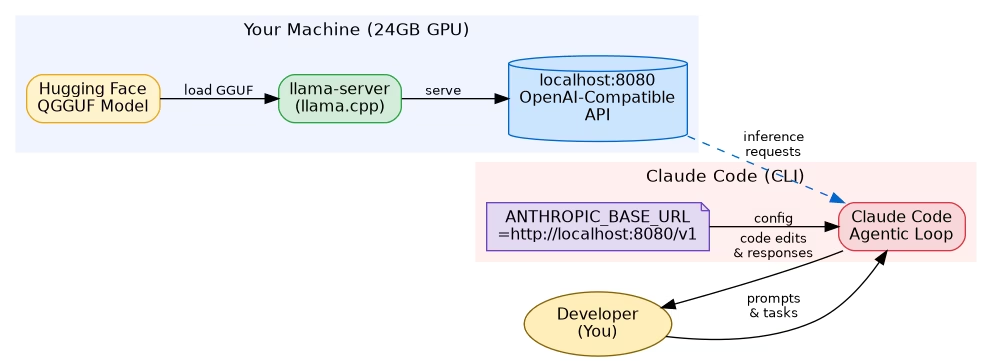
Step 1 — Install llama.cpp from Source
Pre-built llama.cpp binaries often lack CUDA support or are outdated. Building from source takes 5 minutes and ensures you get GPU acceleration:
# Install build dependencies
sudo apt update
sudo apt install -y git cmake build-essential libcurl4-openssl-dev

# Clone the repository
git clone https://github.com/ggerganov/llama.cpp
cd llama.cpp

# Build with CUDA support
cmake -B build   -DGGML_CUDA=ON   -DCMAKE_CUDA_ARCHITECTURES=native   -DCMAKE_BUILD_TYPE=Release

cmake --build build --config Release -j$(nproc)

# Verify the server binary
./build/bin/llama-server --version
The -DGGML_CUDA=ON flag enables GPU offloading. The -DCMAKE_CUDA_ARCHITECTURES=native flag auto-detects your GPU’s compute capability — no need to hard-code it.
If you’re on macOS with Apple Silicon, replace the CUDA flags with -DGGML_METAL=ON for Metal GPU acceleration.
Step 2 — Download the Qwen2.5-Coder GGUF Model
The quantized GGUF files are hosted on Hugging Face. The Q4_K_M variant gives the best balance of quality and VRAM usage for a 32B model:
# Install huggingface-hub CLI
pip install huggingface-hub

# Download Qwen2.5-Coder-32B Q4_K_M (approx 19GB)
huggingface-cli download   Qwen/Qwen2.5-Coder-32B-Instruct-GGUF   qwen2.5-coder-32b-instruct-q4_k_m.gguf   --local-dir ./models   --local-dir-use-symlinks False

# Verify download
ls -lh ./models/qwen2.5-coder-32b-instruct-q4_k_m.gguf
If you have less than 24GB VRAM, use the Q2_K variant (~11GB) or drop to the 7B model. For 16GB VRAM cards like the RTX 4080, try qwen2.5-coder-32b-instruct-q2_k.gguf — quality is reduced but it fits.
Alternatively, download directly with wget:
wget "https://huggingface.co/Qwen/Qwen2.5-Coder-32B-Instruct-GGUF/resolve/main/qwen2.5-coder-32b-instruct-q4_k_m.gguf" -O ./models/qwen2.5-coder-32b-instruct-q4_k_m.gguf --progress=barStep 3 — Start the Local API Server
Start llama-server with settings tuned for single-user agentic coding sessions:
./build/bin/llama-server --model ./models/qwen2.5-coder-32b-instruct-q4_k_m.gguf --host 0.0.0.0 --port 8080 --ctx-size 32768 --n-gpu-layers 99 --parallel 1 --batch-size 512 --ubatch-size 512 --flash-attn --no-mmap --threads 8Key flags explained:
--n-gpu-layers 99— offload all layers to GPU (set lower if you get OOM errors)--ctx-size 32768— 32K context window; enough for large files and conversation history--parallel 1— critical for performance (see Step 5)--batch-size 512— prompt evaluation batch size; tune based on VRAM--flash-attn— enables Flash Attention 2 for faster inference and lower VRAM--no-mmap— loads model fully into RAM/VRAM, avoids slow memory-mapped I/O
Wait for the log line: llama server listening at http://0.0.0.0:8080. The first load takes 30–60 seconds as the model is transferred to GPU memory.
Step 4 — Connect Claude Code to Your Local Model
Claude Code respects the ANTHROPIC_BASE_URL environment variable. Point it at your local llama-server:
# Set the local endpoint (OpenAI-compatible)
export ANTHROPIC_BASE_URL=http://localhost:8080/v1

# Claude Code will now route all requests to llama-server
claude
To make this permanent, add it to your shell profile:
# Add to ~/.bashrc or ~/.zshrc
echo 'export ANTHROPIC_BASE_URL=http://localhost:8080/v1' >> ~/.bashrc
source ~/.bashrc
You can also use a wrapper script to toggle between local and cloud:
#!/bin/bash
# ~/bin/claude-local
export ANTHROPIC_BASE_URL=http://localhost:8080/v1
exec claude "$@"
Test that Claude Code is routing correctly:
curl http://localhost:8080/v1/models
# Should return a JSON list with your Qwen model
Step 5 — Fix the 90% Performance Bug
This is the step most tutorials skip — and it’s why people give up on local LLMs thinking they’re too slow.
The problem: By default, llama-server sets --parallel to a value greater than 1 (often 8 or more). Each parallel slot pre-allocates a full KV cache of ctx-size / parallel tokens per slot. With --parallel 8 and --ctx-size 32768, each slot only gets 4096 tokens of effective context — and the server is juggling 8 imaginary simultaneous users.
The fix: Set --parallel 1. You’re the only user. Give 100% of GPU resources to your single request:
# ❌ Slow — default parallel=8, each slot gets 4096 tokens
./build/bin/llama-server --model model.gguf --ctx-size 32768

# ✅ Fast — parallel=1, full 32768 token context per request
./build/bin/llama-server --model model.gguf --ctx-size 32768 --parallel 1
The impact is dramatic. In benchmarks on an RTX 4090:
--parallel 8(default): ~8 tokens/sec generation speed--parallel 1: ~45–55 tokens/sec generation speed
That’s a 5–6x speedup from a single flag change. Additionally, set --ubatch-size equal to --batch-size for optimal prompt processing throughput.
Testing Your Setup
With llama-server running and ANTHROPIC_BASE_URL set, do a quick end-to-end test:
# Direct API test
curl http://localhost:8080/v1/chat/completions   -H "Content-Type: application/json"   -d '{
    "model": "qwen2.5-coder",
    "messages": [{"role": "user", "content": "Write a Python function to parse a JSON file and return a list of dicts."}],
    "max_tokens": 200
  }'
Then launch Claude Code and give it a real task:
export ANTHROPIC_BASE_URL=http://localhost:8080/v1
claude

# Inside Claude Code:
# > Refactor this Python ETL pipeline to use async/await
# > Add type hints to all functions in src/
# > Write unit tests for the data validation module
Watch the llama-server logs — you should see inference requests coming in and tokens being generated. First response after a cold prompt may take 5–10 seconds for prompt evaluation; subsequent tokens flow at 40–55 tokens/sec on a 4090.
Performance Tips & Troubleshooting
Out of VRAM (CUDA OOM): Reduce --n-gpu-layers in increments of 10. Each layer reduction moves some computation to CPU (slower but functional). Alternatively use the Q2_K GGUF or the 14B model variant.
Slow prompt processing: Increase --batch-size to 1024 or 2048 if you have VRAM headroom. This speeds up reading long files and conversation history.
Model not found by Claude Code: Verify with curl http://localhost:8080/v1/models. If the endpoint returns an error, check that llama-server is running and the port is not blocked by a firewall.
Context window errors: If Claude Code sends requests exceeding --ctx-size, increase it to 65536 (requires more VRAM). With Flash Attention enabled, a 32B model at 32K context uses ~22GB VRAM on Q4_K_M.
Improving code quality: Set the temperature lower for more deterministic code generation. Add --temp 0.2 to the llama-server flags, or pass it in Claude Code’s config.
Run as a systemd service: For always-on local inference, create a systemd unit file so llama-server starts automatically on boot and restarts on crash.
# /etc/systemd/system/llama-server.service
[Unit]
Description=llama.cpp local inference server
After=network.target

[Service]
ExecStart=/path/to/llama.cpp/build/bin/llama-server   --model /path/to/models/qwen2.5-coder-32b-instruct-q4_k_m.gguf   --port 8080 --ctx-size 32768 --n-gpu-layers 99 --parallel 1 --flash-attn
Restart=on-failure
User=youruser

[Install]
WantedBy=multi-user.target
Frequently Asked Questions
Can I run Qwen2.5-Coder-32B on a 16GB VRAM GPU?
Yes, with Q2_K quantization (~11GB GGUF file). Code quality drops somewhat compared to Q4_K_M, but for many tasks it remains highly capable. Alternatively, use the Qwen2.5-Coder-14B-Instruct model which fits comfortably at Q4_K_M quantization in 16GB VRAM.
Does Claude Code fully support local models via ANTHROPIC_BASE_URL?
Yes. Claude Code uses the ANTHROPIC_BASE_URL environment variable to override the API endpoint. Since llama-server exposes an OpenAI-compatible API, the requests are translated automatically. Most agentic features (file editing, bash execution, multi-turn conversation) work without modification.
How does Qwen2.5-Coder-32B compare to Claude 3.5 Sonnet for coding?
On standard coding benchmarks (HumanEval, MBPP), Qwen2.5-Coder-32B scores comparably to GPT-4o and slightly below Claude 3.5 Sonnet. For most day-to-day coding tasks — refactoring, writing tests, documentation, debugging — the quality difference is minimal. Where Claude 3.5 Sonnet notably pulls ahead is in very complex multi-step reasoning and ambiguous instruction following.
What is the –parallel flag and why does it matter so much?
The --parallel flag controls how many concurrent requests llama-server handles simultaneously. Each slot pre-allocates a portion of the KV cache. With --parallel 8 and a 32K context, each request only gets 4K of KV cache — severely limiting context and slowing inference. Setting --parallel 1 gives a single user the full KV cache and GPU bandwidth, resulting in 5–6x faster generation.
Can I use this setup on macOS with Apple Silicon?
Yes. Build llama.cpp with -DGGML_METAL=ON instead of CUDA flags. The M2 Ultra and M3 Max with 64–96GB unified memory can run the full Q4_K_M 32B model. Metal inference on M-series chips achieves 30–40 tokens/sec on the 32B model — excellent for local coding sessions.
Is there a simpler way to set up a local LLM server without building from source?
Yes — Ollama provides pre-built binaries and a simpler CLI, though with less control over server parameters. LM Studio offers a GUI alternative. However, building llama.cpp from source gives you the most control over performance tuning, which is critical for agentic workloads that send many large requests.
Wrapping Up
Running Qwen2.5-Coder-32B locally with Claude Code is a genuinely practical setup for data engineers and developers who run heavy agentic coding sessions. The upfront cost of a capable GPU pays for itself within months if you’re currently paying for API access. The key insights are: build llama.cpp with CUDA, use the Q4_K_M quantization for quality/VRAM balance, and — most critically — set --parallel 1 to avoid the silent performance killer that makes most people abandon local LLMs.
If you found this guide useful, check out related posts on building local MLOps pipelines and optimising Python ETL performance on wcblog.in. Got questions or hit an issue? Drop them in the comments below.