The Problem: AI Agents Forget
If you’ve used an AI coding agent for any extended session — debugging a tricky issue, refactoring a large codebase, or working through a complex architecture — you’ve probably noticed something frustrating: the agent starts forgetting things.
This isn’t a bug. It’s a hard constraint. Every AI model has a context window — a fixed limit on how much text it can hold in memory at one time. When a session runs long enough, older messages get pushed out to make room for new ones.
For OpenClaw specifically, this means:
- Early decisions and context get silently dropped
- The agent loses track of files it edited an hour ago
- You end up re-explaining things you already covered
- Long sessions become unreliable
The standard workaround is context compaction — summarising older messages into a condensed form. But summarisation always loses detail. You trade recall for space.
Lossless Claw takes a fundamentally different approach.
What is Lossless Claw?
Lossless Claw is an OpenClaw plugin developed by Martian Engineering that eliminates memory loss in long agent sessions. Instead of discarding or summarising messages when the context window fills up, it:
- Saves every message to a local SQL database — nothing is ever deleted
- Builds a DAG (Directed Acyclic Graph) of summaries — organising session history into a navigable tree
- Provides three recall tools the agent can use to retrieve any detail on demand
The result: perfect recall, regardless of how long a session runs.
How It Works — Architecture
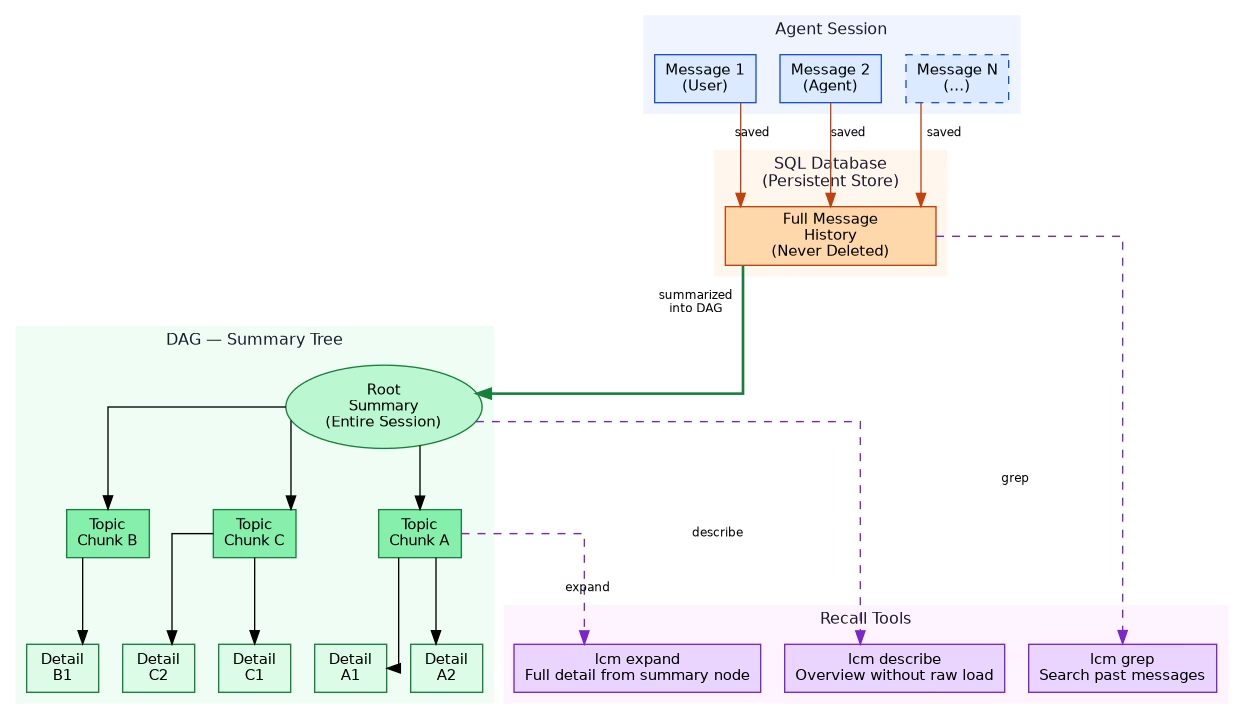
Step 1: Every Message is Persisted
As the session progresses, every user message and agent response is immediately written to a local SQLite database. Unlike the context window (which is volatile and size-limited), the database persists across restarts and has no practical size limit.
Step 2: A DAG of Summaries is Built
Lossless Claw doesn’t just dump raw messages into a pile — it organises them into a Directed Acyclic Graph of summaries:
- The root node holds a high-level summary of the entire session
- Child nodes represent topic chunks or time windows
- Leaf nodes hold detailed summaries of specific exchanges
This tree structure lets the agent navigate history efficiently — starting from a broad overview and drilling down only into the parts it actually needs.
Step 3: The Agent Uses Recall Tools
The plugin exposes three tools the agent can call mid-session:
| Tool | What it does |
|---|---|
lcm grep | Full-text search across all saved messages — find any past message instantly |
lcm describe | Get an overview of compacted history without loading raw messages |
lcm expand | Retrieve full detail from a specific summary node in the DAG |
Together, these tools give the agent a selective memory — it only loads what it needs, keeping token usage manageable while maintaining complete access to history.
Installation
Installing Lossless Claw is a single terminal command:
openclaw plugins install @martian-engineering/lossless-clawThen restart OpenClaw for the plugin to load:
openclaw gateway restartVerify it loaded:
openclaw plugins listYou should see lossless-claw in the loaded plugins list.
The Three Recall Tools in Detail
lcm grep — Search Past Messages
Works like grep but over your entire session history stored in SQL:
lcm grep "authentication flow"
lcm grep "database schema"
lcm grep "error: cannot find module"
Returns matching messages with timestamps and context — useful when you remember discussing something but can’t recall exactly when.
lcm describe — High-Level Overview
Gives the agent a structured overview of what’s been covered in the session without loading thousands of raw tokens:
lcm describeReturns a summary of major topics, decisions made, and files touched — essentially the root and first-level nodes of the DAG. Fast and cheap.
lcm expand — Drill Into Details
When lcm describe shows a topic chunk the agent needs more detail on, lcm expand retrieves the full summary for that node:
lcm expand chunk_A
lcm expand "authentication discussion"
This selective loading is what keeps token usage reasonable — you only pay for the detail you actually need.
Pros and Cons
What’s Great
- Perfect recall — no message is ever lost, regardless of session length
- Navigable history — the DAG structure makes retrieval structured and efficient
- Survives restarts — SQL persistence means history carries over between sessions
- Single install command — no complex configuration required
Trade-offs to Consider
- More storage — every message is saved permanently; long sessions accumulate significant data
- Extra API calls — building DAG summaries requires additional LLM calls (summarisation cost)
- Summarisation latency — slight overhead as summaries are generated in the background
- Token overhead — recall tools themselves consume tokens when invoked
For most use cases, the trade-offs are worth it — especially if you run long coding sessions where context loss is actively hurting productivity.
Who Should Use Lossless Claw?
Great fit if you:
- Run multi-hour coding or debugging sessions with OpenClaw
- Work on large codebases where early context matters throughout
- Find yourself re-explaining decisions the agent already made
- Want session history to persist across restarts
May not need it if you:
- Mostly run short, focused sessions
- Already use a solid memory system (like QMD with semantic search)
- Are sensitive to extra API costs from summarisation calls
Lossless Claw vs Built-in Compaction
OpenClaw’s built-in compaction summarises old messages when the context fills — lightweight but lossy. Lossless Claw is a complement or replacement:
| Feature | Built-in Compaction | Lossless Claw |
|---|---|---|
| Memory loss | Yes — summarisation loses detail | No — full SQL persistence |
| Storage cost | Minimal | Grows with session length |
| API overhead | Minimal | Summarisation calls |
| Recall quality | Approximate | Exact and structured |
| Setup | Built-in | Plugin install required |
| Best for | Short or medium sessions | Long or complex sessions |
Summary
Lossless Claw solves a real and annoying problem with AI coding agents. The context window limit has always been a ceiling on how useful these tools can be for extended work — Lossless Claw removes that ceiling by treating the database as the true memory store and the context window as just a working scratchpad.
If you regularly hit the “agent forgot what we decided earlier” problem, it’s worth installing. One command, and your agent gains a permanent memory.
openclaw plugins install @martian-engineering/lossless-claw