Duplicate data in data lakes is one of the most common and frustrating challenges for data engineers.
But what happens when:
- You don’t have a primary key
- You don’t have a reliable incremental column
- You don’t have a unique timestamp
- And your Iceberg table already contains duplicate records?
In this blog, I will walk you through a real-world approach to detecting, removing, and safely restoring unique data in an Apache Iceberg table using Amazon Athena.
This method works even when your table has:
- No unique constraint
- No incremental load column
- No CDC (Change Data Capture) metadata
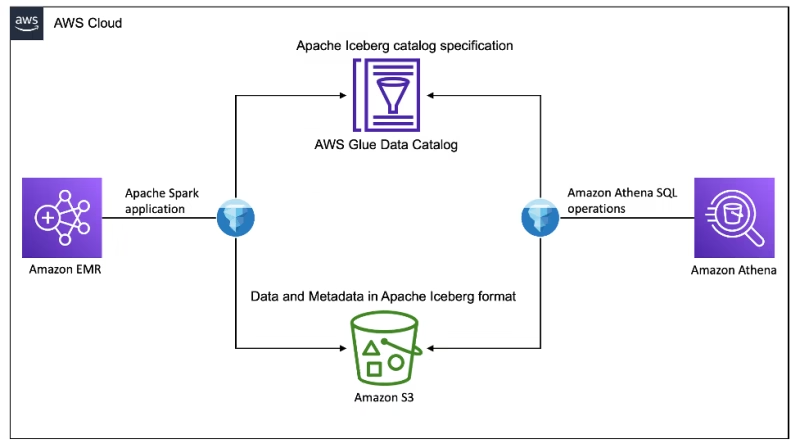
🚨 The Problem: No Unique Identifier
Imagine you have an Iceberg table like this:
CREATE TABLE demo_silver_db.bom_meta (
   messageid string,
   accountid string,
   createdat bigint,
   ...
)
WITH (
   table_type='ICEBERG'
);
Over time, due to:
- Multiple ingestion retries
- Reprocessing jobs
- Failed merges
- Streaming duplicates
You end up with duplicate rows.
But there is no single unique column to identify duplicates.
🧠 Strategy Overview
Since Iceberg supports:
- Snapshots
- Time travel
- Row-level DELETE
- Insert overwrite patterns
We can:
- Go back to a historical snapshot
- Identify duplicate groups
- Extract unique records using
DISTINCT - Reinsert cleaned data
- Create a fresh snapshot
This gives us a clean version of the table.
🔍 Step 1: Identify Duplicate Records
We first detect duplicates based on business logic.
Example duplicate definition:
messageid + accountid + year + month + day + hourSELECT
messageid,
accountid,
year,
month,
day,
hour,
COUNT(*) AS duplicate_count
FROM demo_silver_db.bom_meta
GROUP BY
messageid,
accountid,
year,
month,
day,
hour
HAVING COUNT(*) > 1
ORDER BY duplicate_count DESC;This tells us where duplicates exist.
⏪ Step 2: Go Back to Historical Snapshot
Iceberg allows time travel.
SELECT *
FROM demo_silver_db.bom_meta
FOR TIMESTAMP AS OF TIMESTAMP '2026-03-02 04:15:41.902 UTC';
This reads the table as it existed at that exact time.
No data is modified — it’s a safe read.
🧹 Step 3: Reinsert Only Unique Records
We use SELECT DISTINCT to remove duplicate rows and reinsert them into the table.
INSERT INTO demo_silver_db.bom_meta
SELECT DISTINCT
    messageid,
    accountid,
    createdat,
    "data.CalcBem",
    "data.CalcOK",
    ...
    year,
    month,
    day,
    hour
FROM demo_silver_db.bom_meta
FOR TIMESTAMP AS OF TIMESTAMP '2026-03-02 04:15:41.902 UTC'
WHERE messageid IN (
    SELECT messageid
    FROM demo_silver_db.bom_meta
    FOR TIMESTAMP AS OF TIMESTAMP '2026-03-02 04:15:41.902 UTC'
    GROUP BY messageid, accountid, year, month, day, hour
    HAVING COUNT(*) > 1
);
What this does:
- Reads duplicate data from historical snapshot
- Removes exact duplicate rows
- Reinserts only unique values
- Creates a new Iceberg snapshot
🧾 Why This Works
Iceberg tables:
- Do not enforce primary keys
- Allow duplicate records
- Track table versions using metadata
Using snapshot + distinct:
- We avoid corrupting current data
- We preserve historical lineage
- We create a clean state
⚠ Important Considerations
1️⃣ DISTINCT works only if entire row matches
If duplicates differ in even one column, DISTINCT will not remove them.
In that case, use:
ROW_NUMBER() OVER (
    PARTITION BY messageid, accountid
    ORDER BY createdat ASC
)
2️⃣ Always Validate Before DELETE
Before deleting duplicates:
SELECT *
FROM (
   SELECT *,
          ROW_NUMBER() OVER (
             PARTITION BY messageid, accountid
             ORDER BY createdat
          ) rn
   FROM demo_silver_db.bom_meta
)
WHERE rn > 1;
Never directly delete without previewing.
3️⃣ Every INSERT or DELETE Creates a New Snapshot
Iceberg automatically creates a new snapshot after:
- INSERT
- DELETE
- MERGE
So rollback is always possible.
💡 Alternative: Row Number Based Deduplication (Recommended)
If your duplicates are defined by business key:
INSERT INTO demo_silver_db.bom_meta
SELECT *
FROM (
   SELECT *,
          ROW_NUMBER() OVER (
             PARTITION BY messageid, accountid
             ORDER BY createdat
          ) rn
   FROM demo_silver_db.bom_meta
   FOR TIMESTAMP AS OF TIMESTAMP '2026-03-02 04:15:41.902 UTC'
)
WHERE rn = 1;
This keeps only one record per key.
📊 When Should You Use This Approach?
Use this method when:
- ❌ No primary key exists
- ❌ No reliable incremental column
- ❌ No CDC mechanism
- ❌ Duplicate ingestion happened
- ❌ Iceberg table already corrupted
🏁 Final Thoughts
Removing duplicates in Apache Iceberg without a unique identifier is possible using:
- Time travel
- Snapshot reads
- DISTINCT
- ROW_NUMBER
- Controlled INSERT patterns
The key is:
Always define your business-level uniqueness first.
Iceberg gives you the tools — but you must define the logic.