

Amazon S3 just solved one of the most persistent pain points for data engineers and cloud architects at scale: bucket name conflicts across a globally shared namespace. With the new Account Regional Namespace feature for general purpose buckets, your team can predictably name and create S3 buckets scoped to your own AWS account and region — no more racing to grab names before someone else does.
In this post, I'll break down what this feature does, why it matters for data platform teams, how to use it via Console, CLI, Boto3, and CloudFormation — and how to enforce it organisation-wide with IAM and AWS Organizations SCPs.
What Is the S3 Account Regional Namespace?
Traditionally, every Amazon S3 general purpose bucket name had to be globally unique across all AWS accounts and all regions. That single constraint created real problems at enterprise scale:
- Common names like
data-lake,raw-ingest, orprod-etlwere already taken - Naming conventions became complex and fragile
- Infrastructure-as-code templates failed when deployed to new accounts
- Security teams couldn't enforce predictable naming patterns
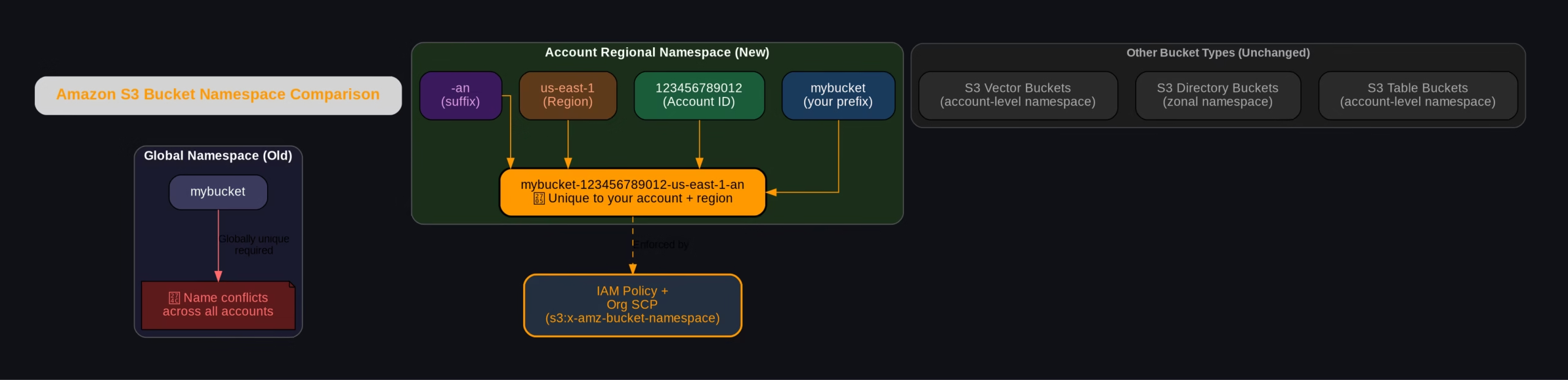
The new account regional namespace fixes this by letting you create bucket names that are unique only within your own AWS account and region — not globally. AWS enforces this by appending a deterministic suffix to your bucket name:
mybucket-123456789012-us-east-1-anWhere:
mybucket— your chosen prefix123456789012— your AWS Account IDus-east-1— the AWS Region-an— the account-regional namespace marker
If any other account tries to create a bucket using your account's suffix, AWS automatically rejects the request. Your namespace is yours.
Account Regional Namespace vs Global Namespace — Visual Comparison
The diagram below shows how the naming structure compares between the old global namespace and the new account regional namespace:
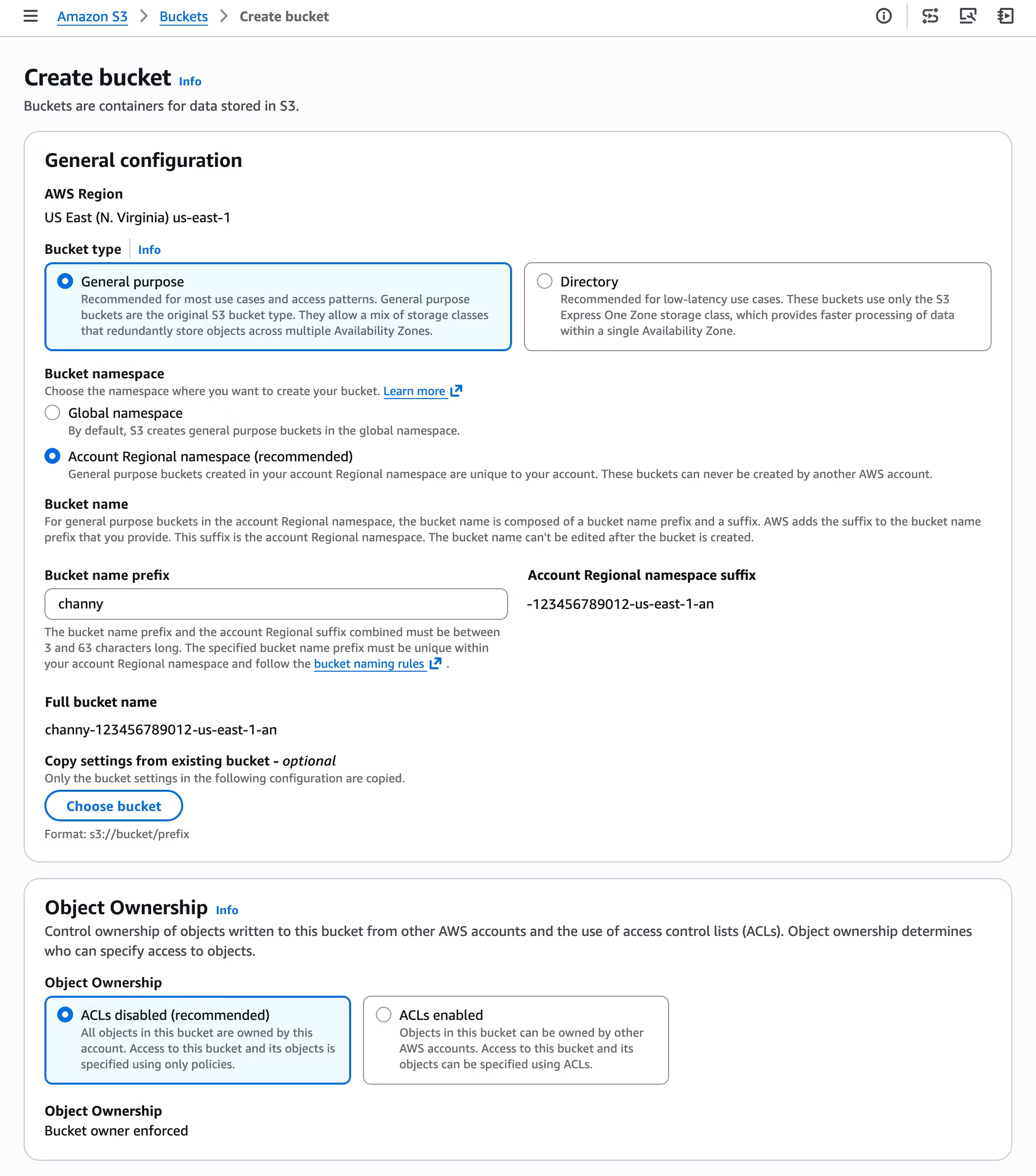
How to Create an Account Regional Namespace Bucket
Via the AWS Console
- Open the Amazon S3 Console
- Click Create bucket
- Under bucket name, choose Account regional namespace
- Enter your desired prefix (e.g.
my-data-lake) - AWS appends the account + region suffix automatically
The combined prefix + suffix must be between 3 and 63 characters.
Via AWS CLI
aws s3api create-bucket \
  --bucket mybucket-123456789012-us-east-1-an \
  --bucket-namespace account-regional \
  --region us-east-1
Via AWS SDK for Python (Boto3)
import boto3

class AccountRegionalBucketCreator:
    """Creates S3 buckets using account-regional namespace feature."""

    ACCOUNT_REGIONAL_SUFFIX = "-an"

    def __init__(self, s3_client, sts_client):
        self.s3_client = s3_client
        self.sts_client = sts_client

    def create_account_regional_bucket(self, prefix):
        """
        Creates an account-regional S3 bucket with the specified prefix.
        Format: <prefix>-<account-id>-<region>-an
        """
        account_id = self.sts_client.get_caller_identity()['Account']
        region = self.s3_client.meta.region_name
        bucket_name = f"{prefix}-{account_id}-{region}{self.ACCOUNT_REGIONAL_SUFFIX}"

        params = {
            "Bucket": bucket_name,
            "BucketNamespace": "account-regional"
        }
        if region != "us-east-1":
            params["CreateBucketConfiguration"] = {
                "LocationConstraint": region
            }

        return self.s3_client.create_bucket(**params)


if __name__ == "__main__":
    s3  = boto3.client("s3")
    sts = boto3.client("sts")

    creator = AccountRegionalBucketCreator(s3, sts)
    response = creator.create_account_regional_bucket("my-data-lake")
    print(f"Bucket created: {response}")
Via AWS CloudFormation
CloudFormation pseudo parameters make this seamless. You can use either approach:
Option 1 — Full bucket name with pseudo parameters:
BucketName: !Sub "my-data-lake-${AWS::AccountId}-${AWS::Region}-an"
BucketNamespace: "account-regional"
Option 2 — Prefix only (suffix auto-appended by AWS):
BucketNamePrefix: "my-data-lake"
BucketNamespace: "account-regional"
Enforcing Account Regional Namespace Across Your Organisation
The real power for platform teams is enforcing this naming convention so no developer can accidentally create buckets in the global namespace. Use the new IAM condition key s3:x-amz-bucket-namespace:
IAM Policy — Enforce Account Regional Namespace
{
  "Version": "2012-10-17",
  "Statement": [
    {
      "Sid": "EnforceAccountRegionalNamespace",
      "Effect": "Deny",
      "Action": "s3:CreateBucket",
      "Resource": "*",
      "Condition": {
        "StringNotEquals": {
          "s3:x-amz-bucket-namespace": "account-regional"
        }
      }
    }
  ]
}
Deploy this as an AWS Organizations SCP and every account in your org is covered — no exceptions.
Why This Matters for Data Engineers
If you're building data platforms on AWS, this feature changes how you design and deploy infrastructure:
| Problem Before | Solution Now |
|---|---|
Global name collisions on common names like raw-zone, trusted-zone | Use raw-zone-<accountid>-<region>-an — always available to you |
| IaC templates fail in new accounts due to taken names | Templates are reusable — suffix guarantees uniqueness per account |
| No way to enforce naming conventions | SCP + IAM condition key enforces namespace org-wide |
| Manual naming gymnastics across multi-region setups | Predictable, deterministic names across all regions |
What You Need to Know (Limitations)
- ✅ Available in 37 AWS Regions including AWS China and GovCloud (US)
- ✅ No additional cost — same pricing as regular S3 buckets
- ✅ Supports all features of general purpose buckets
- ❌ You cannot rename existing global buckets to account regional namespace — create new ones and migrate
- ❌ Only for general purpose buckets — S3 table buckets, vector buckets (already account-level) and directory buckets (zonal) are unaffected
Frequently Asked Questions (FAQ)
What is S3 account regional namespace?
It is a new S3 bucket naming feature that scopes bucket names to your specific AWS account and region. Instead of competing for globally unique names, buckets are named with a deterministic suffix (-<accountid>-<region>-an) that only your account can use.
Does account regional namespace cost extra?
No. Creating general purpose buckets with account regional namespace is available at no additional cost in all 37 supported AWS Regions.
Can I migrate my existing S3 buckets to account regional namespace?
No — you cannot rename existing global namespace buckets. You need to create new buckets with the account regional namespace and migrate your data using tools like AWS DataSync, S3 Batch Operations, or aws s3 sync.
How do I enforce account regional namespace for my whole AWS Organisation?
Use an AWS Organizations Service Control Policy (SCP) with the s3:x-amz-bucket-namespace IAM condition key. A Deny statement on s3:CreateBucket where namespace is not account-regional will block all non-compliant bucket creation across every account in your org.
Does this work with Terraform and CDK?
AWS CloudFormation has native support via BucketNamePrefix and BucketNamespace properties. For Terraform and CDK, you can construct the full bucket name string using account ID and region interpolation, and pass bucket-namespace: account-regional in the bucket configuration once those tools update their providers to support the new parameter.
What is the bucket name length limit?
The combined bucket name prefix plus the account regional suffix must be between 3 and 63 characters total — same constraint as standard S3 bucket names.
Which S3 bucket types support account regional namespace?
Only general purpose buckets. S3 table buckets and vector buckets already use an account-level namespace. S3 directory buckets use a zonal namespace. None of these are affected by this new feature.