S3 Files went generally available on April 7, 2026. The AWS blog covered the setup steps. This post covers something more useful: what it actually changes for data engineers who live inside pipelines, not press releases.
Short version: a lot of the copy-paste boilerplate you’ve written over the years — the S3 download at the top of every script, the upload at the bottom, the EFS sync cron job that breaks every quarter — you might not need it anymore. Here’s what changed and where it matters.
What Is Amazon S3 Files?
S3 Files lets you mount an S3 bucket as an NFS v4.1/v4.2 file system. EC2, Lambda, EKS, and ECS can all mount it. Your code sees /mnt/s3files/ and reads or writes like it’s a local directory. Behind the scenes, it’s hitting S3.
That’s the pitch. The reality is more nuanced — and the nuance matters for how you design pipelines.
This is not FUSE. Tools like Mountpoint for Amazon S3 emulate a file system on top of S3’s object API. Partial writes don’t work. Overwriting a file means a full DELETE + PUT under the hood. Empty directories behave strangely.
S3 Files is architecturally different. It connects EFS (a real NFS file system) to S3. The file system side handles real POSIX operations. The S3 side stores real objects. A synchronisation layer runs between them — batching writes roughly every 60 seconds and importing S3 changes typically within 30 seconds.
That 60-second commit window is the most important number in this whole feature. We’ll come back to it.
The Pipeline Pattern S3 Files Eliminates
If you’ve worked with S3-backed ML or ETL pipelines, you know this pattern:
- Spin up EC2 / SageMaker Processing Job
- Download 50–100GB of training data from S3 to EBS
- Run your preprocessing script
- Upload results back to S3
- Clean up EBS volume
Steps 2, 4, and 5 are pure overhead. You’re copying data from one AWS service to another and back again because your tools expect a file system and S3 isn’t one. For 100GB of data, the download alone can take 5–10 minutes depending on instance type. That’s before your job does any actual work.
With S3 Files, you mount the prefix and your script reads directly from /mnt/s3files/training-data/. No download. No upload. No cleanup.
# Before S3 Files — download, process, upload
import boto3
import pandas as pd

s3 = boto3.client('s3')
s3.download_file('my-bucket', 'training/data.parquet', '/tmp/data.parquet')
df = pd.read_parquet('/tmp/data.parquet')
# ... process ...
df.to_parquet('/tmp/result.parquet')
s3.upload_file('/tmp/result.parquet', 'my-bucket', 'output/result.parquet')

# After S3 Files — bucket mounted at /mnt/s3files
import pandas as pd

df = pd.read_parquet('/mnt/s3files/training/data.parquet')
# ... process ...
df.to_parquet('/mnt/s3files/output/result.parquet')
The code shrinks. The runtime shrinks. The boto3 boilerplate disappears.
Architecture: Before and After S3 Files
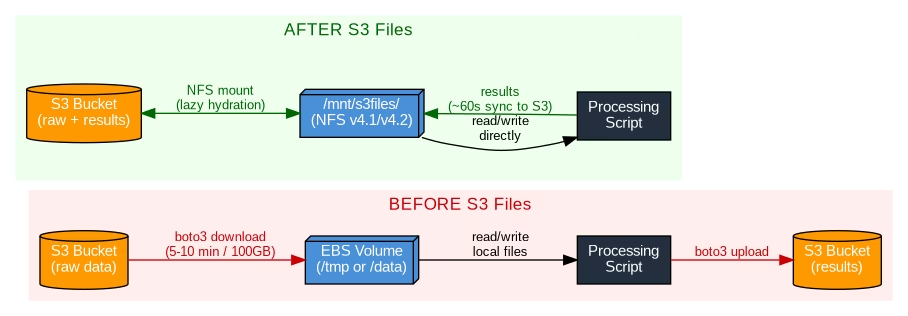
How the Sync Model Works (Read This Before You Build)
Understanding the sync model prevents nasty production bugs.
File system → S3: Writes are batched in ~60 second windows. Multiple writes to the same file within that window get collapsed into a single S3 PUT. If job A writes a file via the mount and job B reads it via the S3 API 10 seconds later, job B might see the old version — or nothing at all.
S3 → File system: When you PUT an object directly to S3 (via boto3, CLI, or another service), the mount reflects it within roughly 30 seconds. Real-world testing by DevelopersIO confirmed this consistently.
Conflicts: If both sides modify the same file simultaneously, S3 wins. The file system version moves to a lost+found directory and a CloudWatch metric fires.
AWS VP Andy Warfield describes the sync model as “stage and commit” — borrowed from git. Your file system is the working directory. S3 is the committed state. There’s a deliberate gap between them, and it’s a feature, not a bug. The batching reduces S3 request costs significantly for write-heavy workloads.
There’s no “commit now” API at GA. Warfield flagged it as a future improvement. The practical rule: don’t mix mount writes with immediate S3 API reads in the same tight pipeline. Keep both jobs on the same mount point, or design explicit waits between them.
Performance Numbers Worth Knowing
| Metric | S3 Files | EBS gp3 (default) | EBS gp3 (max provisioned) |
|---|---|---|---|
| Max read throughput | 3 GiB/s | 125 MiB/s | ~2 GiB/s |
| Max read IOPS | 250,000 | 3,000 | 16,000 |
| Max write throughput | 1–5 GiB/s | 125 MiB/s | ~2 GiB/s |
| Max write IOPS | 50,000 | 3,000 | 16,000 |
| Provisioning required | None | Yes | Yes |
Reading 100GB at EBS gp3 default throughput (125 MiB/s) takes about 13 minutes. At S3 Files peak (3 GiB/s), that drops to under 35 seconds. And since reads of 1MB or larger are billed at S3 GET rates only — not file system access charges — heavy sequential workloads end up cheaper than equivalent EFS throughput tiers.
Lambda Gets More Practical for ML Workloads
Lambda and large reference data have always been awkward. Your options before S3 Files:
- Container image with model baked in (max 10GB, rebuild on every model update)
- EFS mount (requires VPC, often increases cold starts)
- Download to
/tmpat runtime (max 10GB, adds latency on every cold start)
S3 Files is option four. Mount the prefix, read model files via the file system. Files load lazily as accessed — Warfield calls this “lazy hydration.” Update the model? Push a new S3 object. No Lambda redeployment needed.
Here’s how much code disappears on a thumbnail generation Lambda:
# Before — 14 lines, boto3 required
import boto3
from PIL import Image

s3 = boto3.client('s3')

def handler(event, context):
    bucket = event['Records'][0]['s3']['bucket']['name']
    key = event['Records'][0]['s3']['object']['key']
    download_path = f'/tmp/{key.split("/")[-1]}'
    s3.download_file(bucket, key, download_path)
    img = Image.open(download_path)
    img.thumbnail((128, 128))
    thumb_path = f'/tmp/thumb_{key.split("/")[-1]}'
    img.save(thumb_path)
    s3.upload_file(thumb_path, bucket, f'thumbnails/{key}')

# After S3 Files — 5 lines, no boto3 needed
from PIL import Image

def handler(event, context):
    key = event['Records'][0]['s3']['object']['key']
    img = Image.open(f'/mnt/s3files/{key}')
    img.thumbnail((128, 128))
    img.save(f'/mnt/s3files/thumbnails/{key}')
Airflow Pipeline Redesign
If you’re orchestrating with Airflow, the task graph gets simpler — but you need to handle the commit window at job boundaries.
# Before — three tasks
download = S3ToLocalOperator(...)
process  = PythonOperator(python_callable=run_preprocessing, ...)
upload   = LocalToS3Operator(...)
download >> process >> upload

# After — one task (reads and writes via mount)
process = PythonOperator(python_callable=run_preprocessing, ...)

# If downstream reads via S3 API, add a sensor to clear the commit window
from airflow.providers.amazon.aws.sensors.s3 import S3KeySensor

wait_for_commit = S3KeySensor(
    task_id='wait_for_s3_commit',
    bucket_name='my-bucket',
    bucket_key='output/result.parquet',
    timeout=300,
    poke_interval=30,
)

process >> wait_for_commit >> downstream_s3_task
What to Check Before Adopting S3 Files
Versioning is mandatory
S3 Files requires bucket versioning. For existing buckets, review your lifecycle rules before enabling it. Old versions accumulate and cost money if you’re not expiring them.
VPC-only access
Mount targets live in a VPC. Lambda and EC2 must be in the same AZ as the mount target. No on-premises access, no cross-cloud.
Renames are expensive at scale
S3 has no native rename. A directory rename of 100,000 files completes instantly on the file system — but takes several minutes to reflect in S3 as 100,000 CopyObject + 100,000 DeleteObject calls. Spark’s default write-rename pattern hits this hard. Use S3A committers (Magic or Directory committer) to write directly to final paths.
50 million object limit
Warfield flagged this directly: mounting buckets with more than 50 million objects can cause problems. Mount a specific prefix instead of the bucket root.
Some S3 keys won’t map to POSIX paths
Object keys ending with /, keys with POSIX-invalid characters, or path components over 255 bytes can’t be represented as file paths. They get flagged via CloudWatch events rather than silently mangled — but account for them if your bucket has unconventional key patterns.
When to Use S3 Files vs. Stick With the S3 API
Use S3 Files when:
- Your pipeline has explicit download/upload steps that exist only to bridge S3 to file-based tools
- You’re running ML preprocessing on EC2 or SageMaker and spending real time on data staging
- Lambda functions download large reference data to
/tmpon every cold start - You have legacy apps using
open()/read()/write()that you want to point at S3 without rewriting
Stick with the S3 API when:
- Downstream jobs read from S3 immediately after writes — the 60-second window will cause stale reads
- Your pipeline does mass directory renames (Spark partitioned writes, for example)
- You need cross-region or on-premises access to the same data
- Enabling versioning on existing buckets would break lifecycle rules you depend on
The commit window is not a limitation to work around — it’s a cost optimisation that collapses multiple writes into single S3 PUTs. Work with it, not against it.
FAQ: Amazon S3 Files for Data Engineers
Does S3 Files replace EFS entirely?
No. EFS is better for workloads that need real-time consistency across multiple writers, sub-millisecond random read latency, or NFS access from on-premises. S3 Files trades some consistency for native S3 integration and higher sequential throughput.
Can multiple EC2 instances mount the same S3 Files file system?
Yes. File locking (flock) works for mutual exclusion between processes on the mount. The S3 API bypasses file locks though — don’t mix mount writes and S3 API writes on the same files simultaneously.
What happens to my data if I delete the file system?
Your S3 objects stay in S3. The file system is a view over your data, not the store. Deleting the file system doesn’t touch the bucket.
Does S3 Files work with PySpark?
Spark’s default write pattern uses rename-on-commit, which maps to expensive CopyObject + DeleteObject calls on S3 Files. Configure Spark to use S3A committers (Magic or Directory committer) that write directly to the final path without renames.
What does S3 Files cost?
You pay EFS storage rates for the active working set cache, plus standard S3 storage for your objects. The cache eviction period is configurable from 1 to 365 days (default 30 days). Evicted data stays in S3 — it’s never deleted from the bucket.
Is there a force-sync option to push writes to S3 immediately?
Not at GA. Warfield mentioned it as a future improvement. For now, design around the 60-second window or use S3 event notifications to trigger downstream work once objects appear.
AWS announced S3 Files GA on April 7, 2026. All performance numbers are from the official AWS S3 Files documentation and Andy Warfield’s post on All Things Distributed.