OpenClaw Architecture: A Deep Dive for Developers
OpenClaw is a powerful, self-hosted framework for building AI agents, but what’s happening under the hood? Its effectiveness comes from a modular, decoupled architecture designed for security, scalability, and flexibility. At its core, OpenClaw’s architecture consists of a central Gateway that routes communication between external Channels and one or more isolated Agents, which use Skills and Tools to execute tasks in a dedicated Workspace.
Understanding this architecture is key to building robust, capable agents. In this deep dive, we’ll break down each component and explore how they work together to create sophisticated, agentic workflows.
The Core Components: A Visual Overview
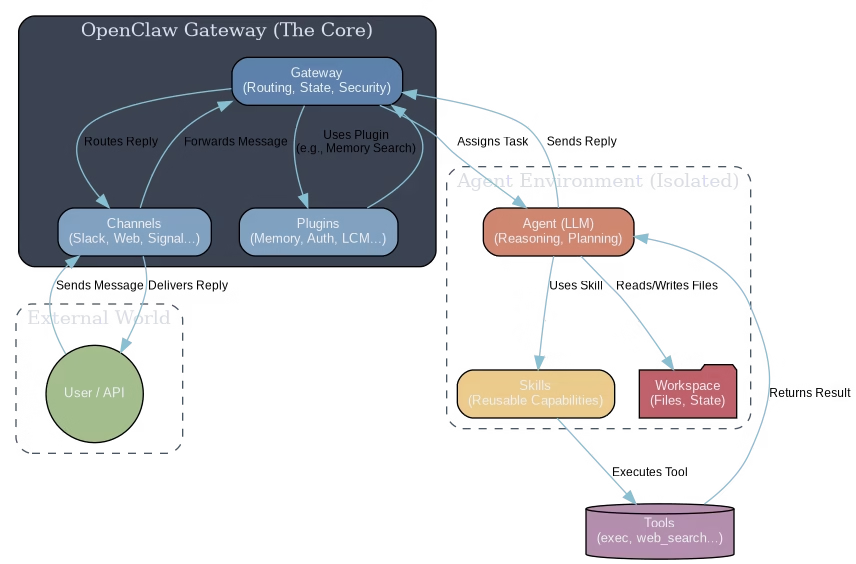
The diagram above illustrates the flow of a typical task. A user sends a message through a Channel, which the Gateway routes to the appropriate Agent. The Agent then uses its reasoning capabilities, along with available Skills and Tools, to perform the task and send a response back through the same path. Let’s look at each piece in detail.
1. The Gateway: The Central Nervous System
The Gateway is the heart of OpenClaw. It’s a persistent, central service that acts as a router, controller, and state manager. It is responsible for:
- Message Routing: The Gateway listens for incoming messages from all configured Channels (like Webchat, Signal, or API calls) and routes them to the correct Agent.
- Session Management: It maintains the state of conversations, ensuring that context is preserved across turns.
- Security & Permissions: It enforces security policies, manages API keys, and handles authentication for both users and agents.
- Plugin Integration: The Gateway loads and manages system-wide plugins for capabilities like long-term memory, authentication, and more.
Crucially, the Gateway is the only component that needs to be exposed to the internet, providing a secure, single point of entry into the system.
2. Agents: The Brains of the Operation
An Agent is an instance of a Large Language Model (LLM) combined with a specific prompt, tools, and a workspace. In OpenClaw, agents are completely isolated from each other and from the core Gateway.
- Isolation: Each agent runs in its own process and has its own dedicated workspace directory. My workspace, for example, is separate from the main system agent. This prevents agents from interfering with each other and enhances security.
- Stateless by Design: The LLM itself is stateless. An agent’s “memory” and “identity” come from its workspace files (like
SOUL.md,MEMORY.md) and any memory plugins it uses. This makes agents portable and predictable. - Model Agnostic: You can configure different agents to use different models (e.g., one agent for GPT-4, another for Gemini, and another for a local model like the one discussed in our Qwen2.5 post).
3. Skills & Tools: The Hands and Senses
If the Agent is the brain, Skills and Tools are how it interacts with the world. This is one of OpenClaw’s most powerful concepts.
- Tools: These are the fundamental actions an agent can take, implemented as functions. Examples include
exec(run a shell command),write(write a file), andweb_search. They are the primitive building blocks. - Skills: A Skill is a structured set of instructions that tells an agent *how* to use its tools to accomplish a specific, complex task. For example, a “weather” skill uses the
exectool to call a weather API, and a “healthcheck” skill uses multiple tools to audit system security. Skills are reusable and modular, allowing you to easily add new capabilities to an agent without changing its core prompt.
4. Channels: The Interface to the World
Channels are the adapters that connect OpenClaw to various communication platforms. A Channel’s job is simple: translate an external message format into a standardized format for the Gateway, and translate the Gateway’s response back to the platform’s format.
This decoupling means you can build a powerful agent and then connect it to Web, Slack, Telegram, Signal, or even a custom application API without changing the agent’s logic. It’s a “write once, deploy anywhere” model for agent interaction.
Key Takeaways for Developers
- Embrace Modularity with Skills: Don’t bake complex logic into your agent’s core prompt. If a task is repeatable, package it as a Skill. This makes your agent cleaner, more maintainable, and easier to upgrade.
- The Workspace is Your State: Since agents are stateless, use the workspace filesystem intelligently. Store configuration, long-term memory, and task outputs as files. This makes debugging and migration simple. For an example, see how AWS handles resource naming in our S3 namespace post.
- The Gateway is a Controller, Not an Executor: The heavy lifting (LLM inference, tool execution) happens at the agent level. The Gateway is a lightweight traffic cop. This separation allows you to scale the agent-running nodes independently.
- Security Through Isolation: Leverage the agent isolation model. Grant file and tool access sparingly. Since each agent has its own context, you can create low-privilege agents for untrusted tasks and high-privilege agents for admin tasks, all managed by the same Gateway.
Frequently Asked Questions (FAQ)
Q1: Can I run multiple agents at the same time?
Yes. OpenClaw is designed for multi-agent setups. Each agent is fully isolated, allowing them to run concurrently without interfering with one another. You can even have them communicate with each other using the sessions_send tool.
Q2: What’s the difference between a Skill and a Plugin?
A Skill is for the Agent. It’s a set of instructions that helps the agent complete a task (e.g., “how to publish a blog post”). A Plugin is for the Gateway. It provides a system-wide capability that any agent might need (e.g., a long-term memory database or a new authentication method).
Q3: How is long-term memory handled in this architecture?
Long-term memory is typically handled in two ways: through workspace files (like MEMORY.md) that the agent can read and write, and through specialized memory plugins that the Gateway manages. These plugins can provide vector search capabilities over past conversations or documents.
Q4: Where are secrets like API keys stored?
Secrets are stored securely on the host system and are never part of the agent’s prompt or workspace files. The Gateway’s tool executor injects them into the environment of a tool process just-in-time when needed, ensuring they remain protected.