
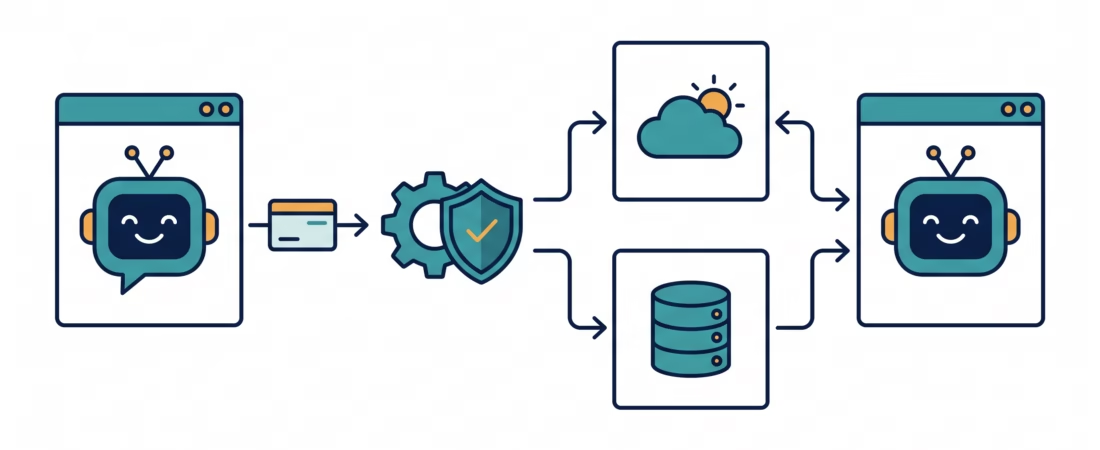
LLM tool calling lets a model ask your application to run a function, such as checking an order or looking up the weather. The model does not run that function by itself. Your code receives the request, checks it, decides whether it is allowed, performs the work, and sends the result back so the model can answer.
That distinction is the part beginners often miss. Tool calling is not a magic connection between a chatbot and your database. It is a control-flow loop that your application owns. Once you see that loop clearly, provider APIs, call IDs, parallel requests, and error handling make a lot more sense.
What LLM tool calling means
A tool is a capability your application makes available to a model. It might read a product catalogue, run a calculation, search a help centre, or create a support ticket. You describe the tool to the model, including its name and the arguments it expects.
When the model thinks a tool would help, it returns a structured request: “Call get_order_status with order ID 4812.” Your application then decides what to do with that request. The model suggests the operation; your program executes it.
Providers use slightly different names. OpenAI calls this function calling or tool calling. Anthropic uses tool use. The underlying pattern is similar, but request fields and response blocks differ. Google’s Gemini API also has function calling with declared functions and returned calls.
Tool calling is useful when a model needs current information or must ask your software to perform an action. For an ordinary answer based on the conversation alone, adding a tool can make the system harder to maintain for no gain.
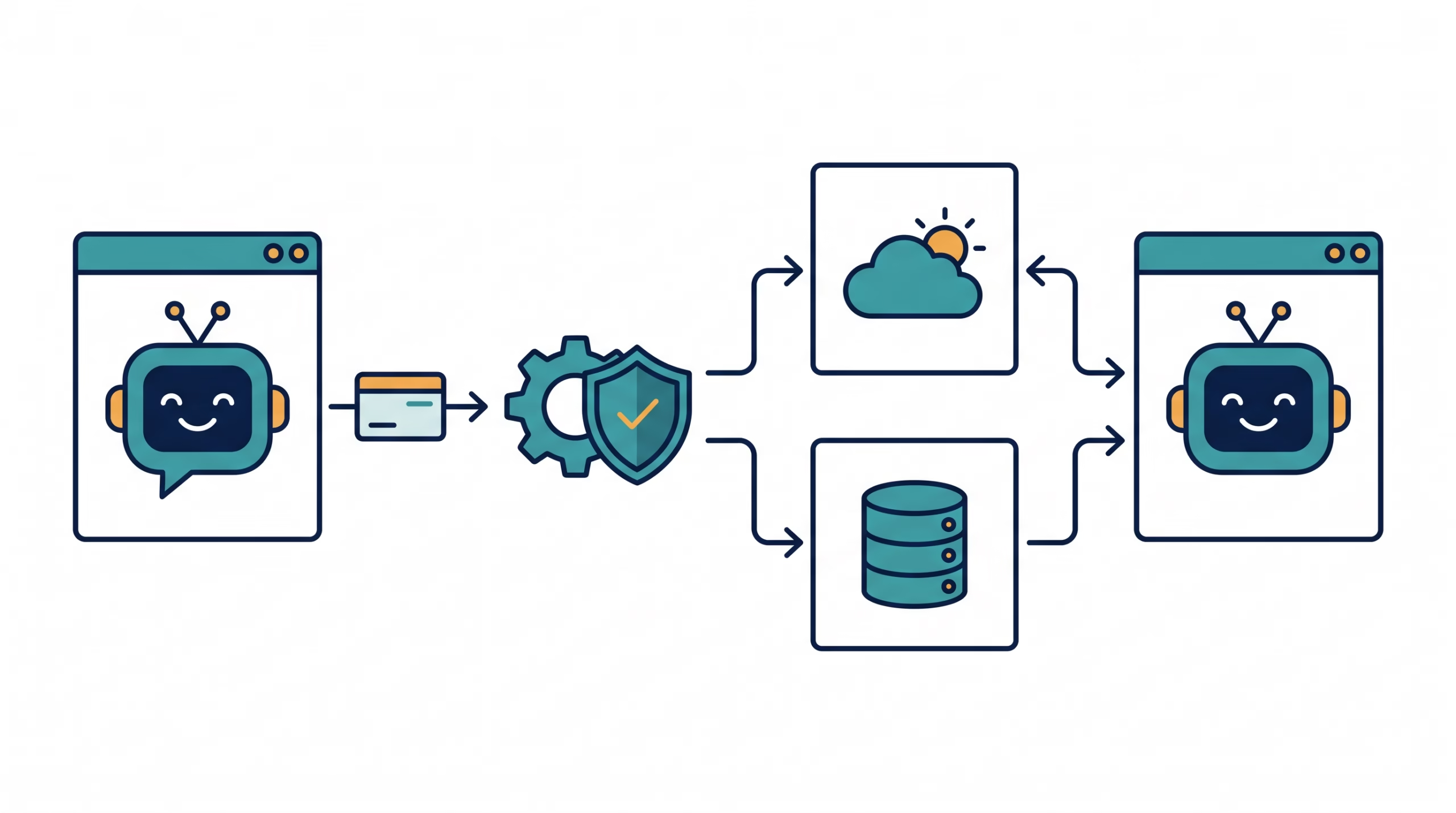
The LLM tool calling loop, step by step
Imagine a user asking, “Where is order 4812?” The model cannot know your private order database from its training. Your app can offer a read-only tool that looks up an order the signed-in customer is allowed to see.
- Send the request and tool definitions. Your app sends the message plus a description of available tools and their argument schemas.
- Receive the model’s response. It may contain normal text, a tool request, or a refusal or error state, depending on the API.
- Validate the requested call. Check that the tool exists, parse its arguments, verify the caller’s identity and permissions, and apply business rules.
- Run your own function. If permitted, application code performs the lookup or action. It should not blindly trust model-generated arguments.
- Return the result with the matching call ID. Add the tool result to the conversation in the format the provider expects.
- Ask the model to continue. It can turn the result into an answer or request another tool.
This can happen more than once. A travel assistant might check a flight, then look up the airport’s current weather. The second call may depend on the first result. Your application keeps control of each handoff.
A tool request is not an execution
A response that says “call send_refund” is a request from the model, not proof that a refund happened. Until your server runs the function, the action has not occurred. Likewise, a tool name and valid-looking JSON do not prove the user can access the requested account.
For a read-only lookup, your app can often check access and run the function immediately. For a payment, refund, account deletion, or message sent to another person, add a permission check and perhaps a confirmation step. Put that rule in application code, where you can test and audit it.
How to define a tool
A useful definition gives the model enough information to choose correctly, without handing it a menu of vague actions. A common definition has four parts:
- Name: a clear verb and object, such as
get_order_status. - Description: when to use it and what it returns. State limits, such as “Use only after the customer supplies an order number.”
- Parameter schema: types, required fields, allowed values, and short field descriptions.
- Implementation: ordinary code that validates the request and calls the relevant service.
A provider-neutral example might look like this:
Tool: get_order_status
Purpose: Look up one order belonging to the signed-in customer.
Arguments:
  order_id: string, required
Returns:
  status, last_updated, estimated_delivery (if available)
The schema helps the model produce arguments in the expected shape. It does not check whether the order belongs to the current user. Your implementation must use trusted session data for that check, not an account ID supplied by the model.
Keep tools narrow. A single manage_account function with an operation field for “view,” “edit,” “close,” and “transfer” is harder to reason about than separate tools with distinct permissions. Clear descriptions reduce wrong selections, but the server still needs to handle them safely.
Why tool-call IDs matter
Providers attach an identifier to each tool call. When your app sends back the result, it needs to refer to the same call. This matters when the model asks for two lookups in one response: the weather result must not be attached to the calendar call.
The exact field names vary. OpenAI examples use a call ID with the function-call output. Anthropic returns a tool_use block with an ID, then expects a matching tool_result. Keep the original assistant response and each result intact in conversation history. Don’t invent new IDs or reorder results in a way the API does not support.
If you’re new to the API layer, our LangChain fundamentals guide explains how an orchestration library sits on top of provider calls. Learn the provider’s own format too; it makes framework behavior easier to debug.
Sequential, repeated, and parallel tool calls
A simple interaction may need one tool. More involved tasks can need several:
- Sequential: call
find_customer, then use its result as input toget_recent_orders. - Repeated: check several order numbers, one after another.
- Parallel: fetch unrelated data at the same time, such as a forecast and a store’s opening hours.
Parallel work can reduce waiting when calls do not depend on one another. But it adds bookkeeping: collect each result, match it to its call ID, and decide what to do if only some calls succeed. If call B needs output from call A, keep them sequential.
Don’t assume that enabling multiple tools means the model will always use them as expected. Read the provider’s response and stop reason, handle each call, then continue with the returned results. Another response may contain more tool requests.
Handle bad arguments and tool failures
Model-generated arguments are untrusted input. Parse them as data, validate types and ranges, reject unexpected fields where possible, and handle missing values. A schema catches some shape errors, but it cannot express every business rule.
External services fail too. A database may time out; an order number may not exist; a permissions check may deny access. Return a concise tool result that says what happened. Then let your application decide whether to retry, stop, or give the model a safe error it can explain.
Be careful with retries for actions that change state. If a request times out after a refund was created, retrying without an idempotency check could issue a second refund. Read operations and write operations deserve different policies.
For a deeper look at how an agent runtime routes tool requests and holds execution boundaries, see how the OpenClaw agent loop works. The same ownership idea applies in a small app: the model proposes; the host program decides and runs.
Provider APIs or LangChain?
Using a provider SDK directly makes the round trip visible. You can inspect the model response, read call IDs, run your own dispatch logic, and return results in the provider’s expected format. That is a good way to learn and often works well when your app uses one provider.
LangChain can wrap tool definitions and execution in a shared interface, which helps when you compose prompts, models, and tools into a larger workflow. The trade-off is another layer to understand. If a result is missing or the wrong tool runs, inspect both the framework messages and the underlying provider response.
Choose based on the problem, not the size of the library. Start with the smallest route that exposes the behavior you need. Move to an orchestration framework when repeated patterns justify it; tool calling does not require an agent framework.
A practical checklist before you ship
- Can you explain which code executes the tool? It should be your application or a clearly identified provider-hosted tool.
- Does every tool have a distinct purpose and clear description?
- Do you validate arguments and enforce identity, permissions, and business rules outside the model?
- Do tool results map back to the right call IDs?
- Can the system handle malformed arguments, timeouts, denials, and partial success?
- Do state-changing actions need confirmation, deduplication, or an audit record?
If those answers are clear, you have the foundation of a tool-calling integration. If not, keep the first version read-only. A small tool that is easy to reason about beats a broad “do anything” function that is hard to secure.
Frequently asked questions
Does the LLM run the function?
Usually not. The model returns a structured request. Your application runs the function and sends its result back. Some providers offer hosted tools they execute, so check where each tool runs.
Is function calling the same as structured output?
No. Tool calling asks your software to perform a capability and return data. Structured output constrains the shape of a model response. Tool arguments may use a schema, but valid JSON does not prove an action is permitted or the values are correct.
Can one model response request several tools?
Some APIs support multiple calls in one response, including calls that can run in parallel. Your application must process each call and return each result in the required format. Support and controls differ by provider.
Should I use an agent framework for tool calling?
Not necessarily. A provider SDK is enough for a straightforward loop. A framework can help when you need reusable orchestration across models or tools, but it does not remove the need to validate arguments and enforce permissions.
Try one read-only tool first
Build a small example that looks up public weather for a city or searches your test catalogue. Log the model’s request, validate its arguments, run the function, return the result with the right call ID, and ask the model to explain it. Once that path works, add a second tool and test what happens when it fails.
That exercise will teach you more than starting with an assistant that can “do everything.” Keep the first tool narrow, and make the execution boundary visible in your code.