
The OpenClaw agent loop is where a message stops being “chat input” and becomes an owned AI agent run. That sounds small until you try to run agents on real channels: WhatsApp, Telegram, Slack, Discord, cron jobs, webhooks, browser tools, local files, and a model that may decide to call tools before it replies.
A toy agent loop is easy to describe: observe, think, act, observe again. Useful, but incomplete. OpenClaw has to answer the harder operational questions. Which session owns this message? Can two runs write to the same transcript at once? What happens if a tool is still running when a new message arrives? How does a caller know the final reply reached the source chat?
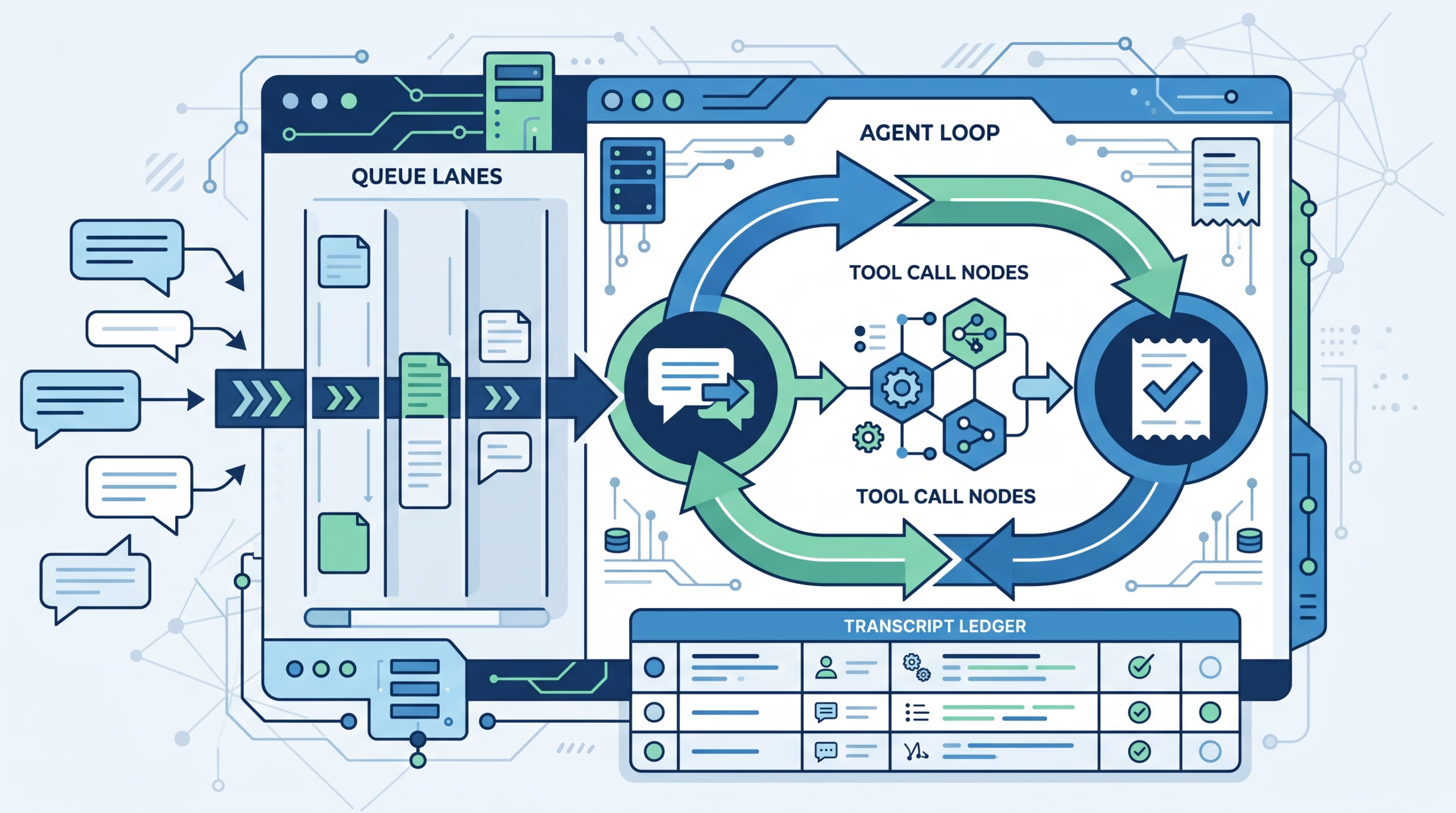
That is the better way to read the docs. The loop is not only about the model. It is the Gateway-owned run lifecycle around the model: intake, context assembly, model inference, tool execution, streaming, persistence, timeout handling, and delivery evidence.
What the OpenClaw agent loop actually does
OpenClaw defines the agent loop as a serialized, per-session run that turns a message into actions and a reply. The phrase “per-session” matters. OpenClaw routes incoming work into sessions based on where it came from: direct messages, group chats, cron jobs, webhooks, or UI conversations. The Gateway owns that session state, so a run does not float around as an isolated model request with no durable home.
The public entry points are simple:
agent, the Gateway RPC that accepts the run.agent.wait, the Gateway RPC that waits for the run to finish.openclaw agent, the CLI path into the same idea.
That simplicity hides a lot of machinery. A run has to resolve a session, prepare workspace and context, load skills, stream assistant and tool events, enforce timeout rules, write transcript data, and return a terminal result. OpenClaw also has to protect the transcript from stale writes if a newer run supersedes an older one.
That last bit is not glamorous. It is also exactly the kind of detail that separates a production agent host from a demo.
The run sequence, step by step
The docs describe the run as a chain. Here is the plain-English version.
Admission: agent returns a run id
When a client calls the agent RPC, the Gateway validates the request, resolves the target session, persists session metadata, and immediately returns a runId plus an acceptedAt timestamp.
That is an admission receipt, not the final answer. It means the Gateway has accepted responsibility for the run. The actual work continues after that point.
This design is useful for chat channels and control-plane clients because the caller does not need to hold a fragile blocking request while the agent thinks, calls tools, and streams output. It can keep a run id and ask about that run later.
Preparation: model, skills, workspace, and context
Next, OpenClaw runs the command path for the turn. It resolves model settings, thinking or trace defaults, and the current skills snapshot. Then it prepares the embedded agent run.
Before the model gets involved, OpenClaw has already done a lot of host work:
- Resolve or create the workspace.
- Apply sandbox workspace rules when needed.
- Load skills and inject them into the environment and prompt.
- Resolve bootstrap and context files.
- Prepare the transcript target.
- Record the writer claim for the active run.
This is where the host loop and the model loop split. The model may reason, call tools, and write a reply. The Gateway decides what the model sees, where the run writes, which session owns it, and how state is fenced.
Execution: model calls, tool calls, and streaming
Once the embedded run starts, OpenClaw subscribes to runtime events and bridges them into an agent stream. Tool events go to the tool stream. Assistant deltas go to the assistant stream. Lifecycle updates go to the lifecycle stream with phases such as start, finishing, end, and error.
This is more useful than a single final blob. Operators can see whether the agent is preparing context, calling tools, streaming text, finishing, or failing. Messaging channels can also shape output differently. Some channels receive block replies. Some support preview updates. The docs are blunt about one boundary: OpenClaw does not currently send true token-by-token deltas to ordinary chat messages. It streams through host-level events and channel-shaped previews or blocks.
Tool execution is part of the loop, but it is not allowed to run wild. Tool start, update, and end events are tracked. Tool results are sanitized before logging or emission. Messaging sends are tracked so a final answer does not duplicate a message already delivered through a tool.
Completion: persistence, receipt, and agent.wait
The agent.wait RPC waits for lifecycle end or error on a specific run id. Its response includes status, start and end timestamps, and an error when one exists. The wait result can also carry the run’s terminal reply and terminal receipt.
The receipt is worth pausing on. When sourceReplyDelivered is true, OpenClaw has evidence that the final reply reached the external source conversation. That is stronger than “the model wrote something” or “the dashboard displayed a mirror of the reply.” For routed agents, cron jobs, and app-to-agent announcements, that distinction prevents false confidence.
Why the OpenClaw agent loop is serialized per session
Agents create race conditions quickly. A person sends one message, then corrects it. A cron job fires while a direct message is active. A tool takes longer than expected. A model starts writing an answer while another runtime is trying to touch the same transcript.
OpenClaw handles this with lane-aware queueing. Runs are serialized by session key, and they may also pass through a global lane. In practical terms, one active run gets to own a session at a time. Other work waits, steers, collects, follows up, or interrupts depending on the configured queue mode.
The default queue behavior is steer. If a new prompt arrives while a session run is active, OpenClaw tries to inject it into the active runtime at a safe boundary. If steering is not available, it waits until the current run finishes and then starts the follow-up work. Other modes exist for different operator tastes:
followupqueues each incoming message for a later turn.collectcombines queued messages into one later turn when routing allows it.interruptaborts the active session run and starts the newest message.
This is more than rate-limit hygiene. It protects shared resources: transcript rows, CLI sessions, tool state, logs, and channel delivery state. If two agent runs can write to the same session at once, the first visible bug may look like a weird answer. The real bug is lost ownership.
The writer claim is the boring part that matters
Before streaming begins, an admitted run records an activeWriterRunId claim. Later transcript appends or rewrites provide an expectedWriterRunId. The synchronous commit checks that the expected id still matches the active claim.
That means a superseded run cannot commit stale transcript data after a newer run has taken over. This is the sort of feature most users never ask about, but they feel it when it is missing. Without a writer fence, agent systems get strange under pressure: duplicate tool summaries, old final answers, vanished user corrections, and transcripts that no longer match what the user saw.
OpenClaw’s approach is conservative. The Gateway owns the session. The SQLite writer queue orders per-agent mutations. A state-directory lock prevents another Gateway or local agent process from owning the same state directory at the same time. The model may be flexible, but the state path is not casual.
How OpenClaw compares with the generic ReAct loop
The classic ReAct pattern interleaves reasoning and acting. The model reasons about the task, chooses an action, observes the result, updates its plan, and keeps going. The 2022 ReAct paper showed why that matters: action lets the model gather ground truth from external sources, while reasoning helps it track plans and exceptions. In historical benchmark results, ReAct reported a 34 percentage point success-rate gain on ALFWorld and 10 percentage points on WebShop over imitation and reinforcement learning methods.
That research is still useful. It explains the model-side loop. But it does not answer the host-side questions OpenClaw has to answer every day.
A ReAct loop says: the agent should observe and act. An OpenClaw loop says: this specific session run has been accepted, queued, assigned a writer claim, given a context snapshot, streamed through typed events, bounded by timeout handling, persisted under a guarded transaction, and reported through a wait contract.
Both layers matter. Confusing them leads to bad designs. If you only design the model loop, you get an agent that can call tools but may corrupt state under concurrency. If you only design the host loop, you get a reliable shell around an unhelpful model. Production agents need both.
Where hooks, queues, and streaming fit
OpenClaw has hook systems around the loop. Internal hooks can react to command and lifecycle events such as command:new or agent:bootstrap. Plugin hooks can run inside the agent or Gateway pipeline, including before prompt build, before or after tool calls, before agent reply, and at agent end.
The useful distinction is scope. Internal hooks are good for Gateway-side automation such as adding bootstrap context, logging commands, or reacting to lifecycle events. Plugin hooks are better when you need to modify prompts, inspect tools, shape replies, or enforce policy inside the agent pipeline.
Queues decide when a run is allowed to execute. Hooks decide what extra logic runs around parts of the lifecycle. Streaming decides what observers and channels see while the run is in motion. They are separate surfaces, but they meet inside the same lifecycle.
That separation keeps OpenClaw understandable. A webhook may trigger work from outside. A queue may admit it later. A hook may adjust bootstrap context before prompt build. The model may call tools. The streaming layer may show progress. The wait call may return the final status and receipt. Each piece has a job.
When this design helps most
The OpenClaw agent loop matters most when the agent has moved beyond one browser tab. It helps when you have multiple sources, long-running tasks, attached tools, and real state.
For a personal agent, the loop protects continuity. Your DMs, cron runs, and tool outputs do not all become one uncontrolled pile of messages. They are routed through sessions and admitted as owned runs.
For a multi-channel setup, the loop protects delivery. A message that starts in iMessage or Slack needs to come back through the right path, with enough receipt data to know whether it reached the source.
For developer workflows, the loop protects state. Tool calls may inspect files, run commands, or write output. The transcript needs to match the actual run, and the active writer should be the only writer.
For cron and background work, the loop protects capacity. Scheduled jobs should not jam ordinary inbound replies forever, and ordinary replies should not trample a background run’s session state. OpenClaw’s queue lanes and background limits give those jobs boundaries.
What to watch when debugging an agent run
If an OpenClaw agent feels stuck, do not start by blaming the model. Look at the lifecycle.
- Was the run accepted, and do you have a
runId? - Is it waiting in a session lane or global lane?
- Did context preparation finish?
- Are tool events starting and ending?
- Did the run reach lifecycle
finishing,end, orerror? - Did
agent.waitreturn a terminal receipt? - Was the source reply delivered, or only mirrored somewhere else?
That checklist is more useful than “the agent is slow.” A slow model call, a blocked tool, a queued session, a failed delivery route, and a stale transcript writer are different problems. OpenClaw exposes enough lifecycle shape to tell them apart.
OpenClaw agent loop FAQ
Is the OpenClaw agent loop the same as ReAct?
No. ReAct is a model-side pattern for interleaving reasoning and action. The OpenClaw agent loop is the host-side lifecycle that admits a run, builds context, lets the model and tools work, streams events, persists results, and reports completion.
Why does OpenClaw serialize runs per session?
Because sessions have shared state. Two active runs writing to the same transcript or tool-backed session can create stale replies and corrupted history. Serialization gives one run ownership at a time.
What is agent.wait for?
agent.wait waits for a specific run id to reach lifecycle end or error. It returns status, timing, optional error data, and, when available, the terminal reply and receipt.
What does a terminal receipt prove?
A receipt can show whether the source reply was delivered to the external conversation. That matters when a dashboard or mirror view is not enough evidence that the user actually received the reply.
Do hooks replace the agent loop?
No. Hooks run around parts of the loop. They can adjust context, observe events, inspect tool calls, or shape replies depending on the hook type. The loop still owns the run from admission through completion.
Does OpenClaw stream token deltas to chat channels?
Not as ordinary channel messages today. OpenClaw has host-level assistant, tool, and lifecycle streams, plus channel-specific block or preview behavior. The docs distinguish that from true token-delta streaming to chat.
Bottom line
The OpenClaw agent loop is the operating contract around an AI agent run. It accepts work, assigns it to a session, builds the prompt and workspace, runs the model and tools, streams what is happening, fences transcript writes, handles timeout and completion, and reports whether the reply reached the source.
That is the right place to be strict. The model can be creative inside its turn. The host should be boring about state, queues, receipts, and writer ownership.
If you are self-hosting OpenClaw, read the agent-loop docs before you tune models or add tools. A better model helps. A cleaner run lifecycle keeps the whole agent from lying to itself about what happened.