
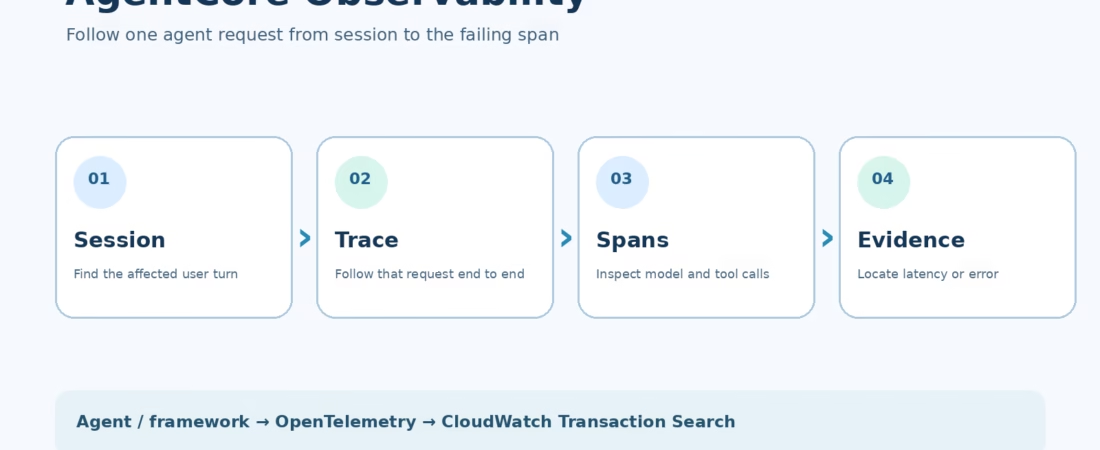
Amazon Bedrock AgentCore Observability is useful when an agent gives the wrong answer and the application log says only “request succeeded.” A successful HTTP response tells you little about which model call ran, which tool was selected, how long it waited, or whether an error was swallowed before the final reply. AWS’s AgentCore Observability walkthrough shows the CloudWatch views that can answer those questions. This guide turns that walkthrough into an operational setup: what to enable, what telemetry to expect, where to look first, and what the dashboards cannot prove.
My view: tracing belongs in the first working version of an agent. Adding it after a bad production answer means you have already lost the execution path you needed to inspect. But collecting every prompt and tool response without a data policy is not a win either.
What Amazon Bedrock AgentCore Observability actually measures
AgentCore Observability connects agent activity to Amazon CloudWatch. You can inspect service metrics, application logs, sessions, traces, and spans. The distinction matters. AgentCore Runtime publishes built-in operational metrics, while detailed spans for framework operations, model calls, and tools depend on supported instrumentation and the AWS Distro for OpenTelemetry (ADOT). The exact detail you see depends on your framework, deployment, tracing settings, and emitted telemetry. Do not assume that deploying an agent automatically gives you a perfect transcript of every internal decision.
The AWS article discusses agents on AgentCore Runtime and agents hosted elsewhere, including EC2, EKS, and Lambda. That is the useful architectural point: the monitoring destination can be consistent even when the hosting choice is not. An agent on Runtime has a shorter setup path; an external agent needs explicit instrumentation, export configuration, and the right AWS permissions.
This is different from our broader AgentCore overview, which explains the platform’s Runtime, tools, and pricing. Here the question is narrower: can you account for an agent’s behavior on a specific request?
Understand sessions, traces, and spans before opening the dashboard
A session is the interaction context across one or more turns. A trace records a request-response cycle. A span records one operation inside that cycle, such as a model call, retrieval step, or tool call. In practice, you start with a bad user turn, open its trace, and inspect the slow or failing span. AWS defines this hierarchy in its AgentCore telemetry guide.
Suppose a travel agent replies with a hotel that is unavailable. The session identifies the conversation, the trace identifies the offending turn, and the spans may show a search tool returning stale inventory before the model drafted the answer. That does not prove why the model believed the tool, but it gives the team a testable hypothesis. A log line that says “completed” would not.
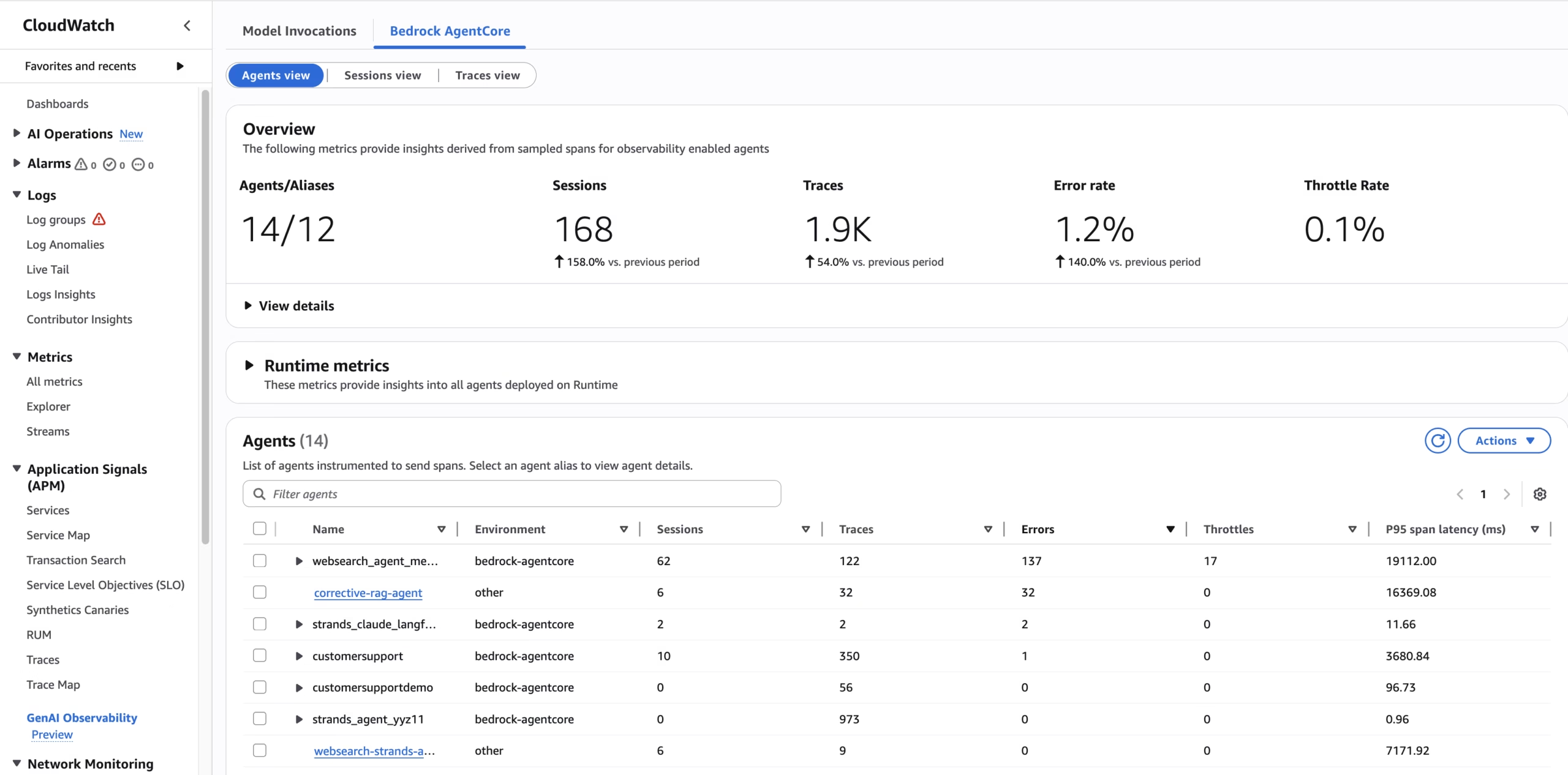
The overview screenshot is useful for triage, not diagnosis. A rising error rate tells you where to look. It does not tell you whether the fault is a model timeout, bad tool credentials, a throttled endpoint, or a handler exception. For that, open the agent, then the session and trace.
Set up a Runtime-hosted agent
Start with CloudWatch Transaction Search
AWS says you must enable CloudWatch Transaction Search to view AgentCore spans and traces. This is an account-level setup. The current getting-started guide says agentcore deploy can enable it during deployment; if you deploy another way, check the CloudWatch Transaction Search settings yourself. AWS’s console flow includes enabling OpenTelemetry span ingestion and selecting the percentage of traces to index. Wait for ingestion to show as enabled before treating an empty trace view as an application fault. AWS notes that spans may take about ten minutes to become searchable after initial enablement.
Deploy the agent, then check which telemetry is present
AgentCore Runtime creates a log group for runtime service logs. Its built-in metrics give you a baseline for invocation health. To get the full agent path, make sure your framework emits relevant OpenTelemetry signals and that the supported ADOT setup is active. Current AWS docs describe framework-specific instrumentation; Strands, LangChain, CrewAI, and custom applications do not all emit identical span detail. This is a place where the original AWS blog’s “automatic” wording needs careful reading. Automatic platform telemetry is not the same as guaranteed model and tool spans from arbitrary code.
For a Python agent that needs SDK-based instrumentation, AWS’s configuration guide shows this pattern. Pin and test a compatible ADOT release in your own dependency file; the version floor below is the one AWS currently documents for per-agent span destinations:
python -m pip install 'aws-opentelemetry-distro>=0.18.0' boto3
opentelemetry-instrument python my_agent.py
The command instruments the process; it does not magically make an uninstrumented custom tool describe its business logic. Add specific spans where the framework leaves important blind spots. Keep the span names stable so a comparison between releases means something.
Find the data in the right place
Open the AgentCore console’s Observability page or CloudWatch’s GenAI Observability page. AWS documents Overview, Sessions, Traces, and Spans views. Standard runtime output appears under a log group shaped like /aws/bedrock-agentcore/runtimes/<agent_id>-<endpoint_name>. Depending on your configuration and when the agent was created, spans may be in a spans stream in that agent’s log group or in the shared aws/spans group. See the viewing guide before assuming a missing stream means no traces were sent.
Instrument agents outside AgentCore Runtime
For agents on EC2, EKS, another hosting service, or another cloud, you need to build the telemetry path yourself. First, enable Transaction Search in the AWS account where you expect the traces. Next, make sure your framework emits OpenTelemetry GenAI spans, install ADOT or the AWS Lambda OpenTelemetry layer where appropriate, and configure its export destination and credentials. Finally, invoke a known test case and confirm it appears in CloudWatch. The AWS configuration guide has the current environment-variable and log-destination details; use it over copying the 2025 blog’s example variables into production unchanged.
Why the caution? A working exporter and a working framework instrumentor are separate pieces. If the exporter is healthy but the framework emits no model spans, you may see only process-level or service-level telemetry. If the framework emits spans but the destination policy is wrong, nothing useful reaches CloudWatch. For custom span destinations, AWS also documents a CloudWatch Logs resource policy permitting xray.amazonaws.com to write to the destination. An IAM role alone may not cover that delivery path.
Keep a small smoke test. Send one prompt that forces a known tool call. Record the session ID and approximate time, then verify a trace with a child span for the tool. Repeat after changing the framework package, ADOT version, or deployment image. This test is more valuable than a screenshot taken once during initial setup.
Debug one bad answer from the dashboard down
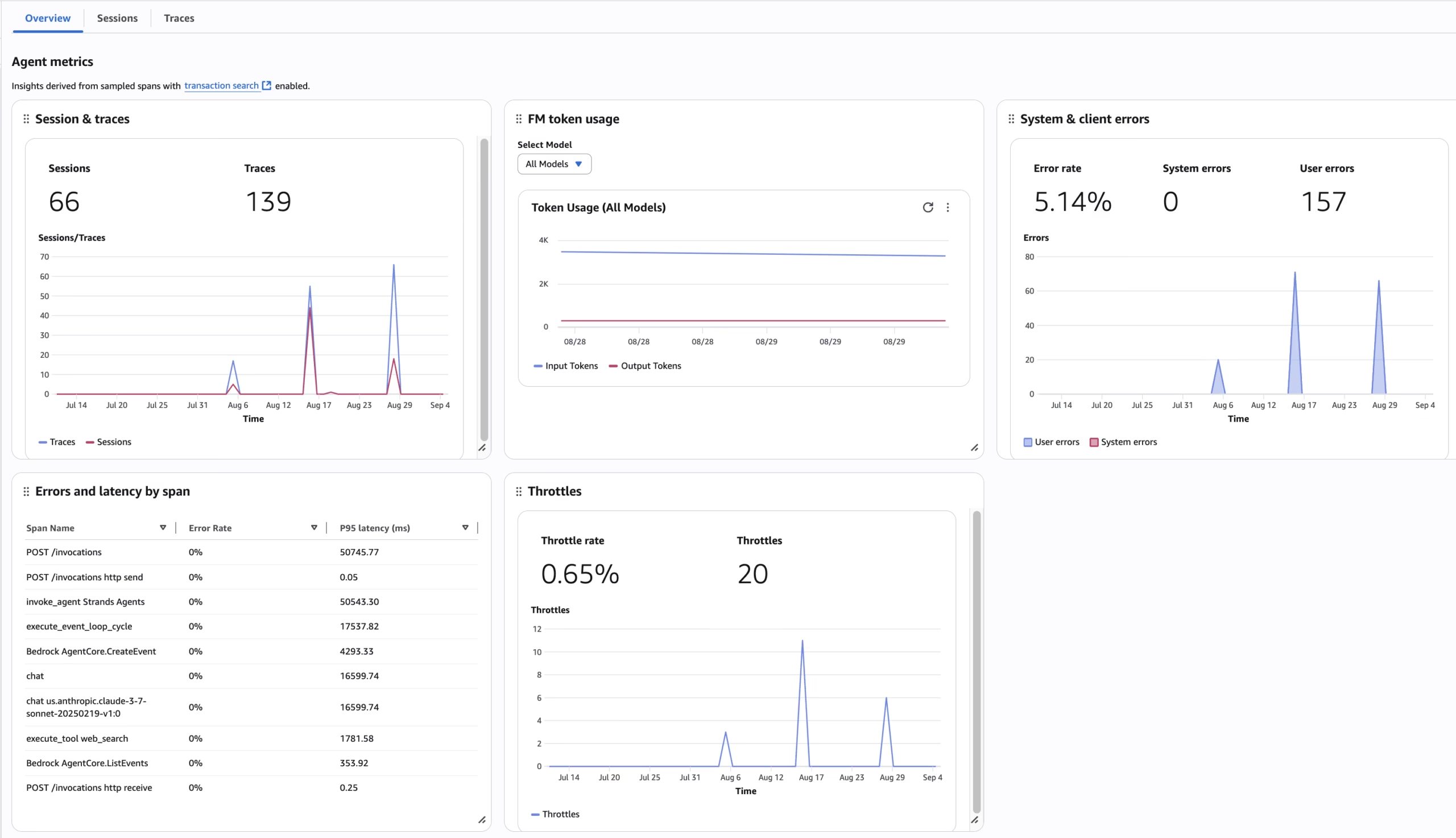
Start with the user-visible symptom. Was the answer wrong, late, missing, or returned with an application error? Choose the right time window and agent. In the agent view, inspect error and throttle trends alongside session and trace counts. Then open the affected session and trace rather than trying to infer an individual failure from an aggregate chart.
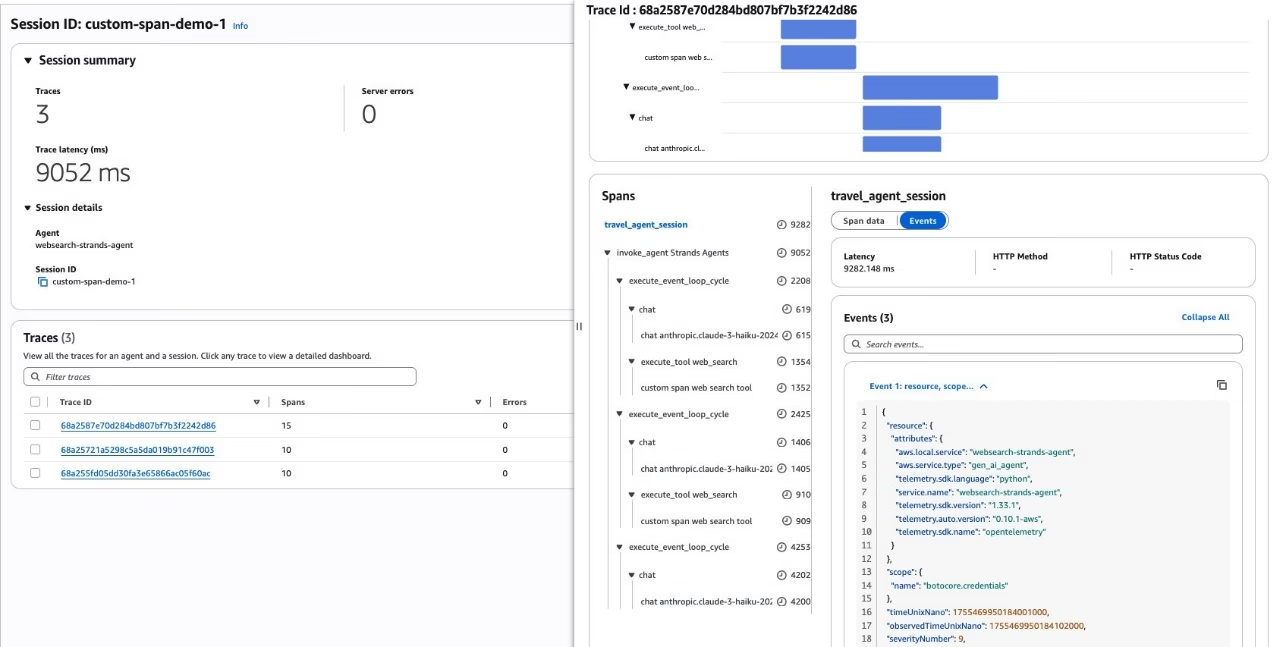
Read the trace in order. Find the first operation that departed from expectation. A slow model span calls for a different response than a failed tool span. A tool that returned success with bad data calls for a contract or freshness check, not a retry policy. If the trace ends before the user saw a reply, compare it with runtime logs and the application edge. Observability is most useful when it narrows the next test, not when someone merely says “the dashboard looks green.”
Correlate traces with release version, environment, and a non-sensitive use-case identifier. Stable custom attributes make it possible to compare a regression between two deployments. Avoid putting raw email addresses, customer IDs, prompt text, or secrets into these attributes. An identifier that lets your own system find the record, under the right access controls, is usually enough.
Privacy, cost, and alerts are part of the design
Traces can expose more than timing. Model input, tool arguments, and returned data may contain personal or business-sensitive information, depending on what your instrumentation captures. Decide which fields you actually need, redact or omit sensitive payloads, restrict access to CloudWatch data, and set a retention policy. The AWS article recommends filtering sensitive data. That advice should be applied before production traffic, not after the first incident.
There is also a cost trade-off. AWS says AgentCore Observability uses CloudWatch billing for telemetry ingestion, storage, queries, and related data processing; there is no universal per-agent bill. Check the AgentCore pricing page and CloudWatch pricing page for your Region. Estimate using actual span volume, log size, retention, query frequency, and indexing settings. Sampling can lower volume, but a sampled-out incident is harder to reconstruct. Keep enough detail on the paths where an incorrect action would matter most.
Set alerts for a few symptoms that have an owner and a response: sustained errors, unusual throttling, and latency that breaks your service target. Review traces after a framework upgrade even if alarms stay quiet. A new instrumentation version can change span names or attributes, and your dashboards may still load while telling a weaker story.
What observability cannot prove
A trace shows what the system recorded. It is not evidence that the final answer is factually correct, that a tool’s data source is current, or that an agent’s action met a policy. Those questions need tests, evaluation sets, human review for high-impact actions, and access controls. Observability helps you investigate and verify those controls in operation; it does not replace them.
The strongest production setup combines telemetry with a clear failure policy. If a payment tool fails, should the agent retry, stop, or ask a human? The trace can reveal what happened. Your application design decides what should happen next. That is the difference between a dashboard and a trustworthy workflow.
FAQ: AgentCore Observability
Do I need AgentCore Runtime to use AgentCore Observability?
No. AWS documents a path for agents hosted outside Runtime, but you need to configure instrumentation, telemetry export, destinations, and permissions yourself. The Runtime path has more platform setup handled for you.
Why can I see metrics but no traces?
Check whether CloudWatch Transaction Search is enabled and ready, whether tracing is enabled where your resource requires it, whether the framework emits spans, and whether ADOT and the span destination are configured. Also check the agent log group and shared aws/spans destination. Built-in metrics and detailed traces have different prerequisites.
Does automatic tracing record every tool and model call?
No blanket promise is safe. The detail depends on the agent framework, its instrumentor, the ADOT setup, and your own custom operations. Test one known model and tool path and inspect the resulting spans.
Is AgentCore Observability free?
AWS charges for the underlying CloudWatch telemetry and related usage. Consult AWS’s current pricing for the Region and usage pattern. Avoid treating a one-time demo with a handful of traces as a production cost estimate.
A practical first step
Pick one agent and one prompt that triggers a model call and a tool call. Enable Transaction Search, verify the telemetry path, run that prompt, and follow its session through the trace timeline. If you cannot explain the result from the recorded spans, fix the missing instrumentation before sending more production traffic. That is a much better starting point than building an elaborate dashboard around data you have not checked.
Image credit: the three CloudWatch screenshots above are from the AWS Machine Learning Blog article by AWS and its contributors. Reproduced here for commentary and explanation; AWS is not affiliated with this post.