

A model can call the right function and still produce a bad result if the tool itself is vague. Designing LLM tools means giving the model a small, clear menu: names that describe actions, inputs with precise meanings, and outputs that help it choose the next step. The application still owns validation and permissions. A JSON schema can catch a missing field; it cannot decide whether a user is allowed to refund an order.
This guide is for developers who already understand the basic tool-calling loop. If you need that first, start with our beginner’s guide to LLM tool calling. Here, we’ll focus on the interface the model sees and the code that must remain in charge.
Start with the job, not the function name
Before writing a schema, state what the tool does in one sentence. Then state what it does not do. That second sentence exposes muddled boundaries early.
For example, an order-support assistant might need to find an order, inspect its details, and request a refund. Those are three different jobs. A single manage_order function that searches, edits addresses, cancels, and refunds asks the model to infer too much from one name and a large bundle of optional fields.
Prefer a small set of clear operations such as find_orders, get_order, and request_refund. The names tell a developer what each function does. The descriptions can then explain when to call it and where its boundary sits. If two tools have the same practical job, merge them or explain the difference in terms the model can apply.
There is no magic ideal number of tools. Three useful, distinct tools can be easier to choose among than one overloaded tool. A catalog of dozens of near-duplicates can be hard to select from, so give the model only the tools relevant to the current task when your application can do that safely.
Use names and descriptions as part of the interface
A name like search_orders is better than order_helper, but the name is only a label. The description should answer four questions:
- What does this tool do?
- When should the model use it, and when should it choose a neighboring tool?
- What does each important input mean?
- Does it read data or change something, and what does it return?
For example: “Find orders for a customer using the exact customer ID returned by find_customer. Use this to locate matching orders, not to inspect line items. Reads data only; returns order IDs, dates, totals, and status.” That description makes the tool’s job and limits concrete.
Descriptions are not a place for marketing copy or internal jargon. “Intelligently manage customer commerce operations” sounds polished but tells the model almost nothing. Say what the operation does. If a field accepts an ISO date, say so. If omitting a filter means “include all statuses,” say that too.
Provider formats differ. OpenAI function tools commonly use a parameters JSON Schema, Anthropic’s Messages API uses input_schema, and MCP uses inputSchema. The exact envelope changes, but the design question is the same: can a caller tell what to send and what will happen?
Keep the input schema small and explicit
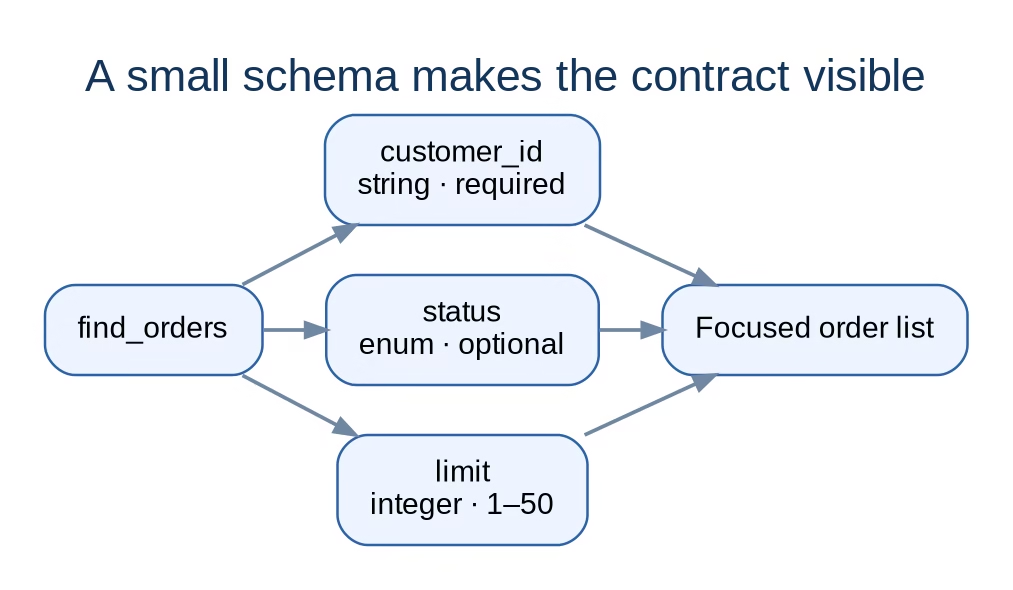
Every parameter is another decision the model must make. Include a field only if the operation needs it. Use types and constraints that match the real contract: strings for identifiers, integers for whole-number limits, enums for fixed choices, and required fields for information the function cannot operate without.
{
  "name": "find_orders",
  "description": "Find orders for a known customer. Reads data only. Returns order IDs, dates, totals, and statuses.",
  "input_schema": {
    "type": "object",
    "properties": {
      "customer_id": {
        "type": "string",
        "description": "Exact ID returned by find_customer; do not pass a name."
      },
      "status": {
        "type": "string",
        "enum": ["open", "paid", "cancelled"],
        "description": "Optional status filter; omit to include all statuses."
      },
      "limit": {
        "type": "integer",
        "minimum": 1,
        "maximum": 50,
        "description": "Maximum results to return."
      }
    },
    "required": ["customer_id"]
  }
}
This is a conceptual example using Anthropic-style field names; check the current documentation for the provider you use. In JSON Schema, listing a property does not automatically make it required. The required list does that. And not every provider supports every JSON Schema feature, so test the schema against the API rather than assuming full compatibility.
Defaults deserve special care. If the API treats an omitted limit as 20, make sure your implementation really applies 20. Do not rely on the model to remember an unwritten default. If a default changes the result in a meaningful way, make it visible in the description or require the field.
Separate tools that have different consequences
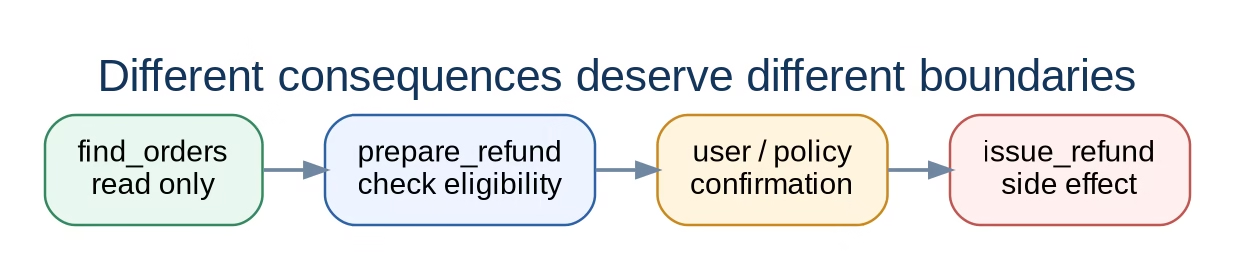
Tools should be separated when their intent, permissions, or side effects differ. Reading an invoice is not the same operation as issuing a refund. Searching for a calendar slot is not the same as booking it.
A useful pattern is to separate “look up” from “change.” One tool can prepare or validate an action, while a second commits it after the application checks the user’s authority and any required confirmation. This gives the model a clearer choice and gives the product a place to pause before a consequential action.
Do not split every tiny step into its own tool, though. If two operations share the same purpose, permissions, and failure handling, separate wrappers can add noise without improving safety. The question is not “Can I make another function?” It is “Does this boundary help the model choose correctly or help the application enforce a rule?”
Overlapping tools deserve a direct test. If the model could reasonably choose either one for the same user request, improve the descriptions, combine the tools, or make their use cases distinct. Avoid hiding the distinction in a long paragraph the model must parse on every call.
Validate every argument before execution

A valid schema only says that the argument has an acceptable shape. It does not prove the ID exists, that the user owns the account, or that a refund is allowed. Treat model-generated arguments like any other untrusted request sent to your backend.
A safe execution path checks, in order:
- Shape: parse the arguments and reject missing fields, wrong types, and unknown values.
- Meaning: confirm that referenced records exist and that amounts, dates, and states make sense.
- Authority: check the authenticated user’s permissions on the server. Never trust an account ID supplied by the model as proof of access.
- Impact: apply business rules, idempotency, rate limits, and any required human confirmation.
- Execution: call the narrowest backend operation needed and record the result.
Descriptions can tell the model that a refund requires an order ID. They cannot authorize a refund. Keep credentials and permission checks outside the prompt, where normal application code can enforce them.
Return results and errors the model can use
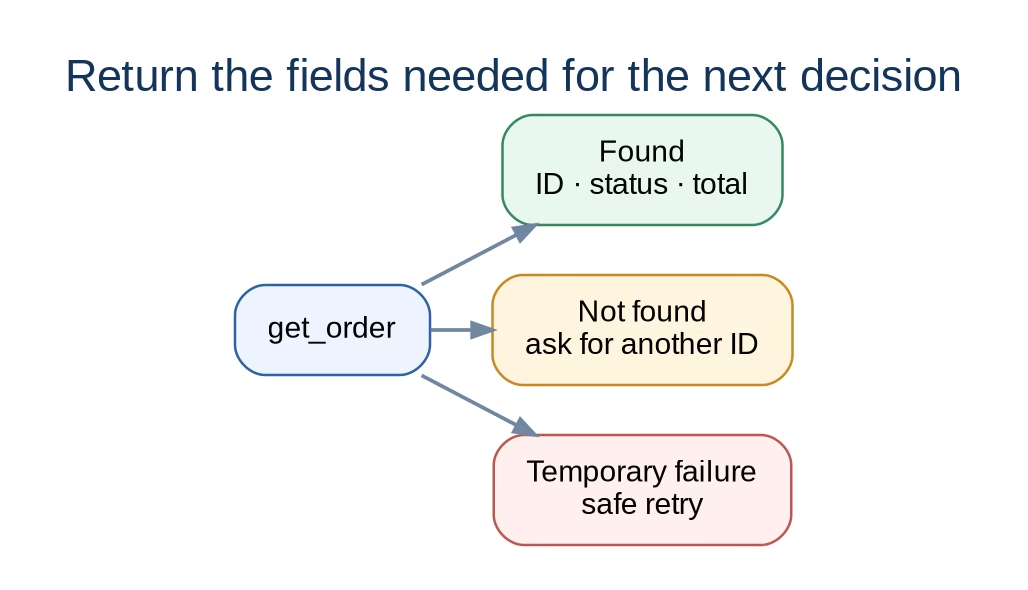
A tool result should answer the question that caused the call. Return stable identifiers and the fields needed for the next step, not a database dump. If the result can be large, support pagination or ask for a focused follow-up lookup.
Errors need the same care. “Failed” is not useful. A better result distinguishes a missing record from a permission problem, a temporary service error, or an invalid state. Give a short explanation and a safe next action where possible: ask the user for a missing order number, retry after a temporary outage, or stop when the current user lacks permission.
Keep sensitive data out of tool results unless the task needs it. The model can only make good decisions from the context it receives, but sending every field “just in case” increases exposure and makes the response harder to reason about.
Test the interface, not just the function
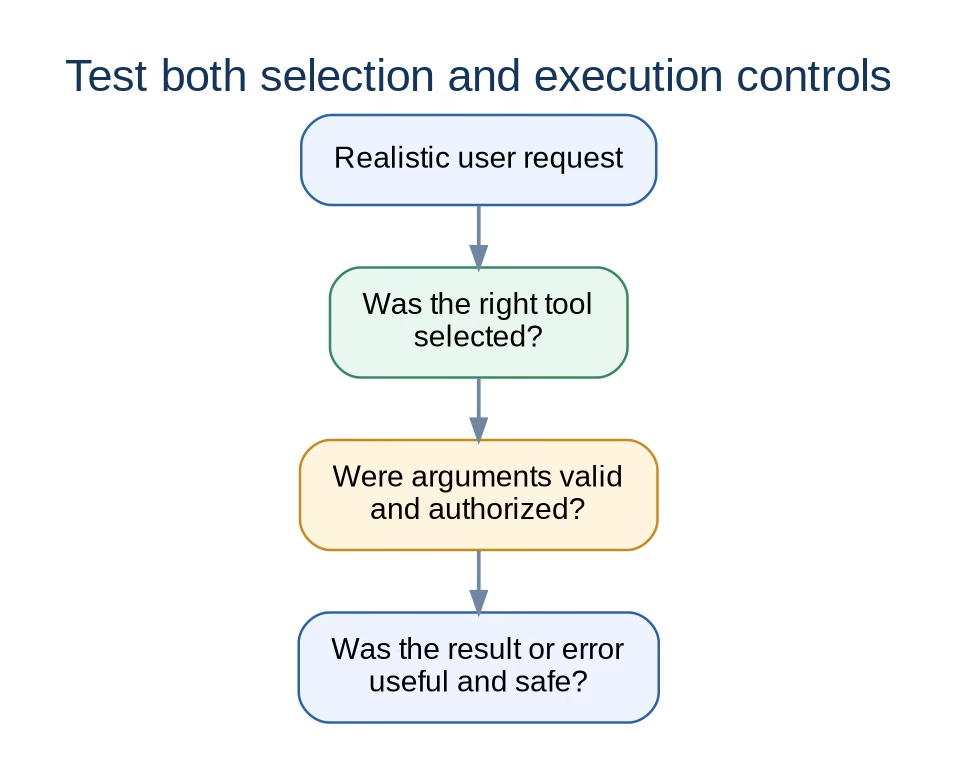
A unit test can show that find_orders returns data for a valid customer ID. It will not tell you whether the model knows when to call it. Test the interface with realistic user requests, including the awkward ones.
Include at least these cases in a small evaluation set:
- A clear request that should call the tool.
- A nearby request that should use a different tool.
- An underspecified request where the model should ask a follow-up question.
- A request that should not call any tool.
- Malformed or out-of-range arguments.
- A valid-looking request from a user who lacks permission.
- A timeout, empty result, or backend error.
Log which tool was selected, the validated argument shape, the result category, and whether the user had to correct anything. Avoid logging secrets or unnecessary personal data. When a test fails, first ask whether the tool boundary or description is ambiguous; do not immediately add more prose to the system prompt.
FAQ about designing LLM tools
Should every tool have one parameter?
No. Use the fewest fields that express the real operation. A lookup may need an ID plus an optional filter. A parameter that combines unrelated choices is often a sign that the tool is doing too much.
Can a JSON schema make a tool safe?
No. It can limit argument structure and supported values. Your application still has to check record ownership, permissions, business rules, and side effects before execution.
Should I include examples in the tool description?
Examples can help when field formats or distinctions are easy to misunderstand. Keep them short and representative. First make the description and schema clear; examples should clarify the contract, not compensate for a muddled one.
How many tools should I expose at once?
There is no universal count. Expose the smallest relevant set that can complete the current task. If the application has a large catalog, consider selecting or loading tools by task instead of giving every request every tool.
Build tools like APIs, keep execution under your control
A good tool is easy to describe, narrow enough to choose, and predictable when it succeeds or fails. Start with one job, give each input a precise meaning, make side effects visible, and test the model’s choices against real requests. Then enforce permissions and business rules in code before anything changes.
Try this on one tool in your own assistant: write a one-sentence boundary, tighten its description, remove one unnecessary argument, and add a test where the user should not be allowed to execute it. If the model and your backend both behave correctly, you have a better interface than another page of prompt instructions can provide.
Sources: AI Engineering Roadmap, M2.6; OpenAI function calling; Anthropic: Define tools; MCP Tools specification.