

LLM capabilities can look impressive in a demo: a model summarizes a report, extracts names from messy notes, or writes a first draft of code. The catch is that “can do it once” and “can do it reliably in your application” are different claims. Language models can also miss instructions, invent facts, mishandle arithmetic, or change their answer when the prompt changes. This guide explains what they tend to do well, where they fail, and how to test a model before you depend on it.
A useful starting point is to treat an LLM as a capable but fallible component, not as an oracle. For each task, ask: what counts as success, what does a mistake cost, and how often does this model succeed with the inputs we expect?
What LLMs are good at (and why the task still matters)

Language models are especially handy when the input and output are mostly language. They can summarize a long meeting transcript, rewrite a paragraph for a different audience, pull dates and names from unstructured notes, sort support messages into categories, translate a passage, brainstorm options, or draft code from a clear specification.
These tasks share a useful feature: a person can often describe the desired result and check it. A summary can be compared with the source. Extracted fields can be checked against the original text. A classification can be reviewed when the model is unsure. Generated code can be run against tests and inspected before use.
Models can also adapt to examples in the prompt. This is often called few-shot prompting: you show a few input-output examples, then provide a new input in the same pattern. It can help with a house style or a narrow label set, but it does not teach the model a permanent new skill. The examples, prompt, model, and task all affect the result.
Tool access changes what a system can do. A model connected to a search tool may retrieve current pages; one connected to a calculator can delegate arithmetic; one connected to a code runner can test a program. The tool must actually be enabled, and the model must call and use it correctly. A feature in a product description is not proof that your particular setup handles your own cases well. Check the exact model’s current documentation and run your own tests.
If you are new to the mechanics, see our guides to how LLMs learn and what a context window does. Both help explain why strong language performance is not the same as a verified answer.
Common LLM failure modes
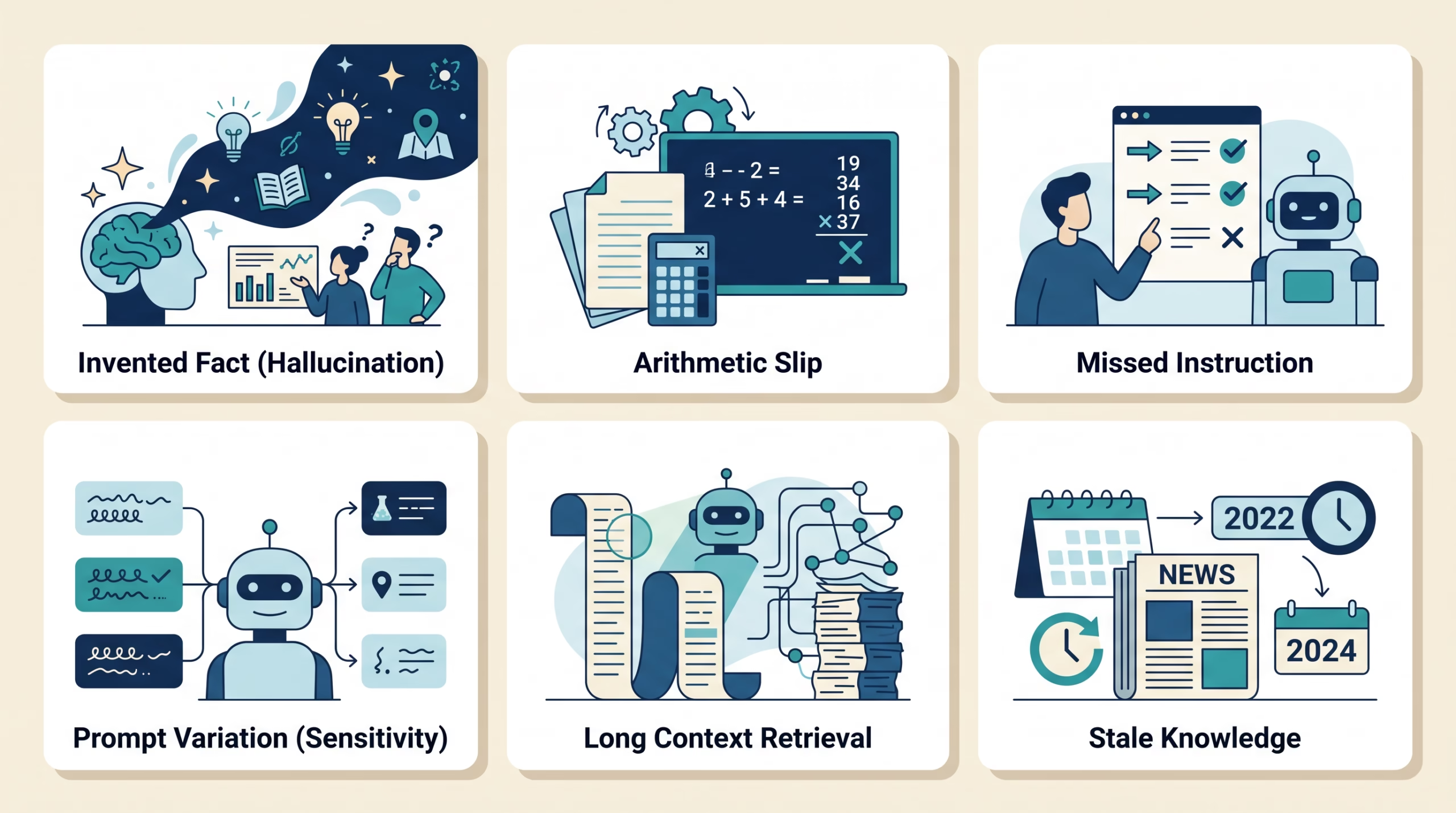
Hallucination is a confident-sounding answer that is false or unsupported. A model may invent a quotation, cite a paper that does not say what it claims, or fill a gap with a plausible detail. OpenAI describes hallucinations as plausible but false statements and notes that evaluations focused only on accuracy can reward guessing over admitting uncertainty. The key point is not that every answer is wrong; it is that fluent wording does not establish truth.
Arithmetic and multi-step reasoning errors can appear even when the explanation sounds orderly. A model may lose track of a quantity, apply a rule inconsistently, or make a small error that breaks a longer calculation. A calculator or executable check is a better final authority for exact arithmetic than a persuasive paragraph.
Instruction-following failures include skipping a requested field, ignoring a format, mixing up constraints, or answering a nearby question instead of the one asked. Long or conflicting prompts make this harder. If the output feeds another system, validate its structure and required fields instead of assuming the model followed every instruction.
Prompt sensitivity means that wording, order, examples, or formatting can change an answer even when the underlying request has not changed. A prompt that works in one demo may fail when a customer phrases the same request differently. Test paraphrases, misspellings, short inputs, and confusing examples.
Context failures happen when relevant information is missing, overlooked, or buried in a long input. A large context limit only describes how much text a model may accept; it does not promise that every detail will be used well. In the 2024 study Lost in the Middle, researchers found that tested models could perform worse when relevant information appeared in the middle of long contexts. That finding is bounded to the tested tasks and models, but it is a good reason to test retrieval from your own documents.
Stale knowledge and nondeterminism need separate treatment. A model may not know events after its training data, unless the system supplies a current source or tool. And repeated runs may vary, especially when generation settings allow variation. Lower randomness does not turn a model into a fact checker.
Why fluent answers can still be wrong

An LLM generates a likely continuation from the context it receives. It does not automatically compare every sentence with a trusted database of facts. This is why a made-up answer can read smoothly: the model is good at producing plausible language, even when the prompt lacks enough evidence to settle the question.
Confidence language is not a reliable error signal. A model may state a false answer plainly, hedge a correct one, or produce a citation-shaped string that points to nothing useful. Ask for sources when the task needs evidence, then open the sources and check that they support the relevant claim. A citation is a lead, not a receipt.
For a question with a definite answer, it helps to track three outcomes separately: correct answer, incorrect answer, and abstention or request for clarification. If the model guesses when it does not know, the accuracy number alone can hide the risk. In a low-stakes brainstorming task, a wrong suggestion may be cheap. In a medical, legal, financial, or safety workflow, a confident unsupported answer can be unacceptable. Human review and qualified professional judgment remain necessary for consequential decisions.
Tools can reduce some errors, but they introduce their own failure points. Search can retrieve a weak source; a calculator can be given the wrong expression; a code tool can run the wrong test. Check both the result and the process that produced it. NIST’s Generative AI Profile offers a broader framework for identifying and managing risks across the system, rather than treating the model response as the whole product.
How to test LLM capabilities for your task
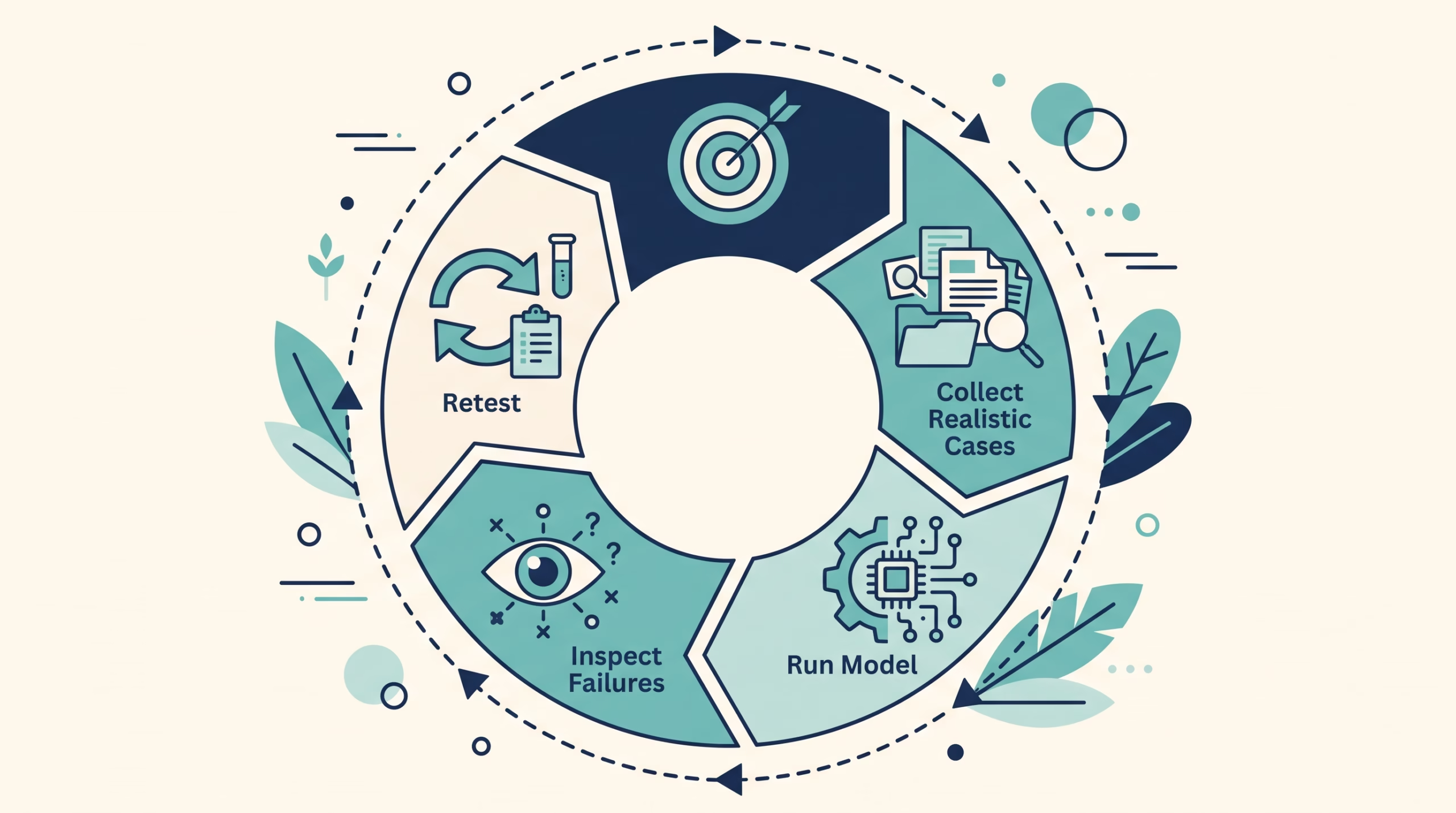
Start with the task, not a model leaderboard. Write down what a good answer must do and what a bad answer looks like. If you are extracting invoice dates, for example, define whether the result must match the source exactly, what to do when a date is absent, and how to represent ambiguous dates.
- Collect realistic examples. Use inputs that resemble the real workload, with permission and sensitive information removed where needed. Include ordinary cases and the awkward ones: missing details, conflicting instructions, unusual formatting, misleading text, and questions the system should not answer.
- Set a scoring rule before running the model. Use exact-match checks for fixed fields, code tests for executable output, and a clear rubric for subjective work. Decide which errors matter most. Do not change the pass rule after seeing the results just to make a model look better.
- Run the complete setup. Test the actual prompt, model version, retrieval system, tools, and output parser. If the deployed application adds context or post-processing, include those pieces. A bare model test may not predict the behavior of the finished system.
- Repeat and vary the inputs. Run cases more than once when output variation matters. Paraphrase prompts without changing their meaning. Record how often the model succeeds, which failure types recur, and whether it knows when to ask for clarification.
- Inspect failures and retest after changes. Keep examples of errors, fix the prompt or workflow, then rerun the same cases plus new examples. A change that fixes one test can break another, so retain a held-back set where possible.
A practical first exercise is the roadmap’s ten-question test. Write questions the model should know, questions it may not know, questions with misleading premises, and questions missing key information. For each one, note whether it answers, asks for clarification, or admits uncertainty. Then check every factual answer against a source you trust. The point is not to trap the model; it is to learn where your own workflow needs a check.
For a useful comparison, do not report only one average. Break results down by task type and error severity. Track correct answers, incorrect answers, abstentions, instruction failures, and any operational limits such as response time or cost. OpenAI’s evaluation guidance recommends testing defined tasks with representative examples. The numbers are only meaningful for the model version, prompt, tools, and data you tested.
Where safeguards belong
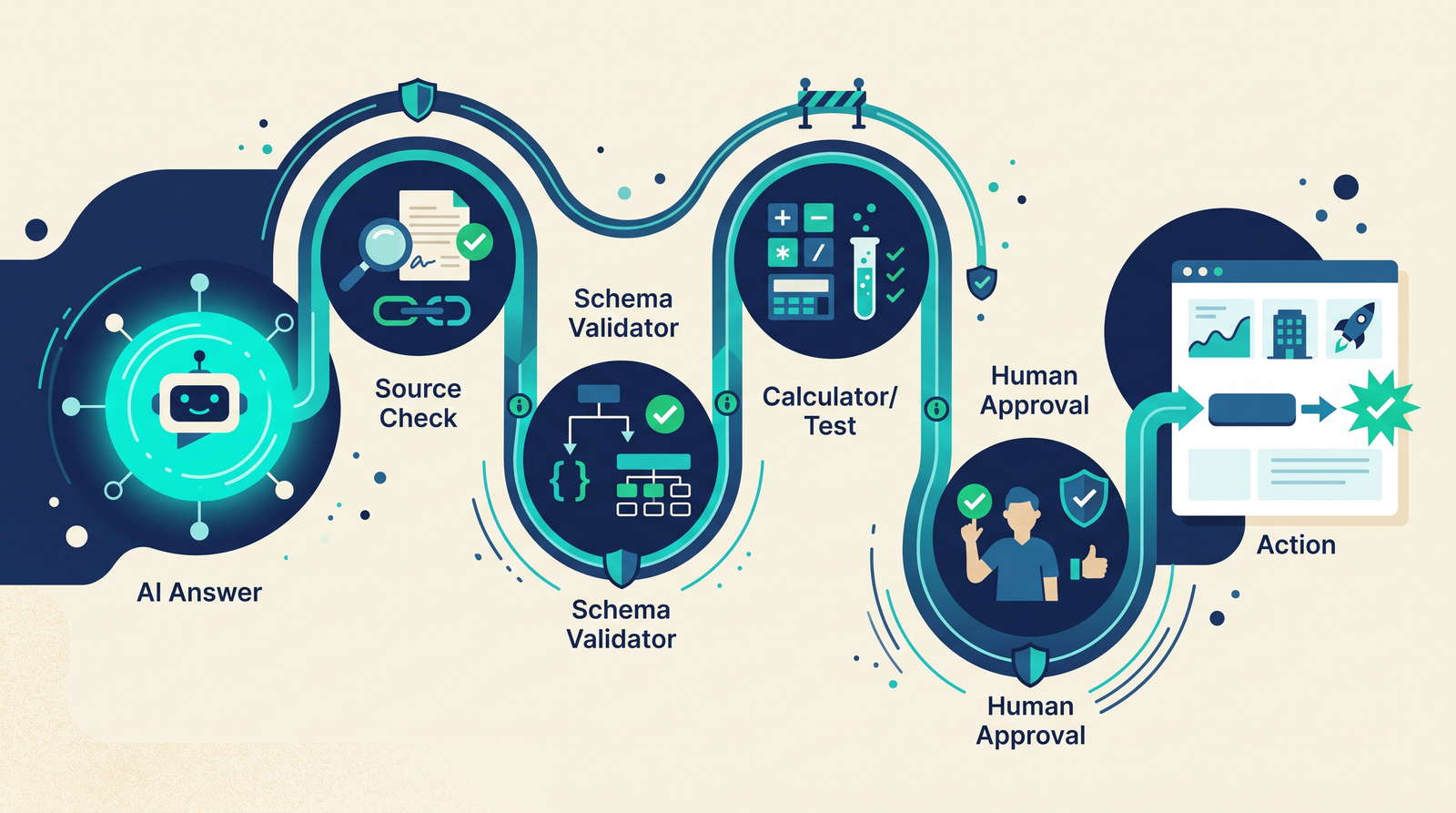
Match the safeguard to the failure. Use source links and human review for factual claims. Use schemas and validators for structured output. Use calculators or executable tests for exact math and code. Ask a clarifying question when required information is missing. Limit the model’s permissions when it can take actions, and require a person to approve high-impact steps.
These checks should be part of the design, not a disclaimer pasted below an answer. If a model drafts a customer response, a reviewer can approve it before it is sent. If it extracts fields into a database, validation can reject impossible values. If it summarizes a policy, the workflow can preserve links to the original passages so someone can check the summary.
Choose a model by measuring the work you need done. Ask “How reliably does this model handle our cases, including the edge cases?” That question is less exciting than “Can it do this?” It is also the one that prevents a clever demo from becoming a brittle product.
FAQs about LLM capabilities and limitations
Can an LLM understand what it is saying?
“Understand” can mean different things. A model can use context to produce useful summaries, classifications, explanations, and transformations. That does not mean it verifies each claim or has human experience. Define the task and test the behavior you need instead of relying on a broad label.
Why do LLMs make up facts?
They generate likely text from learned patterns and the prompt, rather than independently checking every claim against the world. If the prompt leaves a gap, a model may fill it with something plausible. Supplying trusted sources, asking it to say when evidence is missing, and checking the answer can reduce risk, but none guarantees perfection.
Does a bigger model always make fewer mistakes?
No. Model size by itself does not tell you how a specific system will perform on your task. Compare current model versions with the same examples, prompt, tools, and scoring rules. A smaller model may be enough for a narrow, checkable task; a larger one can still fail on your edge cases.
Can I trust a model if it gives citations?
Not without checking them. Confirm that each source exists, is relevant, and supports the sentence attached to it. If the answer affects an important decision, verify the claim from the original source or a qualified reviewer.
What should I test first?
Test the most common task, the most costly mistake, and cases where the right answer is “I don’t know” or “I need more information.” Include prompt variations and repeat runs if consistency matters. Keep the examples so you can rerun them when the model or prompt changes.
Try this before you rely on a model
Pick one real task and build a small set of examples: normal inputs, edge cases, missing information, and misleading premises. Define what counts as correct before asking a model. Run the test, check the outputs, and write down the failure you would least want to see in production. Then add a safeguard for that failure and run the test again.
The goal is not to prove that an LLM is smart or useless. It is to find the boundary of a particular system and decide what should happen when it reaches that boundary.