
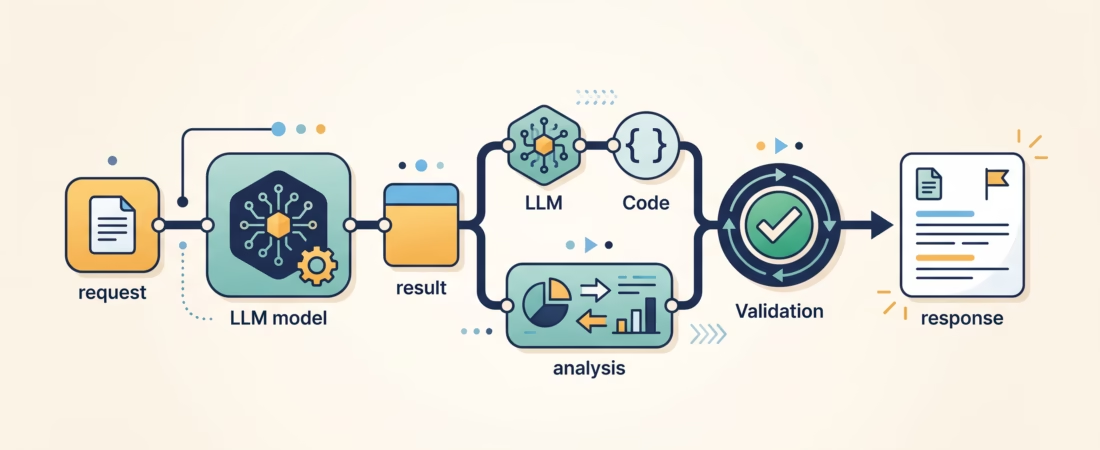
A single model call is easy to picture: send a prompt, receive an answer. Real applications often need more. They may classify a request, call a model for a structured result, check that result, run a tool, and then turn everything into a response. That is a multi-step LLM workflow: a program with several connected steps, with your code controlling what happens next.
The useful starting point is not an agent framework. It is a clear flow you can draw on paper and explain to another engineer. Once you know where decisions, data, and failure checks belong, you can decide whether a library makes the flow easier to maintain.
What multi-step LLM workflows are (and are not)
A workflow combines model calls with ordinary application logic. One step might ask a model to extract fields from an email. A Python function can validate those fields. Another model call can draft a reply using only the validated data. The steps pass information forward, and the application decides whether to continue, retry, branch, or stop.
That last part matters. The model produces an output; it does not automatically make the whole application safe or correct. Your code still owns permissions, input checks, external side effects, and the final decision about whether an output is usable.
Workflows are useful when you can describe the shape of the process ahead of time. A customer-support request might be classified, sent through a billing or technical path, checked against policy, and then answered. The specific text varies, but the program’s steps are known.
Do not mistake “multi-step” for “better.” Every extra model call adds latency, cost, and another place where the handoff can fail. If one well-scoped call answers the request reliably, adding a chain is busywork.
Five workflow patterns to learn
1. Sequential pipeline
In a sequential pipeline, each step uses the result of the step before it. For example: extract facts from a document, check that required facts are present, then write a summary from those facts.
This pattern fits tasks that have natural stages. It is also easy to debug because you can inspect each intermediate result. Give the steps meaningful names and log their inputs and outputs, while taking care not to log private data unnecessarily.
A sequential pipeline can include regular functions as well as model calls. Use code for deterministic operations such as trimming whitespace, checking a required field, or converting a date. Save the model call for work that needs language understanding or generation.
2. Routing
A router inspects an input and sends it to one of several specialized paths. A support assistant might send “Where is my order?” to order lookup, “I was charged twice” to billing, and “The app crashes” to technical support.
Routing avoids asking one giant prompt to handle unrelated cases. But a wrong route can send a request to the wrong instructions or tools. Keep the route choices small, make the labels distinct, and add a safe fallback for unclear requests. For high-impact actions, validate the route with ordinary rules or require human review.
3. Conditional branches
A branch decides whether a workflow continues, stops, or takes a different path. For instance, after extracting an invoice number, code can check whether it matches the expected format. If not, the application asks for clarification instead of calling the payment system.
Prefer deterministic conditions when you can express them clearly. “Does this value match the schema?” belongs in code. “Does this paragraph answer the customer’s question?” may need a model or a person, depending on the stakes.
4. Fan-out and fan-in
Fan-out sends independent subtasks to separate workers; fan-in collects their results. Imagine reviewing a policy draft for factual support, unclear wording, and missing sections. Those checks can run separately, then a final step can combine their findings.
The tasks need to be genuinely independent. If task B depends on task A’s result, they are not parallel. Parallel work can reduce wait time, but it also means more requests may run at once and results need a clear merge rule. Decide what to do if one worker fails or returns an empty answer.
Running the same task several times and comparing answers is another form of parallelization. It may help surface disagreement, but a majority vote is not proof that an answer is true. Use independent evidence or a defined evaluation rule when correctness matters.
5. Evaluator and revision loop
An evaluator loop creates an output, checks it against criteria, and asks for a revision if needed. This can help with work where the quality bar is explicit, such as checking that a generated report includes a set of required sections.
Loops need limits. Set a maximum number of revisions, define what counts as a pass, and decide what the application returns when the output still fails. Without those rules, a “keep improving” loop can waste requests without producing a more useful result.
When should you split a task?
Split a task when the stages are easier to state, verify, or improve separately. Extraction followed by validation is a good example: the first call identifies candidate fields, and code checks that the values meet your requirements before anything uses them.
Splitting can also help when different inputs need distinct instructions, or when independent checks should run side by side. A focused call often has a narrower job than one prompt that asks the model to research, reason, format, check policy, and produce final copy all at once.
Keep a task together when the substeps are tightly connected and the handoff would lose useful context. Do not add a “planner” model call just because a diagram looks more sophisticated with one. First compare a simple call against a small workflow using examples that resemble real traffic.
A practical rule: split only when you can name the benefit. That might be easier validation, clearer error handling, separate prompts for distinct request types, or independent work that can happen in parallel. If you cannot say what gets better, keep the simpler design.
Build the flow by hand before choosing a framework
Start by writing down the input, the state each step needs, and the output expected from each step. Then implement the control flow with ordinary functions. This makes it easier to see what a framework would need to abstract, and prevents framework terminology from hiding a basic logic problem.
Here is a deliberately small example. The steps stand in for provider-specific model calls, so this is a control-flow sketch rather than copy-paste SDK code:
def answer_request(message):
    category = classify(message)

    if category not in {"billing", "technical", "general"}:
        return ask_for_clarification()

    facts = gather_context(category, message)
    if not facts.valid:
        return explain_missing_information(facts)

    draft = write_reply(category, facts)
    if not meets_reply_rules(draft):
        return send_to_human_review(draft)

    return draft
There are three different kinds of work here. classify and write_reply may call an LLM. The checks on the category and the facts are application logic. The human-review path is a decision about authority, not a prompting trick.
For each step, define the input shape and the output shape. If a model returns structured data, parse it and validate it before passing it along. Valid JSON can still contain a wrong category or a made-up fact. If validation fails, return a useful error or ask for a correction; do not quietly treat malformed output as success.
When the hand-built version becomes hard to follow, a graph or composition framework can help represent state and transitions. LangGraph’s workflow guide demonstrates sequential, parallel, and routed patterns. If you are new to framework composition, our LangChain fundamentals guide covers prompts, models, parsers, and pipelines. For the mechanics of model-requested functions, see LLM tool calling explained.
Workflows vs. agents
A workflow has a process laid out in application code. The program determines the available steps and the rules for moving between them. An agent has more freedom to select tools or decide what step to take next while it works toward a goal.
The boundary is not always tidy, and teams use these words differently. What matters for design is who controls the next action. In a fixed support flow, your code may choose the next step after a classifier returns “billing.” In an agent loop, the model may choose among tools repeatedly based on earlier results.
Start with a workflow when the task has a known shape, you need predictable limits, or actions have real consequences. Consider an agent when the required steps are hard to predict and model-driven choices provide a real benefit. Even then, constrain available tools, set stopping rules, and check the results against the environment.
Anthropic’s guide to building effective agents makes a useful architectural point: use the simplest design that fits, and add complexity only when it earns its keep. The article’s product examples date from 2024, so treat its workflow patterns as the useful part rather than its older tooling suggestions.
Common failure points to plan for
- Unclear handoffs: a downstream step receives a long free-form response when it needs a few specific fields. Define an output schema and validate it.
- Hidden state: later steps depend on information that was never explicitly carried forward. Store the data your workflow needs in a clear state object.
- Wrong branches: a request gets routed to a mismatched path. Use distinct route labels, inspect uncertain cases, and add a fallback.
- Unbounded retries: a failed check triggers another model call forever. Set attempt limits and a clear failure outcome.
- Unsafe side effects: a model-generated value directly triggers a refund, deletion, or message. Validate permissions and arguments in application code, and add confirmation or human review where appropriate.
- Unclear success: the workflow ends when the model says “done,” rather than when the real task is complete. Define an outcome you can check, such as a saved record or an approved response.
Log step names, durations, validation outcomes, and error types so you can trace a run. Protect secrets and personal data in logs. Evaluate the workflow end to end on representative inputs; checking only one model response will miss failures caused by the handoffs between steps.
A short design checklist
- Can one model call solve the task well enough? If so, start there.
- For every extra step, can you explain its job and expected output?
- Which parts are deterministic code, and which need language judgment?
- What happens when output is missing, invalid, or uncertain?
- Could independent work run in parallel, and how will you combine partial results?
- Where can the workflow cause an external side effect, and what checks must run first?
- How will you tell whether the complete run succeeded?
Frequently asked questions
Is a chain the same thing as an agent?
No. A chain usually follows a sequence of steps chosen by the application. An agent can choose its next action dynamically. Some libraries combine both styles, so inspect the control flow rather than relying on the product label.
Do I need LangChain or LangGraph to build a workflow?
No. You can begin with regular functions and explicit branches. A framework may help when state, conditional edges, retries, persistence, or tracing become awkward to manage yourself. Learn the control flow first, then adopt the abstraction that solves a problem you actually have.
Should every stage use an LLM?
No. Use code for predictable checks and transformations. Use an LLM when the step needs interpretation or language generation. Mixing the two usually makes a workflow easier to inspect than asking a model to handle every detail in one prompt.
Does splitting a task always improve its answer?
No. Splitting can make subtasks clearer, but it adds handoffs, latency, and ways to fail. Test the complete workflow against a single-call baseline and keep the extra steps only when they improve a defined outcome.
Build one small workflow, then measure it
Pick a task you already understand, such as classifying a support message or extracting fields from a short document. Draw the steps, mark which ones need a model, and add one check before the result is used. Run a handful of real examples, inspect failures, and only then decide whether the flow needs routing, parallel work, or a framework.
That habit—make the control flow visible before making it clever—is the foundation for reliable LLM applications. Start with one small workflow today and write down what a successful run must prove.
Featured illustration created with AI.