
AWS MCP Server is now generally available, and the important part is not just MCP support. The bigger change is that AWS now offers a managed, authenticated path for AI coding agents to read current AWS documentation, call AWS APIs, run short sandboxed Python scripts, and leave an audit trail through IAM, CloudTrail, and CloudWatch. For engineering teams already experimenting with agents, this moves the conversation from “can the agent use AWS?” to “what should the agent be allowed to do?”
Why AWS MCP Server GA matters
AI coding agents are useful until they touch cloud infrastructure. Then the weak spots show up quickly.
An agent may know Terraform or CDK syntax, but it may not know the latest AWS service behavior. It may generate an IAM policy that works by granting too much. It may call the AWS CLI from a local shell where its actions look exactly like a human operator’s actions. That is fine for a demo. It is not fine for a production account.
AWS MCP Server, announced as generally available in the AWS News Blog, is AWS’s managed remote Model Context Protocol server for agents. It is part of the Agent Toolkit for AWS, which also includes curated Skills and plugins for common AI coding environments.
The practical promise is simple: keep the agent’s AWS access narrow, current, and observable.
What is the AWS MCP Server?
AWS MCP Server is a managed MCP endpoint that exposes AWS capabilities to AI agents through a small set of tools instead of asking every agent to discover thousands of AWS APIs on its own.
At a high level, it gives agents four useful capabilities:
- Search and read current AWS documentation.
- Call AWS APIs through authenticated IAM credentials.
- Run short Python scripts in a server-side sandbox.
- Use curated AWS Skills for workflows where agents often make mistakes.
AWS documentation retrieval does not require authentication. API calls, sandboxed scripts, and Skills use your existing IAM credentials. AWS says the server publishes CloudWatch metrics and that API calls are logged through CloudTrail, which matters when security teams ask who or what changed an environment.
The main tools engineers should understand
search_documentation and read_documentation
These tools let an agent retrieve current AWS documentation at query time. That sounds boring until you remember how often AI models are wrong about new services, renamed features, and changed limits.
For example, a model with a 2025 knowledge cutoff may not know enough about newer services such as Amazon S3 Vectors, Aurora DSQL, or Bedrock AgentCore. Documentation tools reduce that gap by letting the agent check AWS docs before it writes infrastructure code or makes a recommendation.
This is especially useful for data engineers working with fast-moving services such as S3, Glue, Redshift, Bedrock, and serverless analytics.
call_aws
The call_aws tool is the direct AWS API path. AWS says it can execute more than 15,000 AWS API operations using existing IAM credentials.
This is powerful, but it is also where teams need discipline. Do not treat call_aws as a magic “agent can do everything” button. Treat it like a privileged automation interface. The IAM principal used by the MCP server should have exactly the access required for the workflow, not the access a senior engineer happens to have in her local profile.
A safe rollout usually starts with read-only access. Let the agent inspect resources, explain dependencies, identify drift, and propose changes. Add mutating permissions only after you know which workflows are safe enough to automate.
run_script
The run_script tool may be the most interesting addition for real engineering work. It lets the agent write and run a short Python script server-side in a sandboxed environment. According to AWS, the sandbox inherits IAM permissions but has no network access.
That design solves a common problem with agents: repetitive API calls. Without a script tool, the agent may call one API, read the result, call another API, filter a response, ask for another page, and burn context on glue work. With run_script, it can batch the logic into one short script, process the result, and return a smaller answer.
For example, a data platform team could ask an agent to:
- list Redshift clusters and summarize encryption settings,
- find S3 buckets without required tags,
- compare Glue job failures across regions,
- check whether Lambda functions touching a data pipeline use expected runtime versions.
The important boundary is that the script runs in AWS’s sandboxed environment, not on the engineer’s laptop and not in a local shell with filesystem access.
AWS Skills
AWS is also moving from Agent SOPs to Skills. Skills are curated instructions and best practices maintained by AWS service teams. That is a good direction because agents usually fail in predictable places: IAM, networking, deployment order, service-specific limits, and production hardening.
A shorter tool list plus curated guidance is better than dumping every possible action into the model context and hoping the model chooses well.
Reference architecture for secure agent access
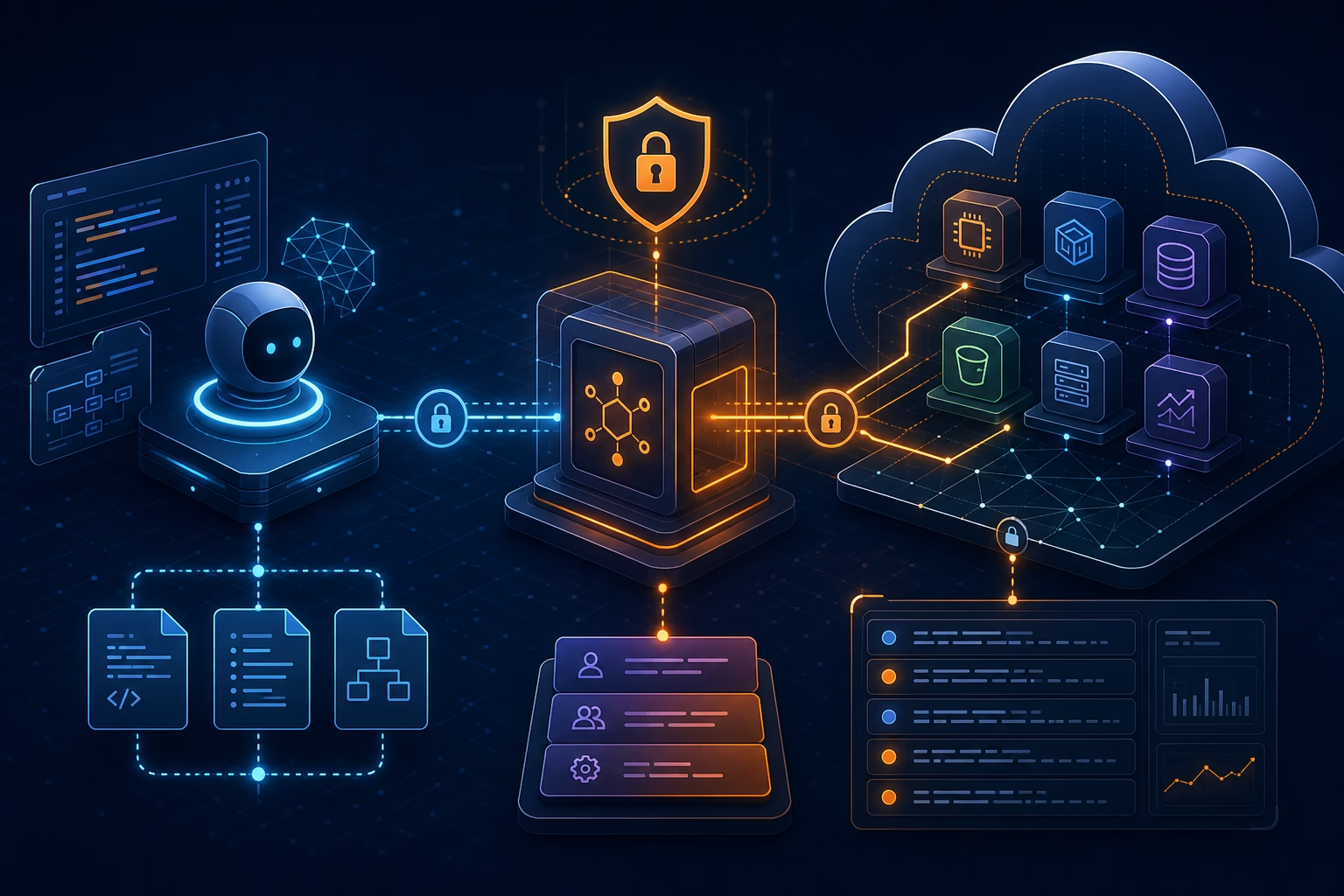
The clean pattern is to put the MCP server between the coding agent and AWS APIs, then make IAM and observability do real work.

In this model, the developer asks an agent to investigate or implement something. The agent calls AWS MCP Server tools. Documentation access can stay unauthenticated. API calls and scripts go through IAM. CloudTrail records API activity. CloudWatch metrics under the AWS-MCP namespace give teams a separate view of agent activity.
That separation is the part enterprise teams should care about. If agent actions and human actions are mixed together in local CLI usage, audit gets messy. If the agent has its own controlled path, security teams can monitor and restrict it.
IAM design: start with separation, not convenience
The wrong way to deploy AWS MCP Server is to point it at a broad administrator role because “the agent needs to be productive.” That is how demos become incidents.
A better approach is to create separate permission paths:
Read-only investigation role
Use this for discovery, troubleshooting, documentation-backed answers, and change planning. It can inspect resources, read configuration, list dependencies, and generate recommendations.
Good use cases:
- inventory AWS resources before a migration,
- explain why a pipeline failed,
- identify missing tags,
- compare deployed infrastructure against a standard.
Narrow mutating role
Use this only for workflows with a clear boundary. For example, an agent may be allowed to update a specific Lambda function alias, restart a Glue job, or create a pull request with CDK changes, but not delete production data stores.
Good use cases:
- safe remediation in non-production accounts,
- repeated operational tasks,
- constrained infrastructure changes reviewed through CI/CD.
Human-only role
Some actions should stay human-only: deleting data, changing organization policies, modifying production IAM trust relationships, disabling logging, or changing KMS key policies. Use IAM policies and Service Control Policies to enforce that separation.
What this means for data engineering teams
Data engineering is a strong fit for AWS MCP Server because cloud data platforms are full of repetitive inspection work.
A data engineer could ask an agent to check why a pipeline is slow. With current documentation access and read-only AWS APIs, the agent could inspect Glue jobs, Redshift workload settings, S3 object patterns, CloudWatch logs, and IAM permissions. It can then produce a grounded diagnosis instead of guessing from stale training data.
For teams using Bedrock, Redshift, S3, Glue, Step Functions, and Lambda together, this is useful. The agent can follow the dependency chain across services. The key is to let it observe broadly before letting it change narrowly.
If you are working on AWS data architecture, these related posts are worth reading next:
- AWS Bedrock Security: 8 Real Attack Paths and How to Block Them
- Amazon S3 Files: What Data Engineers Actually Need to Know
- Redshift Materialized Views: How They Work, Why They’re Fast, and When to Use Them
Security checklist before using AWS MCP Server
Use this checklist before connecting an agent to real AWS accounts.
1. Create a dedicated IAM path for agent access
Do not reuse a human administrator profile. Give the agent a separate role or permission boundary so activity is easier to restrict and audit.
2. Start with read-only permissions
Read-only access is enough for documentation lookup, environment inspection, cost review, architecture explanation, and many troubleshooting tasks.
3. Add mutating permissions per workflow
Do not grant broad write access. Add specific actions for specific accounts, regions, resources, and tags.
4. Use SCPs for non-negotiable boundaries
Service Control Policies can block dangerous actions even if a lower-level IAM policy is accidentally too broad.
5. Monitor CloudTrail and CloudWatch
CloudTrail gives the API event record. CloudWatch metrics under AWS-MCP help separate agent activity from direct human activity.
6. Keep destructive actions behind human approval
Agents can draft changes, explain risk, and generate pull requests. Production deletion, security policy changes, and data access expansion should require explicit human approval.
Where AWS MCP Server fits with existing tools
AWS MCP Server does not replace CDK, CloudFormation, Terraform, CI/CD, or human review. It gives agents a safer and more current way to work with those systems.
A practical workflow looks like this:
- Agent reads current AWS docs.
- Agent inspects the account through read-only APIs.
- Agent proposes infrastructure changes in CDK, CloudFormation, or Terraform.
- CI/CD validates the change.
- A human reviews the pull request.
- Approved automation deploys the change.
That flow keeps the agent useful without turning it into an unreviewed production operator.
FAQ
What is AWS MCP Server?
AWS MCP Server is a managed remote Model Context Protocol server from AWS. It lets AI agents access current AWS documentation, call AWS APIs through IAM, run sandboxed Python scripts, and use curated AWS Skills.
Is AWS MCP Server generally available?
Yes. AWS announced AWS MCP Server general availability in the AWS News Blog. The GA release includes IAM context key support, unauthenticated documentation retrieval, lower token usage, the run_script tool, and AWS Skills.
Does AWS MCP Server need AWS credentials?
Documentation search and reading do not require authentication. AWS API calls, sandboxed scripts, and Skills use your existing IAM credentials.
Is AWS MCP Server safe for production accounts?
It can be used safely only with proper IAM design, SCP guardrails, CloudTrail monitoring, CloudWatch metrics, and human approval for risky actions. Start with read-only access before granting write permissions.
What is the difference between call_aws and run_script?
call_aws executes AWS API operations directly. run_script lets the agent run a short Python script in a server-side sandbox so it can combine multiple AWS API calls and process results in one round-trip.
Which AI tools can use AWS MCP Server?
AWS says it can work with MCP-compatible agents and mentions tools such as Claude Code, Kiro, Cursor, and Codex. The exact setup depends on the client’s MCP support and AWS authentication configuration.
Final take
AWS MCP Server GA is a serious step toward production-grade AI agents on AWS. The value is not that an agent can call AWS APIs. Agents could already do that badly through local shells. The value is that AWS is giving teams a controlled interface with current docs, IAM-based access, sandboxed execution, CloudTrail records, and CloudWatch visibility.
For most teams, the right first use case is not autonomous deployment. It is read-only investigation: let the agent inspect AWS, read the latest docs, explain what it sees, and draft safe changes. Once that is reliable, give it narrow write access one workflow at a time.
Sources
- AWS News Blog: The AWS MCP Server is now generally available — https://aws.amazon.com/blogs/aws/the-aws-mcp-server-is-now-generally-available/
- AWS Documentation: AWS MCP Server — https://docs.aws.amazon.com/agent-toolkit/latest/userguide/mcp-server.html
- AWS Product Page: Agent Toolkit for AWS — https://aws.amazon.com/products/developer-tools/agent-toolkit-for-aws/
════════════════════════════════════════════════