
S3 Files for Lambda lets an AWS Lambda function mount an Amazon S3 bucket as a local file system and use normal file operations such as open(), read_text(), and write_text() instead of downloading objects into /tmp, processing them, and uploading results back to S3. For serverless data pipelines and AI agent workflows, the important change is that multiple Lambda functions can now share a persistent workspace backed by S3.
The old Lambda /tmp pattern was always a tax
If a Lambda function needed to process a file in S3, the usual flow was painfully familiar:
- Receive an S3 event or object key.
- Download the object with the AWS SDK.
- Store it in
/tmp. - Process the file.
- Upload the output back to S3.
- Clean up local storage before the next invocation fills it.
That pattern works. It is also noisy. The business logic gets surrounded by transfer code, path cleanup, object key handling, retry logic, and temporary storage limits.
It becomes worse when several functions need the same working set. Each function downloads its own copy. Each function manages its own /tmp. If the workload touches a repository, a model artifact, a set of Parquet files, or a large reference dataset, the plumbing starts to dominate the implementation.
Libraries such as s3fs and smart_open reduce some of the pain, but they still abstract S3 API calls. S3 Files changes the interface itself: the bucket can be mounted and used like a file system.
What S3 Files changes for Lambda
AWS now says Lambda functions can mount Amazon S3 buckets as file systems with S3 Files. The Lambda function reads and writes through a local mount path, while S3 Files handles the connection back to S3.
That means Lambda code can look more like ordinary file-processing code:
from pathlib import Path

WORKSPACE = Path("/mnt/workspace")

def lambda_handler(event, context):
    source = WORKSPACE / "source" / "pipeline.py"
    output = WORKSPACE / "reports" / "review.json"

    content = source.read_text()
    result = analyze(content)
    output.write_text(result)
No download_file() call. No manual upload step. No local cleanup just to avoid filling /tmp.
The useful mental model is this: S3 remains the durable storage layer, but Lambda can work with files and directories through a mounted path.
Why this matters for AI agents
AI agents are file-hungry. A code review agent wants to inspect a repository. A data quality agent wants to read schemas, sample files, dbt models, and pipeline logs. A remediation agent may need to write findings, patches, or structured JSON output for another step.
Without a shared workspace, every agent function needs a way to fetch inputs and pass outputs to the next function. That usually means object keys, payload limits, repeated downloads, or a separate coordination store.
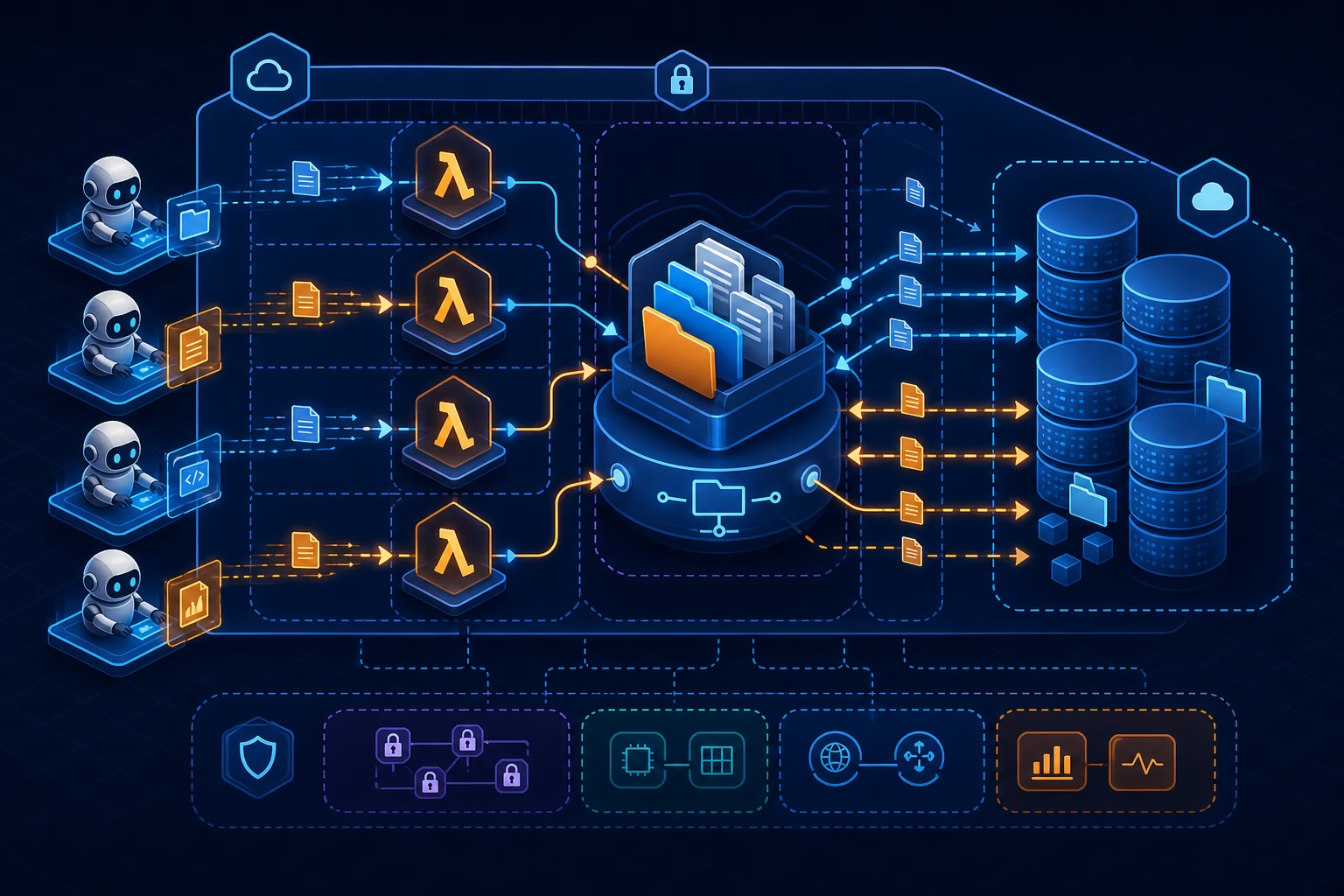
With S3 Files, an orchestrator Lambda can stage a workspace once, then multiple agent Lambdas can mount the same file system and read or write files in parallel. This is a better fit for agentic workflows because most agent tools already think in terms of files.
Reference architecture: Lambda agents on S3 Files
A practical architecture has four pieces:
- a durable orchestrator Lambda that starts and checkpoints the workflow,
- an S3 Files file system mounted into each worker Lambda,
- multiple agent Lambdas that read and write files in the shared workspace,
- Amazon Bedrock or another model provider for the agent reasoning step.

The orchestrator might clone a repository, copy reference files, or stage a data sample under /mnt/workspace. Worker agents then run in parallel. One checks security issues. Another checks style or maintainability. A third checks infrastructure configuration. Each agent writes its result back to the same mounted workspace, and those outputs sync back to S3.
This is not limited to code review. The same pattern works for serverless ETL staging, document processing, ML inference pipelines, report generation, and data quality checks.
Required AWS resources
S3 Files for Lambda is not just a checkbox on a function. You need the supporting storage and network pieces.
For a Lambda setup, AWS documentation calls out these requirements:
- an S3 Files file system,
- mount targets in the same account and Region as the function,
- an access point,
- a Lambda function in the same VPC as the mount target,
- subnets aligned with Availability Zones that have mount targets,
- security groups that allow NFS traffic on port 2049,
- Lambda execution role permissions for S3 Files access.
If you create the file system through the S3 console, AWS can create mount targets and a default access point for you. In production, I would still capture the setup in CloudFormation, SAM, CDK, or Terraform because the network and permission details are exactly the kind of thing teams forget after a manual console experiment.
IAM permissions to check
The Lambda execution role needs S3 Files permissions to mount and write to the file system.
At minimum, check these actions:
s3files:ClientMountfor mounting the file system,s3files:ClientWritefor read-write access,- VPC permissions required by Lambda when it attaches to VPC resources,
s3:GetObjectands3:GetObjectVersionwhen the function reads directly from S3 for throughput optimization.
AWS also provides the managed policy AmazonS3FilesClientReadWriteAccess, but production teams should still review the exact resource scope. Managed policies are convenient for getting started. Least privilege is still the target.
One implementation detail is easy to miss: S3 Files is built on Amazon EFS. In infrastructure templates, you may see EFS-related service principals and NFS networking behavior. Do not let the S3 branding hide the fact that the mount path behaves like a network file system.
VPC trade-off: worth it, but not free
S3 Files for Lambda requires the function to run in the same VPC as the mount target. That is the biggest trade-off for serverless teams that normally prefer Lambda outside a VPC.
The VPC requirement means you must manage subnets, security groups, routing, and possibly NAT if the function needs outbound internet access. The good news is that VPC-attached Lambda is much better than it used to be, but the operational surface is still larger than a plain event-driven Lambda function.
Use S3 Files when the file-system interface is worth that cost. If a function only reads one small object and writes one result, the old SDK path may be simpler. If a workflow needs a shared working directory across steps, S3 Files starts to make sense.
Good use cases for data engineering teams
Serverless ETL staging
A pipeline can stage raw input, intermediate results, validation reports, and final output in a mounted workspace. This makes multi-step transformations easier to reason about, especially when each step is a separate Lambda function.
Repository or project analysis
Agents can inspect a whole repository without passing thousands of file paths through function payloads. One agent can write a security report while another writes maintainability findings.
Shared reference data
A Lambda function can mount a workspace containing lookup tables, rules, prompts, schemas, or model-side metadata. This is useful when several functions need the same reference files.
AI agent memory and handoffs
Agents can write structured outputs for downstream agents: JSON findings, markdown notes, patches, or task state. The file system becomes the handoff layer.
ML inference support files
Some inference workloads need tokenizers, labels, configuration files, or large reference assets. S3 Files can make those assets available through paths instead of repeated object downloads.
Where S3 Files is not the right answer
Do not add S3 Files just because it is new.
For simple object processing, direct S3 SDK calls are still clean and cheap. For extremely latency-sensitive systems, test the mount behavior under real concurrency. For heavy shared mutable state, be careful with file locking, consistency expectations, and write conflicts. For workflows that already run well on ECS, EKS, or EC2, Lambda plus S3 Files may not be the simplest runtime.
The best fit is a file-oriented workflow that wants serverless execution and persistent shared storage without building its own synchronization layer.
S3 Files vs /tmp vs EFS
Lambda /tmp
Use /tmp for scratch data that belongs to one invocation and can disappear. It is simple and local, but it is not a shared workspace.
Amazon EFS
Use EFS when you want a traditional shared file system and do not need S3 to remain the central durable object store for the data.
S3 Files
Use S3 Files when your durable data belongs in S3, but your compute wants file-system semantics. This is the interesting middle ground: S3 economics and durability with a file interface for compute.
Practical rollout checklist
Before using S3 Files with production Lambda functions, check these items:
- Confirm S3 Files and Lambda support in the target Region.
- Create mount targets in the required Availability Zones.
- Put Lambda functions in subnets that can reach those mount targets.
- Allow NFS traffic on port 2049 between Lambda security groups and mount targets.
- Scope
s3files:ClientMountands3files:ClientWritecarefully. - Decide whether each function needs read-only or read-write access.
- Monitor file system storage, performance, client connections, and sync errors in CloudWatch.
- Test concurrent writes and failure recovery before trusting multi-agent workflows.
- Keep destructive agent actions behind human approval.
- Document the mount path contract, such as
/mnt/workspace/input,/mnt/workspace/output, and/mnt/workspace/state.
How this connects to Ruby’s earlier S3 Files post
In the earlier post, we looked at S3 Files from a data engineering perspective: why a bucket-as-file-system changes the way teams think about S3, EFS, ML pipelines, and analytics workloads.
Lambda support makes that story more practical for serverless teams. Instead of only thinking about EC2, containers, or training clusters, you can now design small event-driven functions that share a real workspace.
Related reading:
- Amazon S3 Files: What Data Engineers Actually Need to Know
- AWS MCP Server GA: secure AI agents for AWS teams
- AWS Bedrock Security: 8 Real Attack Paths and How to Block Them
FAQ
What is S3 Files for Lambda?
S3 Files for Lambda lets a Lambda function mount an Amazon S3 bucket as a file system and access objects through a local mount path using standard file operations.
Does S3 Files replace Lambda /tmp storage?
No. /tmp is still useful for temporary scratch data inside one invocation. S3 Files is better when functions need persistent storage, shared files, or a workspace that syncs back to S3.
Does S3 Files for Lambda require a VPC?
Yes. The Lambda function must be in the same VPC as the S3 Files mount target, and the subnets must match Availability Zones where mount targets are available.
What port does S3 Files use with Lambda?
The security groups must allow NFS traffic on port 2049 between the Lambda function and the mount targets.
Can multiple Lambda functions share the same S3 Files workspace?
Yes. Multiple Lambda functions can mount the same S3 Files file system and share data through a common workspace, as long as networking, access points, and permissions are configured correctly.
Is S3 Files good for AI agents?
Yes, when agents need to read and write many files across workflow steps. A shared mounted workspace is a natural fit for code review agents, data quality agents, document processing agents, and serverless orchestration patterns.
Is S3 Files cheaper than EFS?
It depends on the workload. S3 Files uses S3 as the durable storage layer and is built using EFS technology for file system access. Compare S3, S3 Files, EFS, Lambda, data transfer, and VPC/NAT costs for the actual access pattern.
Final take
S3 Files for Lambda is not just a nicer way to read objects. It gives serverless functions a shared, persistent workspace while keeping S3 as the durable data layer.
For data teams, that opens up cleaner designs for file-heavy Lambda workflows: ETL staging, repository analysis, AI agent handoffs, validation reports, and ML support files. The trade-off is real: VPC setup, mount targets, IAM, security groups, and sync behavior all need attention.
My default recommendation is simple: keep direct S3 SDK calls for small one-object functions. Use S3 Files when the workflow naturally thinks in directories, shared state, or many files. That is where the feature earns its complexity.
Sources
- AWS What’s New: Lambda functions can now mount Amazon S3 buckets as file systems with S3 Files — https://aws.amazon.com/about-aws/whats-new/2026/04/aws-lambda-amazon-s3/
- AWS Lambda Developer Guide: Configuring Amazon S3 Files access — https://docs.aws.amazon.com/lambda/latest/dg/configuration-filesystem-s3files.html
- Amazon S3 User Guide: Mounting S3 file systems on AWS Lambda functions — https://docs.aws.amazon.com/AmazonS3/latest/userguide/s3-files-mounting-lambda.html
- AWS News Blog: Launching S3 Files, making S3 buckets accessible as file systems — https://aws.amazon.com/blogs/aws/launching-s3-files-making-s3-buckets-accessible-as-file-systems/
- DEV Community article that inspired the agent example — https://dev.to/aws/lambda-just-got-a-file-system-i-put-ai-agents-on-it-1ej8
════════════════════════════════════════════════