
OpenClaw cron job payloads answer the question that matters most after you pick a schedule: what exactly should run when the clock fires?
That sounds simple until the job is real. A morning brief might need a model-backed agent turn. A health probe might only need a shell command. A reminder might belong in the main session as a system event. A compact monitor might be better as a headless script that returns a short notification and some saved state.
The mistake is treating all of those as the same thing with different flags. They are not. In OpenClaw, the schedule says when the job wakes up. Delivery says where the result goes. The payload decides what runs, which authority it carries, what context it can see, and what kind of failure the operator will need to debug later.
Payloads are not schedules
A schedule is timing. It can be a one-shot timestamp, a fixed interval, a cron expression, an on-exit trigger, or a stream source. The schedule is allowed to be boring. “Run this every weekday at 7 AM” is only half the design.
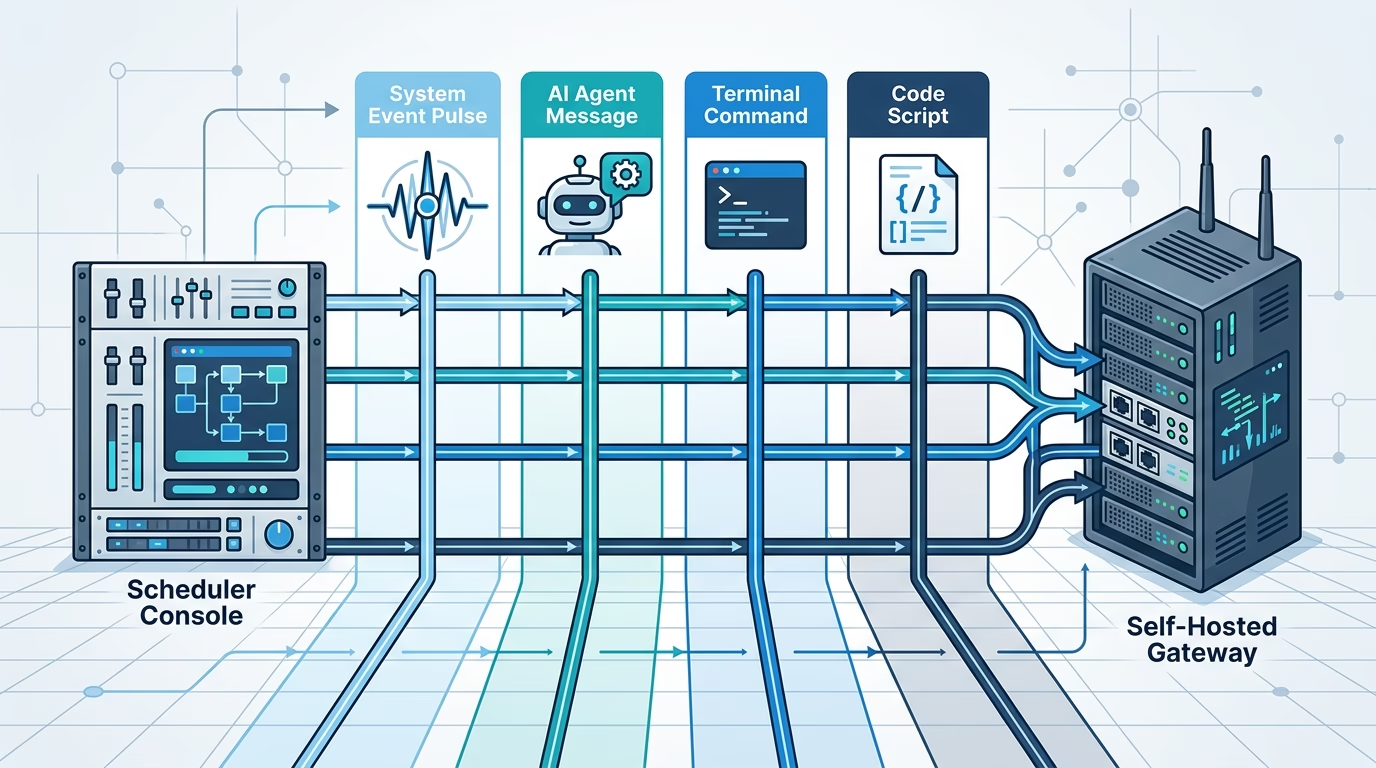
The payload is the work. OpenClaw’s automation docs define four payload kinds: system event, agent message, command, and script. Every job carries exactly one of them. That one choice changes the execution path.
This split is good engineering. It keeps you from making a model call when all you wanted was a queue depth probe. It also keeps you from hiding a risky host command inside a prompt and hoping the agent does the same thing every time.
Think of the job definition as three separate choices:
- Schedule: when the job fires.
- Payload: what executes.
- Delivery: where the final result, if any, goes.
If you keep those separate, the design becomes easier to review. You can ask a clean question at each layer instead of staring at one long command and guessing what it will do.
The four OpenClaw cron job payloads
OpenClaw gives you four payload kinds because scheduled automation is not one job shape. Some work should wake an agent. Some should only enqueue a reminder. Some should run a deterministic process. Some should call tools from a headless code runner.
System event
A system event uses --system-event <text>. It is enqueued into the main session and does not make a model call by itself.
This is the right shape for lightweight reminders and main-session nudges. For example, a heartbeat-enabled agent might need a note added to its normal flow: “Next heartbeat: check the calendar.” That does not need a fresh isolated run. It needs a durable event in the main session.
The catch is context. A main-session automation event is self-contained. It does not automatically include every scratch note or implied heartbeat instruction you wish it had. If the reminder should consult something, say that in the event text.
Agent message
An agent message uses --message <text>. This is a model-backed agent turn. It is the payload people usually imagine when they hear “scheduled AI agent.”
Use it when the job needs judgment: summarize updates, inspect a queue, compare changes, produce a report, triage messages, or decide whether anything needs action. Because it is a real agent turn, it can use model settings, fallback choices, thinking level, context style, and a tool policy.
The prompt has to stand on its own. An unattended scheduled turn should return the deliverable, not an acknowledgement. There is no human sitting there to answer a clarifying question at 7 AM.
Command
A command payload uses --command <shell> or --command-argv <json>. It runs a shell or process on the Gateway host and does not call the model.
This is the boring option, which is sometimes exactly what you want. If the job is “run this probe and report the output,” a command is cleaner than asking an agent to run a shell command through a tool. The scheduler captures stdout and stderr, records history, applies timeouts, and feeds the output into the selected delivery mode.
There is a sharp authority line here. Command payloads are an operator-admin Gateway automation surface. The docs are clear that creating, updating, removing, or manually running automation jobs requires operator.admin. This is not the same thing as an agent visible exec tool call.
Script
A script payload uses --script <file|->. It runs headlessly in the same code-mode executor used by trigger scripts, using the owning agent’s tools. It does not start a conversational agent turn.
Script payloads are useful when the job is more than one command but still does not need a model conversation. A script can return notify, request a wake, persist JSON state, or suggest a paced nextCheck when pacing is enabled.
That power deserves caution. A script payload can run unattended with the owning agent’s tool policy. If that policy includes file, network, or execution tools, the script has real reach. Keep scripts small, review them like automation code, and avoid mixing monitoring with mutation unless the whole point of the job is to act.
Agent-turn payloads: model, thinking, tools, and context
Agent-message payloads have extra controls because they run a model-backed turn. Those controls are not cosmetic. They decide cost, fallback behavior, tool reach, and how much workspace context the run receives.
The main options are:
--modelpins the job’s primary model, and an unresolved or disallowed model fails with a validation error.--fallbackssets the per-job fallback list. Passing an empty string makes the run strict.--thinkingsets the thinking level when the selected model and runtime support it.--light-contextskips workspace bootstrap file injection.--toolsrestricts which tools the scheduled turn may use.
The tool setting is the one to read twice. New jobs that can run tools store an explicit tool policy. Agent-created jobs are capped to the tools available to the creating turn, and the agent cannot widen that saved list later. Operator-created jobs without --tools store an unrestricted * policy.
That difference matters. A daily report created by an agent inside a limited conversation should not quietly gain extra reach. An operator-created job may need broader access, but then the operator owns that choice. The policy is part of the payload design, not an afterthought.
Model choice deserves the same practical treatment. Use the default model when the work is subtle. Use a lighter model for routine summaries, checks, and classification. Add fallbacks when reliability matters more than strict provider control. Use strict fallbacks when the wrong model would be worse than a skipped run.
Command payloads: deterministic host work
Command payloads are best when the work is deterministic. A shell script can check disk space, query a service, count rows, run a backup verification, or call a local reporting script. The scheduler does not need to ask a model to interpret the task before the task even starts.
A typical command job looks like this:
openclaw automations create "*/15 * * * *" \
  --name "Queue depth probe" \
  --command "scripts/check-queue.sh" \
  --command-cwd "/srv/app" \
  --announce \
  --channel telegram \
  --to "-1001234567890"
There are two command styles. --command <shell> stores an argv equivalent to ["sh", "-lc", <shell>]. That is convenient, but it has shell parsing. --command-argv stores exact argv execution, such as ["node","scripts/report.mjs"]. Use exact argv when you do not need shell features.
Command output rules are simple. Non-empty stdout wins. If stdout is empty and stderr has text, stderr is delivered. If both have text, OpenClaw sends a small stdout/stderr block. Exit code zero records the run as OK. Non-zero exit, signal, timeout, or no-output timeout records an error and can trigger failure alerts.
That makes command payloads easy to test. Run the script by hand. Check its exit code. Decide what it prints on success and failure. Then schedule it.
Script payloads: headless tool runs
Script payloads sit between command jobs and agent-message jobs. They are code, but they can use the owning agent’s tools. They are headless, so they do not create a conversational turn.
The defaults are intentionally bounded. Script timeout defaults to 300 seconds and is capped at 900 seconds. The tool budget defaults to 50 calls and is capped at 200. Returned state is capped at 16 KB and only persists after a successful run.
A script can return a result like this:
return {
  notify: "Queue depth is normal.",
  state: { lastDepth: 12 },
  wake: "next-heartbeat"
};
Use a script payload when you want code to own the control flow. For example, a script can fetch a metric, compare it with saved state, and only notify when something changed. That does not need a model if the logic is clear.
Do not use a script payload as a dumping ground for half-designed agent behavior. If the job needs human-level judgment, make it an agent message. If it needs a fixed process, make it a command or a small script. Blurred designs are where scheduled jobs become hard to audit.
Session targets decide where the work lives
The payload decides what runs. The session target decides where an agent-turn or script-style job lives. OpenClaw documents four execution styles for agent turns:
- Main session: uses
--session mainand runs in the owning agent’s main session. Best for reminders and system events. - Isolated: uses
--session isolatedand runs in a dedicatedcron:<jobId>session. Best for reports and background chores. - Current session: uses
--session currentand commits the final result back to the conversation where the job was created. - Custom session: uses
--session session:custom-idand keeps a named session across runs.
Most background jobs should be isolated. Fresh sessions reduce ambient context surprises. The run gets safe preferences, labels, and explicit model or auth choices, but it does not inherit old routing state, elevation, or channel context from an older automation session row.
Use current session when the point is to keep reporting back into the same conversation. Use a custom session when the workflow intentionally builds history, such as a daily standup summary that should remember prior summaries. Use main session for self-contained events, not for chat-style delivery.
A practical decision table
If you are choosing a payload, start with the type of work, not the CLI flag.
| Need | Best payload | Why |
|---|---|---|
| Add a reminder to the agent’s normal flow | System event | No model call is needed at schedule fire time. |
| Summarize, triage, inspect, or reason | Agent message | The job needs a model-backed agent turn. |
| Run a known process and report output | Command | The process is deterministic and belongs on the Gateway host. |
| Run bounded code with tools and saved state | Script | The control flow is code, but the job may need agent tools. |
There is no prize for using the fanciest payload. The best scheduled job is usually the one with the fewest moving parts that still does the work.
Payload mistakes to avoid
The first mistake is using an agent message for everything. Models are useful, but they are not free, instant, or deterministic. If a shell script can answer the question with one exit code and one line of output, use the script.
The second mistake is hiding authority. A command payload runs as Gateway automation. A script payload can use the owning agent’s tools. An agent-message job can carry a tool policy and channel read/write reach. Write the job as if someone else will audit it later, because that someone might be you after a failure notification.
The third mistake is mixing delivery with execution. --announce, webhook delivery, and --no-deliver decide where the result goes. They do not make a command safer, a prompt clearer, or a script more bounded. Fix payload design at the payload layer.
The fourth mistake is letting the prompt ask questions. Scheduled agent turns are unattended. If nothing needs doing, return NO_REPLY. If something fails, state the failure plainly. If the job needs missing input every time it runs, the automation is not ready yet.
The fifth mistake is forgetting timeouts. OpenClaw has defaults: isolated or detached agent-turn jobs are bounded by the scheduler’s 60-minute watchdog unless a timeout is set, command jobs default to 10 minutes, and script payloads default to 5 minutes. Defaults are a backstop, not a design review.
FAQ about OpenClaw cron job payloads
What are OpenClaw cron job payloads?
They are the execution part of an automation job. OpenClaw supports system event, agent message, command, and script payloads. Each job has exactly one payload kind.
What is the difference between a schedule and a payload?
The schedule decides when the job fires. The payload decides what runs when it fires. Delivery then decides where the finished result goes.
When should I use an agent message payload?
Use an agent message when the job needs model judgment, natural-language output, tool use driven by reasoning, or a report that depends on changing context.
When should I use a command payload?
Use a command payload when the job is a known host process: a check script, local report, backup probe, queue counter, or anything else with predictable stdout, stderr, and exit codes.
Are script payloads the same as command payloads?
No. Command payloads run a process on the Gateway host. Script payloads run headlessly in the code-mode executor and can use the owning agent’s tools, subject to the job’s policy and runtime limits.
Which session target should most background jobs use?
Use isolated sessions for most reports and background chores. Use current session when the result must return to the creating conversation. Use custom sessions when the workflow should keep history across runs.
Build the payload from the risk, not the habit
The clean way to design an OpenClaw automation is to start with the risk profile. Does the job need reasoning? Does it need host access? Does it need agent tools? Does it need old conversation context? Does it need to say anything when nothing changed?
Those answers point to the payload. Then the schedule and delivery settings become supporting details instead of a pile of flags.
If you are setting up your first few automations, write down the job in one sentence before touching the CLI: “Every morning, run an isolated agent turn that summarizes overnight updates and announces the result in Slack.” Or: “Every 15 minutes, run a Gateway command that checks queue depth and only reports non-empty output.”
That sentence should name the timing, payload, session target, and delivery path. If it cannot, the job is still fuzzy. Tighten it before you schedule it. Scheduled work is calm only when the execution contract is clear.