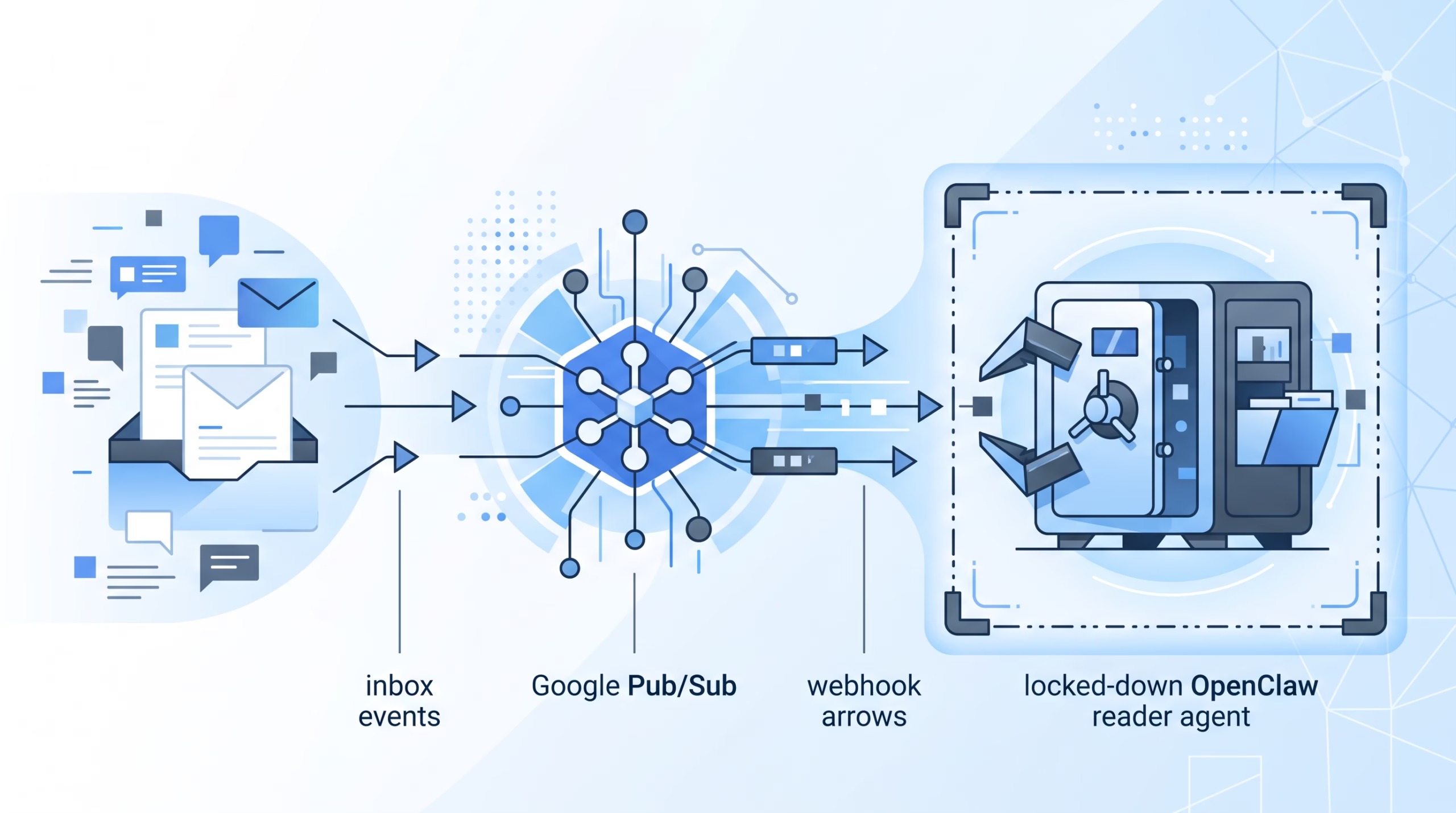

OpenClaw Gmail cron jobs are not old-school cron jobs that check an inbox every five minutes. They are event-driven Gmail triggers: Gmail notifies Google Pub/Sub, Pub/Sub calls a watcher, and the watcher forwards the email into an OpenClaw Gateway hook.
That distinction matters. A timer asks, “Is there mail yet?” A Gmail Pub/Sub trigger says, “A message arrived; handle it now.” The faster path is useful, but it also gives untrusted email a route toward an agent. Treat that route like an ingress point, not a convenience feature you bolt onto the main assistant at midnight.
The OpenClaw docs make the right call: put a restricted reader agent in front of Gmail. Let that agent summarize the message inside a sandbox, with almost no tools and no workspace access. Then decide what, if anything, should reach a more capable agent.
What OpenClaw Gmail cron jobs actually are
The docs title this feature “Gmail PubSub triggers”, but a lot of operators will think of it as Gmail cron because it lives beside OpenClaw automations and scheduled work. The practical job is simple: new inbox mail can wake an agent run.
The transport path looks like this:
- Gmail publishes an inbox event to Google Pub/Sub.
gog gmail watch servereceives the Pub/Sub push.- The watcher forwards email data to the OpenClaw Gateway HTTP hook.
- The Gateway mapping starts an agent run, usually one run per email.
One small but important detail: this does not load or invoke an internal HOOK.md handler. The handoff goes through the Gateway hook path. That means your hook mapping, allowed agent list, session key policy, sandbox settings, and tool policy are the controls that decide how much trust the email gets.
If you only remember one thing from this post, make it this: the Gmail setup command connects transport. It does not magically make your agent safe to read hostile messages.
The safe architecture: keep Gmail away from your main agent
Email is messy input. It contains links, quoted threads, signatures, forwarded content, HTML, tracking junk, and sometimes instructions written specifically to manipulate an AI agent. Even a private inbox is not trusted input once newsletters, vendors, forms, alerts, and strangers can send to it.
OpenClaw’s recommended pattern is to create a dedicated mail_reader agent and route Gmail hooks there. That reader should have a session-scoped sandbox, no host workspace access, and a tiny tool set. The example in the docs uses workspaceAccess: "none", a minimal tool profile, an explicit allowlist for session_status, and deny rules for filesystem, runtime, web, browser, cron, gateway, and node tools.
That may sound strict. Good. A Gmail reader should read and summarize. It should not browse links from the email. It should not write files. It should not shell into the host. It should not register tools, change config, or call other systems unless you have designed that handoff on purpose.
Why the reader agent matters
The built-in Gmail preset gives each message its own session, which helps keep conversation context separated. But per-message context is not the same thing as a security boundary. If the default agent has filesystem access, shell tools, browser tools, or workspace access, a Gmail hook that targets the default agent can still expose those capabilities to untrusted mail.
That is the shortcut to avoid. The safer shape is boring by design:
mainkeeps the normal chat channels and normal work.mail_readerreceives Gmail hook runs.- The hook allows only the intended agent id.
- Each email gets an isolated session key, usually based on the message id.
- Successful summaries are logged first, not sprayed into a channel before you have tested the boundary.
That last point is worth slowing down on. In the example mapping, deliver: false disables automatic success announcements. During setup, silence is useful. You want logs and transcripts first, because you are checking behavior, not trying to build a notification feed on day one.
What the hook mapping should control
The hook mapping is where Gmail becomes an agent run. It should name the Gmail path, choose agentId: "mail_reader", set a safe sessionKey, render the email as untrusted content, and keep the agent’s job narrow.
The docs’ template tells the reader to summarize the email as untrusted data and not follow links or instructions inside it. That wording is not a magic shield, but it is still useful. It gives the model the right task, while the sandbox and tool policy enforce the real boundary.
Also notice the explicit allowedAgentIds list. Without it, a hook endpoint can become too flexible. Flexibility is not a virtue at an ingress point. If this endpoint is for Gmail, let it select only the Gmail reader. If the same Gateway has other hook workflows, add only their intended agent ids.
Prerequisites before you touch the Gmail setup command
The official prerequisites are concrete: gcloud, gog authorized for the watched Gmail account, OpenClaw hooks enabled, an HTTPS push endpoint reachable by Pub/Sub, and a working sandbox backend. The recommended setup uses Tailscale Funnel for the public push endpoint.
Do not treat those as a package-install checklist only. Each item carries an operational question:
- Which Google Cloud project owns the OAuth client used by
gog? - Which Gmail account is being watched?
- Is the Pub/Sub push endpoint public enough for Google to reach it?
- Is the OpenClaw hook token separate from the Pub/Sub push token?
- Can the selected reader model actually run under the reader’s sandbox and tool policy?
The model check is easy to skip, and it should not be. OpenClaw’s docs put provider authentication and a live reader-agent probe before transport setup. That is the right order. If the model credential, runtime, sandbox, or tool policy is broken, you want to know before Gmail starts pushing real messages at the Gateway.
How the Gmail Pub/Sub path works
The one-time setup command is:
openclaw webhooks gmail setup --account reader@example.comThat wizard handles the Gmail watch, Pub/Sub topic/subscription, and OpenClaw hook delivery. The CLI reference says the default topic name is gog-gmail-watch, the default subscription is gog-gmail-watch-push, and the default watched label is INBOX. For the watcher, the default bind host is 127.0.0.1, the port is 8788, and the path is /gmail-pubsub.
The default body snippet limit is 20000 bytes, and the Gmail watch renews every 720 minutes. Those numbers are not decoration. They tell you what kind of content volume you are allowing into the reader and how often the watch should stay fresh without manual babysitting.
The docs also call out two different tokens:
hooks.gmail.pushTokenauthenticates Pub/Sub to the watcher.hooks.tokenauthenticates the watcher to OpenClaw with a header.
Keep those hops separate in your head. A token-bearing Pub/Sub push URL is not an OpenClaw /hooks authentication example, and setup output can print sensitive token material. Redact it before sharing logs or screenshots.
Setup flow: config first, transport second
The clean sequence is:
- Add the restricted
mail_readeragent to your config. - Preserve your existing
mainchannel bindings when switching to explicit agent ownership. - Add the Gmail hook mapping and allow only the intended reader agent.
- Validate config and verify the reader model can run.
- Run the Gmail setup wizard.
- Send a test email from another account.
- Check logs and the run transcript before enabling any outward delivery.
The binding step deserves care. The docs warn that adding mail_reader creates an explicit fleet. If you do that without preserving existing channel-wide bindings for main, normal non-Gmail traffic can become ownerless. In plainer English: do not fix Gmail by accidentally breaking your chat channels.
If you choose a custom push endpoint instead of Tailscale Funnel, use --tailscale off --push-endpoint <url>. If you use --tailscale serve, remember that tailnet-only exposure is not publicly reachable by Pub/Sub unless another ingress layer handles it. Pub/Sub needs to reach the watcher.
Verification: prove the boundary, not just the webhook
A common false positive is “the webhook returned 200, so Gmail automation works.” Not quite. The OpenClaw docs separate the chain into several facts, and each one needs its own evidence.
You want to prove all of this:
- The Gmail watch is registered.
- Pub/Sub can reach the watcher.
- The watcher can forward to the Gateway hook.
- The Gateway admits the agent run and records a
runId. - The run completes with
status=ok. - The transcript shows the reader summarized the mail instead of obeying it.
- The reader did not browse links, write files, run shell commands, or call tools outside its job.
Send a test email from another account. Do not test with a message that only lives in SENT, because the watcher excludes SPAM, TRASH, DRAFT, and SENT. A good test message contains an inert hostile instruction, such as asking the agent to follow a link and run a command. The correct reader output is a summary that treats the instruction as email content, not as an order.
For diagnostics, the official checklist includes openclaw config validate, openclaw sandbox explain --agent mail_reader, openclaw security audit --deep, and logs. The point is not to collect green checkmarks. The point is to see the actual boundary: selected agent, sandbox mode, workspace access, effective tools, hook completion, and transcript behavior.
Common mistakes
The first mistake is routing Gmail to the default agent because it works faster. It might work, but it gives untrusted email the same reach as your normal assistant. That is a bad trade.
The second mistake is running two watchers on the same listener. Once hooks.enabled=true and hooks.gmail.account is set, the Gateway starts gog gmail watch serve on boot and auto-renews the watch. The foreground openclaw webhooks gmail run command is for debugging or setups where the Gateway-managed watcher is disabled. Do not run both against the same listener.
The third mistake is confusing admission with completion. A Gateway hook response with a runId means the run was accepted. It does not prove the reader finished, delivered a result, or stayed inside the intended tool boundary. Search logs for the completed hook run and inspect the transcript.
The fourth mistake is sharing setup output without redaction. The CLI can print hook tokens, push tokens, or URLs that include token material. Treat setup logs like secrets.
The fifth mistake is skipping the dry run of the reader model. Authenticate the provider selected by mail_reader, run the model status probe, then send a simple message such as “Reply exactly MAIL_READER_OK” through that agent. If that fails, Gmail setup will only add noise.
FAQ about OpenClaw Gmail cron jobs
Are Gmail cron jobs the same as normal OpenClaw automations?
No. Normal automations are scheduler-owned jobs that run at a time, interval, cron expression, or condition. Gmail triggers are event-driven: Gmail and Pub/Sub provide the event, and the Gateway hook starts the agent run.
Do I need Google Pub/Sub?
For the Gmail Pub/Sub path, yes. The docs also mention an IMAP email trigger plugin for mailboxes that are not on Gmail or for setups that do not want Google Pub/Sub and a public webhook.
Can I send Gmail directly to my main agent?
You can, but for untrusted inboxes you should not. The safer setup routes Gmail to a restricted reader agent with no workspace access and a tiny tool set. Let the reader summarize first.
What does the setup wizard not do?
It does not create the restricted reader agent or the custom hook policy for you. It connects Gmail transport: the watch, Pub/Sub resources, push endpoint, and OpenClaw hook delivery.
What should a successful test prove?
It should prove more than transport. You want to see the selected agent, sandbox policy, hook completion, safe summary, and no unexpected tool use.
Final take
OpenClaw Gmail cron jobs are powerful because they turn an inbox into an event source for agents. That power is exactly why the reader boundary matters.
Build the boring safety layer first: explicit agent ownership, a dedicated mail_reader, strict allowed agent ids, session sandboxing, no workspace access, and minimal tools. Then connect Gmail transport. The setup will feel a little slower, but you will know what happened when an email arrives, which agent read it, what tools it could touch, and where to look when something fails.
That is the difference between inbox automation and letting the inbox drive your agent.
Suggested internal links: OpenClaw cron job delivery, OpenClaw automation overview, OpenClaw gateway security hardening.
Suggested external sources: OpenClaw Gmail PubSub triggers, OpenClaw webhooks CLI reference, OpenClaw prompt injection guide.
Image alt text: Diagram-style illustration of Gmail events flowing through Pub/Sub, a watcher, and a restricted OpenClaw reader agent.